mirror of
https://github.com/iiab/iiab.git
synced 2025-03-09 15:40:17 +00:00
Compare commits
No commits in common. "master" and "8.0-preview-3" have entirely different histories.
master
...
8.0-previe
309 changed files with 2791 additions and 8952 deletions
58
.github/workflows/10min-iiab-test-install.yml
vendored
58
.github/workflows/10min-iiab-test-install.yml
vendored
|
|
@ -1,58 +0,0 @@
|
||||||
name: '"10 min" IIAB on Ubuntu 24.04 on x86-64'
|
|
||||||
# run-name: ${{ github.actor }} is testing out GitHub Actions 🚀
|
|
||||||
|
|
||||||
# https://michaelcurrin.github.io/dev-cheatsheets/cheatsheets/ci-cd/github-actions/triggers.html
|
|
||||||
on: [push, pull_request, workflow_dispatch]
|
|
||||||
|
|
||||||
# on:
|
|
||||||
# push:
|
|
||||||
#
|
|
||||||
# pull_request:
|
|
||||||
#
|
|
||||||
# # Allows you to run this workflow manually from the Actions tab
|
|
||||||
# workflow_dispatch:
|
|
||||||
#
|
|
||||||
# # Set your workflow to run every day of the week from Monday to Friday at 6:00 UTC
|
|
||||||
# schedule:
|
|
||||||
# - cron: "0 6 * * 1-5"
|
|
||||||
|
|
||||||
jobs:
|
|
||||||
test-install:
|
|
||||||
runs-on: ubuntu-24.04
|
|
||||||
steps:
|
|
||||||
- run: echo "🎉 The job was automatically triggered by a ${{ github.event_name }} event."
|
|
||||||
- run: echo "🔎 The name of your branch is ${{ github.ref }} and your repository is ${{ github.repository }}."
|
|
||||||
#- name: Dump GitHub context (typically almost 500 lines)
|
|
||||||
# env:
|
|
||||||
# GITHUB_CONTEXT: ${{ toJSON(github) }}
|
|
||||||
# run: echo "$GITHUB_CONTEXT"
|
|
||||||
- name: Check out repository code
|
|
||||||
uses: actions/checkout@v4
|
|
||||||
- run: echo "🍏 This job's status is ${{ job.status }}."
|
|
||||||
- name: GitHub Actions "runner" environment
|
|
||||||
run: |
|
|
||||||
uname -a # uname -srm
|
|
||||||
whoami # Typically 'runner' instead of 'root'
|
|
||||||
pwd # /home/runner/work/iiab/iiab == $GITHUB_WORKSPACE == ${{ github.workspace }}
|
|
||||||
# ls
|
|
||||||
# ls $GITHUB_WORKSPACE
|
|
||||||
# ls ${{ github.workspace }}
|
|
||||||
# ls -la /opt # az, containerd, google, hostedtoolcache, microsoft, mssql-tools, pipx, pipx_bin, post-generation, runner, vsts
|
|
||||||
# apt update
|
|
||||||
# apt dist-upgrade -y
|
|
||||||
# apt autoremove -y
|
|
||||||
- name: Set up /opt/iiab/iiab
|
|
||||||
run: |
|
|
||||||
mkdir /opt/iiab
|
|
||||||
mv $GITHUB_WORKSPACE /opt/iiab
|
|
||||||
mkdir $GITHUB_WORKSPACE # OR SUBSEQUENT STEPS WILL FAIL ('working-directory: /opt/iiab/iiab' hacks NOT worth it!)
|
|
||||||
- name: Set up /etc/iiab/local_vars.yml
|
|
||||||
run: |
|
|
||||||
sudo mkdir /etc/iiab
|
|
||||||
# touch /etc/iiab/local_vars.yml
|
|
||||||
sudo cp /opt/iiab/iiab/vars/local_vars_none.yml /etc/iiab/local_vars.yml
|
|
||||||
- run: sudo /opt/iiab/iiab/scripts/ansible
|
|
||||||
- run: sudo ./iiab-install
|
|
||||||
working-directory: /opt/iiab/iiab
|
|
||||||
- run: iiab-summary
|
|
||||||
- run: cat /etc/iiab/iiab_state.yml
|
|
||||||
|
|
@ -1,65 +0,0 @@
|
||||||
name: '"30 min" IIAB on Debian 12 on RPi 3'
|
|
||||||
# run-name: ${{ github.actor }} is testing out GitHub Actions 🚀
|
|
||||||
|
|
||||||
# https://michaelcurrin.github.io/dev-cheatsheets/cheatsheets/ci-cd/github-actions/triggers.html
|
|
||||||
on: [push, pull_request, workflow_dispatch]
|
|
||||||
|
|
||||||
# on:
|
|
||||||
# push:
|
|
||||||
#
|
|
||||||
# pull_request:
|
|
||||||
#
|
|
||||||
# # Allows you to run this workflow manually from the Actions tab
|
|
||||||
# workflow_dispatch:
|
|
||||||
#
|
|
||||||
# # Set your workflow to run every day of the week from Monday to Friday at 6:00 UTC
|
|
||||||
# schedule:
|
|
||||||
# - cron: "0 6 * * 1-5"
|
|
||||||
|
|
||||||
jobs:
|
|
||||||
test-install:
|
|
||||||
runs-on: ubuntu-22.04
|
|
||||||
strategy:
|
|
||||||
matrix:
|
|
||||||
arch: [debian12]
|
|
||||||
include:
|
|
||||||
- arch: debian12
|
|
||||||
cpu: cortex-a7
|
|
||||||
cpu_info: cpuinfo/raspberrypi_3b
|
|
||||||
base_image: https://raspi.debian.net/daily/raspi_3_bookworm.img.xz
|
|
||||||
# source https://raspi.debian.net/daily-images/
|
|
||||||
steps:
|
|
||||||
#- run: echo "🎉 The job was automatically triggered by a ${{ github.event_name }} event."
|
|
||||||
#- run: echo "🔎 The name of your branch is ${{ github.ref }} and your repository is ${{ github.repository }}."
|
|
||||||
#- name: Dump GitHub context (typically almost 500 lines)
|
|
||||||
# env:
|
|
||||||
# GITHUB_CONTEXT: ${{ toJSON(github) }}
|
|
||||||
# run: echo "$GITHUB_CONTEXT"
|
|
||||||
- name: Dump matrix context
|
|
||||||
env:
|
|
||||||
MATRIX_CONTEXT: ${{ toJSON(matrix) }}
|
|
||||||
run: echo "$MATRIX_CONTEXT"
|
|
||||||
- uses: actions/checkout@v3.1.0
|
|
||||||
- uses: pguyot/arm-runner-action@v2
|
|
||||||
with:
|
|
||||||
image_additional_mb: 1024
|
|
||||||
base_image: ${{ matrix.base_image }}
|
|
||||||
cpu: ${{ matrix.cpu }}
|
|
||||||
cpu_info: ${{ matrix.cpu_info }}
|
|
||||||
copy_repository_path: /opt/iiab/iiab
|
|
||||||
commands: |
|
|
||||||
echo "🍏 This job's status is ${{ job.status }}."
|
|
||||||
grep Model /proc/cpuinfo
|
|
||||||
uname -a # uname -srm
|
|
||||||
whoami # Typically 'root' instead of 'runner'
|
|
||||||
pwd # /home/runner/work/iiab/iiab == $GITHUB_WORKSPACE == ${{ github.workspace }}
|
|
||||||
apt-get update -y --allow-releaseinfo-change
|
|
||||||
apt-get install --no-install-recommends -y git
|
|
||||||
ls /opt/iiab/iiab
|
|
||||||
mkdir /etc/iiab
|
|
||||||
cp /opt/iiab/iiab/vars/local_vars_none.yml /etc/iiab/local_vars.yml
|
|
||||||
/opt/iiab/iiab/scripts/ansible
|
|
||||||
./iiab-install
|
|
||||||
cd /opt/iiab/iiab
|
|
||||||
iiab-summary
|
|
||||||
cat /etc/iiab/iiab_state.yml
|
|
||||||
|
|
@ -1,77 +0,0 @@
|
||||||
name: '"30 min" IIAB on RasPiOS on Zero 2 W'
|
|
||||||
# run-name: ${{ github.actor }} is testing out GitHub Actions 🚀
|
|
||||||
|
|
||||||
# https://michaelcurrin.github.io/dev-cheatsheets/cheatsheets/ci-cd/github-actions/triggers.html
|
|
||||||
on: [push, pull_request, workflow_dispatch]
|
|
||||||
|
|
||||||
# on:
|
|
||||||
# push:
|
|
||||||
#
|
|
||||||
# pull_request:
|
|
||||||
#
|
|
||||||
# # Allows you to run this workflow manually from the Actions tab
|
|
||||||
# workflow_dispatch:
|
|
||||||
#
|
|
||||||
# # Set your workflow to run every day of the week from Monday to Friday at 6:00 UTC
|
|
||||||
# schedule:
|
|
||||||
# - cron: "0 6 * * 1-5"
|
|
||||||
|
|
||||||
jobs:
|
|
||||||
test-install:
|
|
||||||
runs-on: ubuntu-22.04
|
|
||||||
strategy:
|
|
||||||
matrix:
|
|
||||||
arch: [aarch64] #[zero_raspbian, zero_raspios, zero2_raspios, aarch64]
|
|
||||||
include:
|
|
||||||
#- arch: zero_raspbian
|
|
||||||
# cpu: arm1176
|
|
||||||
# cpu_info: cpuinfo/raspberrypi_zero_w
|
|
||||||
# base_image: raspbian_lite:latest
|
|
||||||
#- arch: zero_raspios
|
|
||||||
# cpu: arm1176
|
|
||||||
# cpu_info: cpuinfo/raspberrypi_zero_w
|
|
||||||
# base_image: raspios_lite:latest
|
|
||||||
#- arch: zero2_raspios
|
|
||||||
# cpu: cortex-a7
|
|
||||||
# cpu_info: cpuinfo/raspberrypi_zero2_w
|
|
||||||
# base_image: raspios_lite:latest
|
|
||||||
- arch: aarch64
|
|
||||||
cpu: cortex-a53
|
|
||||||
cpu_info: cpuinfo/raspberrypi_zero2_w_arm64
|
|
||||||
base_image: raspios_lite_arm64:latest
|
|
||||||
steps:
|
|
||||||
#- run: echo "🎉 The job was automatically triggered by a ${{ github.event_name }} event."
|
|
||||||
#- run: echo "🔎 The name of your branch is ${{ github.ref }} and your repository is ${{ github.repository }}."
|
|
||||||
#- name: Dump GitHub context (typically almost 500 lines)
|
|
||||||
# env:
|
|
||||||
# GITHUB_CONTEXT: ${{ toJSON(github) }}
|
|
||||||
# run: echo "$GITHUB_CONTEXT"
|
|
||||||
- name: Dump matrix context
|
|
||||||
env:
|
|
||||||
MATRIX_CONTEXT: ${{ toJSON(matrix) }}
|
|
||||||
run: echo "$MATRIX_CONTEXT"
|
|
||||||
- uses: actions/checkout@v3.1.0
|
|
||||||
- uses: pguyot/arm-runner-action@v2
|
|
||||||
with:
|
|
||||||
image_additional_mb: 1024
|
|
||||||
base_image: ${{ matrix.base_image }}
|
|
||||||
cpu: ${{ matrix.cpu }}
|
|
||||||
cpu_info: ${{ matrix.cpu_info }}
|
|
||||||
copy_repository_path: /opt/iiab/iiab
|
|
||||||
commands: |
|
|
||||||
echo "🍏 This job's status is ${{ job.status }}."
|
|
||||||
#test `uname -m` = ${{ matrix.arch }}
|
|
||||||
grep Model /proc/cpuinfo
|
|
||||||
uname -a # uname -srm
|
|
||||||
whoami # Typically 'root' instead of 'runner'
|
|
||||||
pwd # /home/runner/work/iiab/iiab == $GITHUB_WORKSPACE == ${{ github.workspace }}
|
|
||||||
apt-get update -y --allow-releaseinfo-change
|
|
||||||
apt-get install --no-install-recommends -y git
|
|
||||||
ls /opt/iiab/iiab
|
|
||||||
mkdir /etc/iiab
|
|
||||||
cp /opt/iiab/iiab/vars/local_vars_none.yml /etc/iiab/local_vars.yml
|
|
||||||
/opt/iiab/iiab/scripts/ansible
|
|
||||||
./iiab-install
|
|
||||||
cd /opt/iiab/iiab
|
|
||||||
iiab-summary
|
|
||||||
cat /etc/iiab/iiab_state.yml
|
|
||||||
9
.gitignore
vendored
9
.gitignore
vendored
|
|
@ -1,13 +1,8 @@
|
||||||
# https://git-scm.com/docs/gitignore
|
xs-config.spec
|
||||||
|
|
||||||
build
|
build
|
||||||
deprecated
|
deprecated
|
||||||
.ansible
|
.ansible
|
||||||
*.patches
|
*.patches
|
||||||
*.log
|
*.log
|
||||||
*.retry
|
*.retry
|
||||||
|
|
||||||
# Lines below for emacs, which generates even more tmp files since 2022
|
|
||||||
*~
|
*~
|
||||||
.#*
|
|
||||||
\#*#
|
|
||||||
|
|
|
||||||
|
|
@ -1,3 +1,3 @@
|
||||||
# SEE THE NEW<br>[github.com/iiab/iiab/wiki/Contributors-Guide-(EN)](https://github.com/iiab/iiab/wiki/Contributors-Guide-(EN))
|
# SEE THE NEW<br>[github.com/iiab/iiab/wiki/IIAB-Contributors-Guide](https://github.com/iiab/iiab/wiki/IIAB-Contributors-Guide)
|
||||||
|
|
||||||
# THANKS!
|
# THANKS!
|
||||||
|
|
|
||||||
|
|
@ -15,6 +15,6 @@ this is to include the following two lines at the top of the file:
|
||||||
Licensed under the terms of the GNU GPL v2 or later; see LICENSE for details.
|
Licensed under the terms of the GNU GPL v2 or later; see LICENSE for details.
|
||||||
|
|
||||||
All files not containing an explicit copyright notice or terms of license in
|
All files not containing an explicit copyright notice or terms of license in
|
||||||
the file are Copyright © 2015-2025, Unleash Kids, and are licensed under the
|
the file are Copyright © 2015-2022, Unleash Kids, and are licensed under the
|
||||||
terms of the GPLv2 license in the file named LICENSE in the root of the
|
terms of the GPLv2 license in the file named LICENSE in the root of the
|
||||||
repository.
|
repository.
|
||||||
|
|
|
||||||
26
README.md
26
README.md
|
|
@ -2,26 +2,26 @@
|
||||||
|
|
||||||
# Internet-in-a-Box (IIAB)
|
# Internet-in-a-Box (IIAB)
|
||||||
|
|
||||||
[Internet-in-a-Box (IIAB)](https://internet-in-a-box.org) is a “learning hotspot” that brings the Internet's crown jewels
|
[Internet-in-a-Box (IIAB)](https://internet-in-a-box.org) is a "learning hotspot" that brings the Internet's crown jewels
|
||||||
(Wikipedia in any language, thousands of Khan Academy videos, zoomable OpenStreetMap, electronic books, WordPress journaling, “Toys from Trash” electronics projects, ETC) to those without Internet.
|
(Wikipedia in any language, thousands of Khan Academy videos, zoomable OpenStreetMap, electronic books, WordPress journaling, Toys from Trash electronics projects, ETC) to those without Internet.
|
||||||
|
|
||||||
You can build your own tiny, affordable server (an offline digital library) for your school, your medical clinic, your prison, your region and/or your very own family — accessible with any nearby smartphone, tablet or laptop.
|
You can build your own tiny, affordable server (an offline digital library) for your school, your medical clinic, your prison, your region and/or your very own family — accessible with any nearby smartphone, tablet or laptop.
|
||||||
|
|
||||||
Internet-in-a-Box gives you the DIY tools to:
|
Internet-in-a-Box gives you the DIY tools to:
|
||||||
1. Download then drag-and-drop to arrange the [very best of the World’s Free Knowledge](https://internet-in-a-box.org/#quality-content).
|
1. Download then drag-and-drop to arrange the [very best of the World’s Free Knowledge](https://internet-in-a-box.org/#quality-content).
|
||||||
2. Choose among [30+ powerful educational apps](https://wiki.iiab.io/go/FAQ#What_services_%28IIAB_apps%29_are_suggested_during_installation%3F) for your school or learning/teaching community, optionally with a complete LMS (learning management system).
|
2. Choose among [30+ powerful educational apps](https://wiki.iiab.io/go/FAQ#What_services_.28IIAB_apps.29_are_suggested_during_installation.3F) for your school or learning/teaching community, optionally with a complete LMS (learning management system).
|
||||||
3. Exchange local/indigenous knowledge with nearby communities, using our [Manage Content](https://github.com/iiab/iiab-admin-console/blob/master/roles/console/files/help/InstContent.rst#manage-content) interface and possible mesh networking.
|
3. Exchange local/indigenous knowledge with nearby communities, using our [Manage Content](https://github.com/iiab/iiab-admin-console/blob/master/roles/console/files/help/InstContent.rst#manage-content) interface and possible mesh networking.
|
||||||
|
|
||||||
FYI this [community product](https://en.wikipedia.org/wiki/Internet-in-a-Box) is enabled by professional volunteers working [side-by-side](https://wiki.iiab.io/go/FAQ#What_are_the_best_places_for_community_support%3F) with schools, clinics and libraries around the world. *Thank you for being a part of our http://OFF.NETWORK grassroots technology [movement](https://meta.wikimedia.org/wiki/Internet-in-a-Box)!*
|
FYI this [community product](https://en.wikipedia.org/wiki/Internet-in-a-Box) is enabled by professional volunteers working [side-by-side](https://wiki.iiab.io/go/FAQ#What_are_the_best_places_for_community_support.3F) with schools, clinics and libraries around the world. *Thank you for being a part of our http://OFF.NETWORK grassroots technology [movement](https://meta.wikimedia.org/wiki/Internet-in-a-Box)!*
|
||||||
|
|
||||||
## Installation
|
## Installation
|
||||||
|
|
||||||
Install Internet-in-a-Box (IIAB) from: [**download.iiab.io**](https://download.iiab.io/)
|
Install Internet-in-a-Box (IIAB) from [download.iiab.io](https://download.iiab.io/)
|
||||||
|
|
||||||
Please see [FAQ.IIAB.IO](https://wiki.iiab.io/go/FAQ) which has 50+ questions and answers to help you along the way (e.g. [“Is a quick installation possible?”](https://wiki.iiab.io/go/FAQ#Is_a_quick_installation_possible%3F)) as you put together the <!--digital--> “local learning hotspot” most suitable for your own teaching/learning community. Here are 2 ways to install IIAB:
|
Please see [FAQ.IIAB.IO](https://wiki.iiab.io/go/FAQ) which has 40+ questions and answers to help you along the way, as you put together the <!--digital--> "local learning hotspot" most suitable for your own teaching/learning community. Here are 2 ways to install IIAB:
|
||||||
|
|
||||||
- Our [1-line installer](https://download.iiab.io/) gets you the very latest, typically within about an hour, on [different Linux distributions](https://github.com/iiab/iiab/wiki/IIAB-Platforms#operating-systems).
|
- Our [1-line installer](https://download.iiab.io/) gets you the very latest, typically within about an hour, on [different Linux distributions](https://github.com/iiab/iiab/wiki/IIAB-Platforms#operating-systems).
|
||||||
- [Prefab disk images](https://github.com/iiab/iiab/wiki/Raspberry-Pi-Images-~-Summary#iiab-images-for-raspberry-pi) ([.img files](https://archive.org/search.php?query=iiab%20.img&sort=-publicdate)) are sometimes a few months out of date, but can be flashed directly onto a microSD card, for insertion into Raspberry Pi.
|
- [Prefab disk images](https://github.com/iiab/iiab/wiki/Raspberry-Pi-Images:-Summary#iiab-images-for-raspberry-pi) ([.img files](https://archive.org/search.php?query=iiab%20.img&sort=-publicdate)) are sometimes a few months out of date, but can be flashed directly onto a microSD card, for insertion into Raspberry Pi.
|
||||||
|
|
||||||
Our [HOW-TO videos](https://www.youtube.com/channel/UC0cBGCxr_WPBPa3IqPVEe3g) can be very helpful and the [Installation](https://github.com/iiab/iiab/wiki/IIAB-Installation) wiki page has more intricate details e.g. if you're trying to install Internet-in-a-Box (IIAB) onto a [another Linux](https://github.com/iiab/iiab/wiki/IIAB-Platforms) that has not yet been tried.
|
Our [HOW-TO videos](https://www.youtube.com/channel/UC0cBGCxr_WPBPa3IqPVEe3g) can be very helpful and the [Installation](https://github.com/iiab/iiab/wiki/IIAB-Installation) wiki page has more intricate details e.g. if you're trying to install Internet-in-a-Box (IIAB) onto a [another Linux](https://github.com/iiab/iiab/wiki/IIAB-Platforms) that has not yet been tried.
|
||||||
|
|
||||||
|
|
@ -29,22 +29,22 @@ See our [Tech Docs Wiki](https://github.com/iiab/iiab/wiki) for more about the u
|
||||||
|
|
||||||
After you've installed the software, you should [add content](https://github.com/iiab/iiab/wiki/IIAB-Installation#add-content), which can of course take time when downloading multi-gigabyte Content Packs!
|
After you've installed the software, you should [add content](https://github.com/iiab/iiab/wiki/IIAB-Installation#add-content), which can of course take time when downloading multi-gigabyte Content Packs!
|
||||||
|
|
||||||
Finally, you can [customize your Internet-in-a-Box home page](https://wiki.iiab.io/go/FAQ#How_do_I_customize_my_Internet-in-a-Box_home_page%3F) (typically http://box or http://box.lan) using our **drag-and-drop** Admin Console (http://box.lan/admin) — to arrange Content Packs and IIAB Apps (services) for your local community's needs.
|
Finally, you can [customize your Internet-in-a-Box home page](https://wiki.iiab.io/go/FAQ#How_do_I_customize_my_Internet-in-a-Box_home_page.3F) (typically http://box or http://box.lan) using our **drag-and-drop** Admin Console (http://box.lan/admin) — to arrange Content Packs and IIAB Apps (services) for your local community's needs.
|
||||||
|
|
||||||
## Community
|
## Community
|
||||||
|
|
||||||
Global community updates and videos are regularly posted to: **[@internet_in_box](https://twitter.com/internet_in_box)**
|
Global community updates and videos are regularly posted to: **[@internet_in_box](https://twitter.com/internet_in_box)**
|
||||||
|
|
||||||
_Internet-in-a-Box (IIAB) greatly welcomes contributions from educators, librarians and [IT/UX/QA people](https://github.com/iiab/iiab/wiki/Contributors-Guide-(EN)) ([versión en español](https://github.com/iiab/iiab/wiki/Gu%C3%ADa-para-Contribuidores-(ES))) of all kinds!_
|
_Internet-in-a-Box (IIAB) greatly welcomes contributions from educators, librarians and [IT/UX/QA people](https://github.com/iiab/iiab/wiki/Technical-Contributors-Guide) of all kinds!_
|
||||||
|
|
||||||
If you would like to volunteer, please [make contact](https://internet-in-a-box.org/contributing.html) after looking over [“How can I help?”](https://wiki.iiab.io/go/FAQ#How_can_I_help%3F) at: [FAQ.IIAB.IO](https://wiki.iiab.io/go/FAQ)
|
If you would like to volunteer, please [make contact](https://internet-in-a-box.org/contributing.html) after looking over "[How can I help?](https://wiki.iiab.io/go/FAQ#How_can_I_help.3F)" at: [FAQ.IIAB.IO](https://wiki.iiab.io/go/FAQ)
|
||||||
|
|
||||||
<!-- To learn about our software architecture, check out our [Contributors Guide](https://github.com/iiab/iiab/wiki/IIAB-Contributors-Guide).-->
|
<!-- To learn about our software architecture, check out our [Contributors Guide](https://github.com/iiab/iiab/wiki/IIAB-Contributors-Guide).-->
|
||||||
|
|
||||||
To learn more about our open community architecture for “offline” learning, check out [“What technical documentation exists?”](https://wiki.iiab.io/go/FAQ#What_technical_documentation_exists%3F)
|
To learn more about our open community architecture for "offline" learning, check out "[What technical documentation exists?](https://wiki.iiab.io/go/FAQ#What_technical_documentation_exists.3F)"
|
||||||
FYI we use [Ansible](https://wiki.iiab.io/go/FAQ#What_is_Ansible_and_what_version_should_I_use%3F) <!--as the underlying technology--> to install, deploy, configure and manage the various software components.
|
FYI we use [Ansible](https://wiki.iiab.io/go/FAQ#What_is_Ansible_and_what_version_should_I_use.3F) <!--as the underlying technology--> to install, deploy, configure and manage the various software components.
|
||||||
|
|
||||||
*Thank you for helping us enable offline access to the Internet's free/open knowledge jewels, as well as “Sneakernet-of-Alexandria” distribution of local/indigenous content, when mass media channels do not serve grassroots voices.*
|
*Thank you for helping us enable offline access to the Internet's free/open knowledge jewels, as well as "Sneakernet-of-Alexandria" distribution of local/indigenous content, when mass media channels do not serve grassroots voices.*
|
||||||
|
|
||||||
## Versions
|
## Versions
|
||||||
|
|
||||||
|
|
|
||||||
|
|
@ -5,4 +5,4 @@
|
||||||
# Disallowed by Ansible 2.11+ -- see https://docs.ansible.com/ansible/devel/porting_guides/porting_guide_2.7.html#using-a-loop-on-a-package-module-via-squash-actions
|
# Disallowed by Ansible 2.11+ -- see https://docs.ansible.com/ansible/devel/porting_guides/porting_guide_2.7.html#using-a-loop-on-a-package-module-via-squash-actions
|
||||||
#squash_actions = apk, apt, dnf, homebrew, openbsd_pkg, pacman, pkgng, yum, zypper, package
|
#squash_actions = apk, apt, dnf, homebrew, openbsd_pkg, pacman, pkgng, yum, zypper, package
|
||||||
[defaults]
|
[defaults]
|
||||||
interpreter_python=/usr/local/ansible/bin/python3
|
interpreter_python=/usr/bin/python3
|
||||||
|
|
|
||||||
24
iiab-install
24
iiab-install
|
|
@ -10,8 +10,8 @@ ARGS="--extra-vars {" # Needs boolean not string so use JSON list. bash forc
|
||||||
CWD=`pwd`
|
CWD=`pwd`
|
||||||
OS=`grep ^ID= /etc/os-release | cut -d= -f2`
|
OS=`grep ^ID= /etc/os-release | cut -d= -f2`
|
||||||
OS=${OS//\"/} # Remove all '"'
|
OS=${OS//\"/} # Remove all '"'
|
||||||
MIN_RPI_KERN=5.4.0 # Do not use 'rpi-update' unless absolutely necessary: https://github.com/iiab/iiab/issues/1993
|
MIN_RPI_KERN=5.4.0 # Do not use 'rpi-update' unless absolutely necessary: https://github.com/iiab/iiab/issues/1993
|
||||||
MIN_ANSIBLE_VER=2.16.14 # 2024-11-08: ansible-core 2.15 EOL is November 2024 per https://docs.ansible.com/ansible/latest/reference_appendices/release_and_maintenance.html#ansible-core-support-matrix 2022-11-09: Raspberry Pi 3 (and 3 B+ etc?) apparently install (and require?) ansible-core 2.11 for now -- @deldesir can explain more on PR #3419. Historical: Ansible 2.8.3 and 2.8.6 had serious bugs, preventing their use with IIAB.
|
MIN_ANSIBLE_VER=2.12.7 # Ansible 2.8.3 and 2.8.6 had serious bugs, preventing their use with IIAB.
|
||||||
|
|
||||||
REINSTALL=false
|
REINSTALL=false
|
||||||
DEBUG=false
|
DEBUG=false
|
||||||
|
|
@ -65,7 +65,7 @@ if [ ! -f /etc/iiab/local_vars.yml ]; then
|
||||||
echo -e "████████████████████████████████████████████████████████████████████████████████\n" >&2
|
echo -e "████████████████████████████████████████████████████████████████████████████████\n" >&2
|
||||||
fi
|
fi
|
||||||
|
|
||||||
echo -e "\n\e[1mEXITING: /opt/iiab/iiab/iiab-install REQUIRES /etc/iiab/local_vars.yml\e[0m\n" >&2
|
echo -e "\nEXITING: /opt/iiab/iiab/iiab-install REQUIRES /etc/iiab/local_vars.yml\n" >&2
|
||||||
|
|
||||||
echo -e "(1) See http://FAQ.IIAB.IO -> What is local_vars.yml and how do I customize it?" >&2
|
echo -e "(1) See http://FAQ.IIAB.IO -> What is local_vars.yml and how do I customize it?" >&2
|
||||||
echo -e "(2) SMALL/MEDIUM/LARGE samples are included in /opt/iiab/iiab/vars" >&2
|
echo -e "(2) SMALL/MEDIUM/LARGE samples are included in /opt/iiab/iiab/vars" >&2
|
||||||
|
|
@ -82,15 +82,14 @@ fi
|
||||||
echo -e "\n\n./iiab-install $* BEGUN IN $CWD\n"
|
echo -e "\n\n./iiab-install $* BEGUN IN $CWD\n"
|
||||||
|
|
||||||
echo -e "local_facts.fact DIAGNOSTICS... (A FEW LINES OF ERRORS/WARNINGS BELOW ARE OK!)\n"
|
echo -e "local_facts.fact DIAGNOSTICS... (A FEW LINES OF ERRORS/WARNINGS BELOW ARE OK!)\n"
|
||||||
|
|
||||||
scripts/local_facts.fact # Exit & advise, if OS not supported.
|
scripts/local_facts.fact # Exit & advise, if OS not supported.
|
||||||
|
|
||||||
mkdir -p /etc/ansible/facts.d
|
if [ ! -f /etc/ansible/facts.d/local_facts.fact ]; then
|
||||||
|
mkdir -p /etc/ansible/facts.d
|
||||||
|
fi
|
||||||
cp scripts/local_facts.fact /etc/ansible/facts.d/local_facts.fact
|
cp scripts/local_facts.fact /etc/ansible/facts.d/local_facts.fact
|
||||||
echo -e "\nPlaced /etc/ansible/facts.d/local_facts.fact into position.\n"
|
echo -e "\nPlaced /etc/ansible/facts.d/local_facts.fact into position."
|
||||||
|
|
||||||
mkdir -p /etc/iiab/install-flags # MANDATORY since 2022-07-22
|
|
||||||
echo -e "/etc/iiab/install-flags directory created/verified."
|
|
||||||
echo -e "(e.g. for PR #3318 netwarn pop-ups, asking you to run iiab-network)\n"
|
|
||||||
|
|
||||||
if [ ! -f $PLAYBOOK ]; then
|
if [ ! -f $PLAYBOOK ]; then
|
||||||
echo "EXITING: IIAB Playbook ""$PLAYBOOK"" not found."
|
echo "EXITING: IIAB Playbook ""$PLAYBOOK"" not found."
|
||||||
|
|
@ -124,7 +123,7 @@ CURR_ANSIBLE_VER=0
|
||||||
#if [[ $(command -v ansible) ]]; then # Also Works! $(...) nests more easily than backticks
|
#if [[ $(command -v ansible) ]]; then # Also Works! $(...) nests more easily than backticks
|
||||||
#if [[ `which ansible` ]]; then # "which" misses built-in commands like cd, and is RISKY per https://stackoverflow.com/questions/592620/check-if-a-program-exists-from-a-bash-script
|
#if [[ `which ansible` ]]; then # "which" misses built-in commands like cd, and is RISKY per https://stackoverflow.com/questions/592620/check-if-a-program-exists-from-a-bash-script
|
||||||
#if [[ `type -P ansible` ]]; then # "type -P" isn't POSIX compliant; it misses built-in commands like "cd"
|
#if [[ `type -P ansible` ]]; then # "type -P" isn't POSIX compliant; it misses built-in commands like "cd"
|
||||||
if [[ $(command -v ansible) ]]; then # "command -v" is POSIX compliant; it catches built-in commands like "cd"
|
if [[ `command -v ansible` ]]; then # "command -v" is POSIX compliant; it catches built-in commands like "cd"
|
||||||
CURR_ANSIBLE_VER=$(ansible --version | head -1 | cut -f 2- -d " " | sed 's/.* \([^ ]*\)\].*/\1/')
|
CURR_ANSIBLE_VER=$(ansible --version | head -1 | cut -f 2- -d " " | sed 's/.* \([^ ]*\)\].*/\1/')
|
||||||
# Above works with 'ansible [core 2.11.0rc2]' -- these old ways do not:
|
# Above works with 'ansible [core 2.11.0rc2]' -- these old ways do not:
|
||||||
#CURR_ANSIBLE_VER=$(ansible --version | head -1 | awk '{print $2}')
|
#CURR_ANSIBLE_VER=$(ansible --version | head -1 | awk '{print $2}')
|
||||||
|
|
@ -179,15 +178,14 @@ fi
|
||||||
# /etc/iiab/iiab_state.yml is mandatory and must be created here. Background:
|
# /etc/iiab/iiab_state.yml is mandatory and must be created here. Background:
|
||||||
# Allow iiab-install to read IIAB_STATE_FILE to not repeat installs of previous
|
# Allow iiab-install to read IIAB_STATE_FILE to not repeat installs of previous
|
||||||
# roles that already completed within the stage.
|
# roles that already completed within the stage.
|
||||||
if [ ! -f $IIAB_STATE_FILE ]; then # touch $IIAB_STATE_FILE
|
if [ ! -f $IIAB_STATE_FILE ]; then
|
||||||
echo -e "\nCreating... $IIAB_STATE_FILE"
|
#touch $IIAB_STATE_FILE
|
||||||
cat > $IIAB_STATE_FILE << EOF
|
cat > $IIAB_STATE_FILE << EOF
|
||||||
# DO *NOT* MANUALLY EDIT THIS, THANKS!
|
# DO *NOT* MANUALLY EDIT THIS, THANKS!
|
||||||
# IIAB does NOT currently support uninstalling apps/services.
|
# IIAB does NOT currently support uninstalling apps/services.
|
||||||
|
|
||||||
EOF
|
EOF
|
||||||
fi
|
fi
|
||||||
|
|
||||||
echo -e "\nTRY TO RERUN './iiab-install' IF IT FAILS DUE TO CONNECTIVITY ISSUES ETC!\n"
|
echo -e "\nTRY TO RERUN './iiab-install' IF IT FAILS DUE TO CONNECTIVITY ISSUES ETC!\n"
|
||||||
|
|
||||||
echo -e "\e[1mRunning local Ansible playbooks...\n...Stage 0 will now run\n...followed by Stages $(($STAGE + 1))-9\n...and then the Network Role.\e[0m\n"
|
echo -e "\e[1mRunning local Ansible playbooks...\n...Stage 0 will now run\n...followed by Stages $(($STAGE + 1))-9\n...and then the Network Role.\e[0m\n"
|
||||||
|
|
|
||||||
|
|
@ -42,7 +42,7 @@ fi
|
||||||
echo "Ansible will now run iiab-network.yml -- log file is iiab-network.log"
|
echo "Ansible will now run iiab-network.yml -- log file is iiab-network.log"
|
||||||
Start=`date`
|
Start=`date`
|
||||||
ansible -m setup -i ansible_hosts localhost --connection=local | grep python
|
ansible -m setup -i ansible_hosts localhost --connection=local | grep python
|
||||||
ansible-playbook -i ansible_hosts iiab-network.yml --extra-vars "{\"skip_role_on_error\":false}" --connection=local
|
ansible-playbook -i ansible_hosts iiab-network.yml --connection=local
|
||||||
End=`date`
|
End=`date`
|
||||||
|
|
||||||
|
|
||||||
|
|
|
||||||
20
iiab-setup
20
iiab-setup
|
|
@ -1,20 +0,0 @@
|
||||||
#!/bin/bash -e
|
|
||||||
# Running from a git repo
|
|
||||||
# Assumes iiab repos are downloaded
|
|
||||||
|
|
||||||
apt -y update
|
|
||||||
apt -y full-upgrade
|
|
||||||
|
|
||||||
apt -y install git curl nano gawk wget pastebinit
|
|
||||||
|
|
||||||
cd /opt/iiab/iiab
|
|
||||||
scripts/ansible
|
|
||||||
|
|
||||||
# 2022-09-27: iiab-install now handles this
|
|
||||||
#mkdir -p /etc/iiab/install-flags
|
|
||||||
|
|
||||||
if [ ! -f /etc/iiab/local_vars.yml ]; then
|
|
||||||
cp /opt/iiab/iiab/vars/local_vars_none.yml /etc/iiab/local_vars.yml
|
|
||||||
fi
|
|
||||||
|
|
||||||
reboot
|
|
||||||
|
|
@ -8,7 +8,7 @@
|
||||||
# apache_interface: 127.0.0.1
|
# apache_interface: 127.0.0.1
|
||||||
|
|
||||||
# Make this False to disable http://box/common/services/power_off.php button:
|
# Make this False to disable http://box/common/services/power_off.php button:
|
||||||
# allow_www_data_poweroff: False
|
# apache_allow_sudo: True
|
||||||
|
|
||||||
# All above are set in: github.com/iiab/iiab/blob/master/vars/default_vars.yml
|
# All above are set in: github.com/iiab/iiab/blob/master/vars/default_vars.yml
|
||||||
# If nec, change them by editing /etc/iiab/local_vars.yml prior to installing!
|
# If nec, change them by editing /etc/iiab/local_vars.yml prior to installing!
|
||||||
|
|
|
||||||
|
|
@ -1,26 +1,13 @@
|
||||||
- name: Record disk_used_a_priori (permanently, into {{ iiab_ini_file }} below) to later estimate iiab_software_disk_usage
|
# workaround for fact that auto create does not work on iiab_ini_file (/etc/iiab/iiab.ini)
|
||||||
shell: df -B1 --output=used / | tail -1
|
|
||||||
register: df1
|
|
||||||
|
|
||||||
# workaround for fact that auto create does not work on iiab_ini_file
|
|
||||||
- name: Create {{ iiab_ini_file }}
|
- name: Create {{ iiab_ini_file }}
|
||||||
file:
|
file:
|
||||||
path: "{{ iiab_ini_file }}" # /etc/iiab/iiab.ini
|
path: "{{ iiab_ini_file }}"
|
||||||
state: touch
|
state: touch
|
||||||
|
|
||||||
- name: Run command 'dpkg --print-architecture' to identify OS architecture (CPU arch as revealed by ansible_architecture ~= ansible_machine is NOT enough!)
|
- name: Add 'location' variable values to {{ iiab_ini_file }}
|
||||||
command: dpkg --print-architecture
|
|
||||||
register: dpkg_arch
|
|
||||||
|
|
||||||
- name: Run command 'dpkg --print-foreign-architectures' (secondary OS arch, if available)
|
|
||||||
command: dpkg --print-foreign-architectures
|
|
||||||
register: dpkg_foreign_arch
|
|
||||||
|
|
||||||
|
|
||||||
- name: Add 'summary' variable values to {{ iiab_ini_file }}
|
|
||||||
ini_file:
|
ini_file:
|
||||||
path: "{{ iiab_ini_file }}"
|
path: "{{ iiab_ini_file }}"
|
||||||
section: summary
|
section: location
|
||||||
option: "{{ item.option }}"
|
option: "{{ item.option }}"
|
||||||
value: "{{ item.value | string }}"
|
value: "{{ item.value | string }}"
|
||||||
with_items:
|
with_items:
|
||||||
|
|
@ -28,30 +15,18 @@
|
||||||
value: "{{ iiab_base }}"
|
value: "{{ iiab_base }}"
|
||||||
- option: iiab_dir
|
- option: iiab_dir
|
||||||
value: "{{ iiab_dir }}"
|
value: "{{ iiab_dir }}"
|
||||||
- option: disk_used_a_priori
|
|
||||||
value: "{{ df1.stdout }}"
|
|
||||||
|
|
||||||
- name: Add 'initial' variable values to {{ iiab_ini_file }}
|
- name: Add 'version' variable values to {{ iiab_ini_file }}
|
||||||
ini_file:
|
ini_file:
|
||||||
path: "{{ iiab_ini_file }}"
|
path: "{{ iiab_ini_file }}"
|
||||||
section: initial
|
section: version
|
||||||
option: "{{ item.option }}"
|
option: "{{ item.option }}"
|
||||||
value: "{{ item.value | string }}"
|
value: "{{ item.value | string }}"
|
||||||
with_items:
|
with_items:
|
||||||
- option: os_ver
|
|
||||||
value: "{{ os_ver }}"
|
|
||||||
- option: distribution
|
- option: distribution
|
||||||
value: "{{ ansible_facts['distribution'] }}"
|
value: "{{ ansible_distribution }}"
|
||||||
- option: arch
|
- option: arch
|
||||||
value: "{{ ansible_architecture }}"
|
value: "{{ ansible_architecture }}"
|
||||||
- option: dpkg_arch
|
|
||||||
value: "{{ dpkg_arch.stdout }}"
|
|
||||||
- option: dpkg_foreign_arch
|
|
||||||
value: "{{ dpkg_foreign_arch.stdout }}"
|
|
||||||
- option: rpi_model
|
|
||||||
value: "{{ rpi_model }}"
|
|
||||||
- option: devicetree_model
|
|
||||||
value: "{{ devicetree_model }}"
|
|
||||||
- option: iiab_base_ver
|
- option: iiab_base_ver
|
||||||
value: "{{ iiab_base_ver }}"
|
value: "{{ iiab_base_ver }}"
|
||||||
- option: iiab_remote_url
|
- option: iiab_remote_url
|
||||||
|
|
@ -64,3 +39,7 @@
|
||||||
value: "{{ ansible_local.local_facts.iiab_recent_tag }}"
|
value: "{{ ansible_local.local_facts.iiab_recent_tag }}"
|
||||||
- option: install_date
|
- option: install_date
|
||||||
value: "{{ ansible_date_time.iso8601 }}"
|
value: "{{ ansible_date_time.iso8601 }}"
|
||||||
|
- option: rpi_model
|
||||||
|
value: "{{ rpi_model }}"
|
||||||
|
- option: devicetree_model
|
||||||
|
value: "{{ devicetree_model }}"
|
||||||
|
|
|
||||||
|
|
@ -31,6 +31,9 @@
|
||||||
path: /etc/hosts
|
path: /etc/hosts
|
||||||
regexp: '^127\.0\.0\.1'
|
regexp: '^127\.0\.0\.1'
|
||||||
line: '127.0.0.1 {{ iiab_hostname }}.{{ iiab_domain }} localhost.localdomain localhost {{ iiab_hostname }} box box.lan'
|
line: '127.0.0.1 {{ iiab_hostname }}.{{ iiab_domain }} localhost.localdomain localhost {{ iiab_hostname }} box box.lan'
|
||||||
|
#owner: root
|
||||||
|
#group: root
|
||||||
|
#mode: 0644
|
||||||
|
|
||||||
# 2021-07-30: FQDN_changed isn't used as in the past -- its remaining use is
|
# 2021-07-30: FQDN_changed isn't used as in the past -- its remaining use is
|
||||||
# for {named, dhcpd, squid} in roles/network/tasks/main.yml -- possibly it
|
# for {named, dhcpd, squid} in roles/network/tasks/main.yml -- possibly it
|
||||||
|
|
|
||||||
|
|
@ -7,14 +7,11 @@
|
||||||
|
|
||||||
# Higher-level purpose explained at the bottom of:
|
# Higher-level purpose explained at the bottom of:
|
||||||
# https://github.com/iiab/iiab/blob/master/vars/default_vars.yml
|
# https://github.com/iiab/iiab/blob/master/vars/default_vars.yml
|
||||||
- name: "Ansible just ran /etc/ansible/facts.d/local_facts.fact to set 15 vars -- here we extract 6 of those -- iiab_stage: {{ ansible_local.local_facts.stage }}, rpi_model: {{ ansible_local.local_facts.rpi_model }}, devicetree_model: {{ ansible_local.local_facts.devicetree_model }}, os_ver: {{ ansible_local.local_facts.os_ver }}, python_version: {{ ansible_local.local_facts.python_version }}, php_version: {{ ansible_local.local_facts.php_version }}"
|
- name: "Ansible just ran /etc/ansible/facts.d/local_facts.fact to set 11 vars -- here we extract 3 of those -- rpi_model: {{ ansible_local.local_facts.rpi_model }}, devicetree_model: {{ ansible_local.local_facts.devicetree_model }}, iiab_stage: {{ ansible_local.local_facts.stage }}"
|
||||||
set_fact:
|
set_fact:
|
||||||
iiab_stage: "{{ ansible_local.local_facts.stage }}"
|
|
||||||
rpi_model: "{{ ansible_local.local_facts.rpi_model }}"
|
rpi_model: "{{ ansible_local.local_facts.rpi_model }}"
|
||||||
devicetree_model: "{{ ansible_local.local_facts.devicetree_model }}"
|
devicetree_model: "{{ ansible_local.local_facts.devicetree_model }}"
|
||||||
os_ver: "{{ ansible_local.local_facts.os_ver }}"
|
iiab_stage: "{{ ansible_local.local_facts.stage }}"
|
||||||
python_version: "{{ ansible_local.local_facts.python_version }}"
|
|
||||||
php_version: "{{ ansible_local.local_facts.php_version }}"
|
|
||||||
|
|
||||||
# Initialize /etc/iiab/iiab.ini writing the 'location' and 'version' sections
|
# Initialize /etc/iiab/iiab.ini writing the 'location' and 'version' sections
|
||||||
# once and only once, to preserve the install date and git hash.
|
# once and only once, to preserve the install date and git hash.
|
||||||
|
|
@ -23,8 +20,9 @@
|
||||||
when: not iiab_ini_test.stat.exists
|
when: not iiab_ini_test.stat.exists
|
||||||
|
|
||||||
# 2021-07-30: The 'first_run' flag isn't much used anymore. In theory it's
|
# 2021-07-30: The 'first_run' flag isn't much used anymore. In theory it's
|
||||||
# still used in 1-prep/tasks/hardware.yml for raspberry_pi.yml
|
# still used in these 2 places:
|
||||||
#
|
# (1) roles/1-prep/tasks/hardware.yml for raspberry_pi.yml
|
||||||
|
# (2) roles/network/tasks/named.yml for "Stop named before copying files"
|
||||||
# This needs to be reworked for 0-init speed, and overall understandability.
|
# This needs to be reworked for 0-init speed, and overall understandability.
|
||||||
- name: Set first_run flag
|
- name: Set first_run flag
|
||||||
set_fact:
|
set_fact:
|
||||||
|
|
@ -34,23 +32,14 @@
|
||||||
|
|
||||||
# Copies the latest/known version of iiab-diagnostics into /usr/bin (so it can
|
# Copies the latest/known version of iiab-diagnostics into /usr/bin (so it can
|
||||||
# be run even if local source tree /opt/iiab/iiab is deleted to conserve disk).
|
# be run even if local source tree /opt/iiab/iiab is deleted to conserve disk).
|
||||||
- name: Copy iiab-update & iiab-summary & iiab-diagnostics & iiab-root-login from /opt/iiab/iiab/scripts/ to /usr/bin/
|
- name: Copy iiab-summary & iiab-diagnostics from /opt/iiab/iiab/scripts/ to /usr/bin/
|
||||||
copy:
|
copy:
|
||||||
src: "{{ iiab_dir }}/scripts/{{ item }}"
|
src: "{{ iiab_dir }}/scripts/{{ item }}"
|
||||||
dest: /usr/bin/
|
dest: /usr/bin/
|
||||||
mode: '0755'
|
mode: '0755'
|
||||||
with_items:
|
with_items:
|
||||||
- iiab-update
|
|
||||||
- iiab-summary
|
- iiab-summary
|
||||||
- iiab-diagnostics
|
- iiab-diagnostics
|
||||||
- iiab-root-login
|
|
||||||
|
|
||||||
- name: Symlink /usr/bin/iiab-upgrade -> /usr/bin/iiab-update
|
|
||||||
file:
|
|
||||||
src: /usr/bin/iiab-update
|
|
||||||
path: /usr/bin/iiab-upgrade
|
|
||||||
state: link
|
|
||||||
#force: yes
|
|
||||||
|
|
||||||
- name: Create globally-writable directory /etc/iiab/diag (0777) so non-root users can run 'iiab-diagnostics'
|
- name: Create globally-writable directory /etc/iiab/diag (0777) so non-root users can run 'iiab-diagnostics'
|
||||||
file:
|
file:
|
||||||
|
|
@ -61,11 +50,9 @@
|
||||||
|
|
||||||
- name: Pre-check that IIAB's "XYZ_install" + "XYZ_enabled" vars (1) are defined, (2) are boolean-not-string variables, and (3) contain plausible values. Also checks that "XYZ_install" is True when "XYZ_installed" is defined.
|
- name: Pre-check that IIAB's "XYZ_install" + "XYZ_enabled" vars (1) are defined, (2) are boolean-not-string variables, and (3) contain plausible values. Also checks that "XYZ_install" is True when "XYZ_installed" is defined.
|
||||||
include_tasks: validate_vars.yml
|
include_tasks: validate_vars.yml
|
||||||
when: not (rpi_model | regex_search('\\bW\\b')) # Ansible require double backslashes, e.g. with \b "word boundary" anchors: https://www.regular-expressions.info/wordboundaries.html https://stackoverflow.com/questions/56869119/ansible-regular-expression-to-match-a-string-and-extract-the-line/56869801#56869801
|
|
||||||
|
|
||||||
# 2022-12-30: Functionality moved to www_options/tasks/php-settings.yml
|
- name: "Time Zone / TZ: Set symlink /etc/localtime to UTC if it doesn't exist?"
|
||||||
# - name: "Time Zone / TZ: Set symlink /etc/localtime to UTC if it doesn't exist?"
|
include_tasks: tz.yml
|
||||||
# include_tasks: tz.yml
|
|
||||||
|
|
||||||
- name: Set hostname / domain (etc) in various places
|
- name: Set hostname / domain (etc) in various places
|
||||||
include_tasks: hostname.yml
|
include_tasks: hostname.yml
|
||||||
|
|
@ -105,18 +92,12 @@
|
||||||
value: "{{ rpi_model }}"
|
value: "{{ rpi_model }}"
|
||||||
- option: devicetree_model
|
- option: devicetree_model
|
||||||
value: "{{ devicetree_model }}"
|
value: "{{ devicetree_model }}"
|
||||||
- option: os_ver
|
|
||||||
value: "{{ os_ver }}"
|
|
||||||
- option: python_version
|
|
||||||
value: "{{ python_version }}"
|
|
||||||
- option: php_version
|
|
||||||
value: "{{ php_version }}"
|
|
||||||
- option: first_run
|
- option: first_run
|
||||||
value: "{{ first_run }}"
|
value: "{{ first_run }}"
|
||||||
# - option: local_tz # e.g. 'EDT' (summer) or 'EST' (winter) after Ansible interprets symlink /etc/localtime -- or 'UTC' if /etc/localtime doesn't exist
|
- option: local_tz # e.g. 'EDT' (summer) or 'EST' (winter) after Ansible interprets symlink /etc/localtime -- or 'UTC' if /etc/localtime doesn't exist
|
||||||
# value: "{{ local_tz }}"
|
value: "{{ local_tz }}"
|
||||||
# - option: etc_localtime.stdout # e.g. 'America/New_York' direct from symlink /etc/localtime -- or '' if /etc/localtime doesn't exist
|
- option: etc_localtime.stdout # e.g. 'America/New_York' direct from symlink /etc/localtime -- or '' if /etc/localtime doesn't exist
|
||||||
# value: "{{ etc_localtime.stdout }}"
|
value: "{{ etc_localtime.stdout }}"
|
||||||
- option: FQDN_changed
|
- option: FQDN_changed
|
||||||
value: "{{ FQDN_changed }}"
|
value: "{{ FQDN_changed }}"
|
||||||
|
|
||||||
|
|
|
||||||
|
|
@ -1,5 +1,3 @@
|
||||||
# 2022-12-30: Functionality moved to www_options/tasks/php-settings.yml
|
|
||||||
|
|
||||||
- name: "'local_tz: {{ local_tz }}' was set by ansible_date_time.tz in /opt/iiab/iiab/vars/default_vars.yml -- e.g. if Ansible finds symlink /etc/localtime -> ../usr/share/zoneinfo/America/New_York -- it will simplify that to 'EDT' (in the summer) or 'EST' (in the winter)"
|
- name: "'local_tz: {{ local_tz }}' was set by ansible_date_time.tz in /opt/iiab/iiab/vars/default_vars.yml -- e.g. if Ansible finds symlink /etc/localtime -> ../usr/share/zoneinfo/America/New_York -- it will simplify that to 'EDT' (in the summer) or 'EST' (in the winter)"
|
||||||
command: echo
|
command: echo
|
||||||
|
|
||||||
|
|
@ -64,19 +64,19 @@
|
||||||
# 2020-11-04: Fix validation of 5 [now 4] core dependencies, for ./runrole etc
|
# 2020-11-04: Fix validation of 5 [now 4] core dependencies, for ./runrole etc
|
||||||
|
|
||||||
|
|
||||||
- name: Set vars_checklist for 45 + 45 + 40 vars ("XYZ_install" + "XYZ_enabled" + "XYZ_installed") to be checked
|
- name: Set vars_checklist for 44 + 44 + 40 vars ("XYZ_install" + "XYZ_enabled" + "XYZ_installed") to be checked
|
||||||
set_fact:
|
set_fact:
|
||||||
vars_checklist:
|
vars_checklist:
|
||||||
- hostapd
|
- hostapd
|
||||||
- dnsmasq
|
- dnsmasq
|
||||||
- bluetooth
|
- bluetooth
|
||||||
- sshd
|
- sshd
|
||||||
#- openvpn # Deprecated
|
- openvpn
|
||||||
- tailscale
|
|
||||||
- remoteit
|
- remoteit
|
||||||
- admin_console
|
- admin_console
|
||||||
#- nginx # MANDATORY
|
#- nginx # MANDATORY
|
||||||
#- apache # Unmaintained - former dependency
|
#- apache # Unmaintained - former dependency
|
||||||
|
#- mysql # MANDATORY
|
||||||
- squid
|
- squid
|
||||||
- cups
|
- cups
|
||||||
- samba
|
- samba
|
||||||
|
|
@ -85,7 +85,6 @@
|
||||||
- gitea
|
- gitea
|
||||||
- jupyterhub
|
- jupyterhub
|
||||||
- lokole
|
- lokole
|
||||||
- mysql # Dependency - excluded from _installed check below
|
|
||||||
- mediawiki
|
- mediawiki
|
||||||
- mosquitto
|
- mosquitto
|
||||||
- nodejs # Dependency - excluded from _installed check below
|
- nodejs # Dependency - excluded from _installed check below
|
||||||
|
|
@ -156,41 +155,23 @@
|
||||||
that: "{{ item }}_install or {{ item }}_installed is undefined"
|
that: "{{ item }}_install or {{ item }}_installed is undefined"
|
||||||
fail_msg: "DISALLOWED: '{{ item }}_install: False' (e.g. in /etc/iiab/local_vars.yml) WHEN '{{ item }}_installed' is defined (e.g. in /etc/iiab/iiab_state.yml) -- IIAB DOES NOT SUPPORT UNINSTALLS -- please verify those 2 files especially, and other places variables are defined?"
|
fail_msg: "DISALLOWED: '{{ item }}_install: False' (e.g. in /etc/iiab/local_vars.yml) WHEN '{{ item }}_installed' is defined (e.g. in /etc/iiab/iiab_state.yml) -- IIAB DOES NOT SUPPORT UNINSTALLS -- please verify those 2 files especially, and other places variables are defined?"
|
||||||
quiet: yes
|
quiet: yes
|
||||||
when: item != 'mysql' and item != 'postgresql' and item != 'mongodb' and item != 'nodejs' and item != 'yarn' # Exclude auto-installed dependencies
|
when: item != 'nodejs' and item != 'postgresql' and item != 'mongodb' and item != 'yarn' # Exclude auto-installed dependencies
|
||||||
loop: "{{ vars_checklist }}"
|
loop: "{{ vars_checklist }}"
|
||||||
|
|
||||||
|
|
||||||
- name: Set vars_deprecated_list for 4+ vars ("XYZ_install") to be checked
|
|
||||||
set_fact:
|
|
||||||
vars_deprecated_list:
|
|
||||||
- dhcpd # Deprecated
|
|
||||||
- named # Deprecated
|
|
||||||
- wondershaper # Deprecated
|
|
||||||
- dansguardian # Deprecated
|
|
||||||
#- xo_services # Unmaintained
|
|
||||||
#- activity_server # Unmaintained
|
|
||||||
#- ejabberd_xs # Unmaintained
|
|
||||||
#- idmgr # Unmaintained
|
|
||||||
#- dokuwiki # Unmaintained
|
|
||||||
#- ejabberd # Unmaintained
|
|
||||||
#- elgg # Unmaintained
|
|
||||||
|
|
||||||
- name: 'DISALLOW "XYZ_install: True" if deprecated'
|
- name: 'DISALLOW "XYZ_install: True" if deprecated'
|
||||||
assert:
|
assert:
|
||||||
that: "{{ item }}_install is undefined or not {{ item }}_install"
|
that: "{{ item }}_install is undefined or not {{ item }}_install"
|
||||||
fail_msg: "DISALLOWED: '{{ item }}_install: True' (e.g. in /etc/iiab/local_vars.yml)"
|
fail_msg: "DISALLOWED: '{{ item }}_install: True' (e.g. in /etc/iiab/local_vars.yml)"
|
||||||
quiet: yes
|
quiet: yes
|
||||||
loop: "{{ vars_deprecated_list }}"
|
with_items:
|
||||||
# 2023-12-04: ansible-core 2.16.1 suddenly no longer allows 'assert' with
|
- dhcpd # Deprecated
|
||||||
# 'with_items' below (whereas 'loop' construct above works!) BACKGROUND:
|
- named # Deprecated
|
||||||
#
|
- wondershaper # Deprecated
|
||||||
# 'due to mitigation of security issue CVE-2023-5764 in ansible-core 2.16.1,
|
- dansguardian # Deprecated
|
||||||
# conditional expressions with embedded template blocks can fail with the
|
#- xo_services # Unmaintained
|
||||||
# message “Conditional is marked as unsafe, and cannot be evaluated.”'
|
#- activity_server # Unmaintained
|
||||||
# https://docs.ansible.com/ansible-core/2.16/porting_guides/porting_guide_core_2.16.html#playbook
|
#- ejabberd_xs # Unmaintained
|
||||||
#
|
#- idmgr # Unmaintained
|
||||||
# with_items:
|
#- dokuwiki # Unmaintained
|
||||||
# - dhcpd # Deprecated
|
#- ejabberd # Unmaintained
|
||||||
# - named # Deprecated
|
#- elgg # Unmaintained
|
||||||
# - wondershaper # Deprecated
|
|
||||||
# - dansguardian # Deprecated
|
|
||||||
|
|
|
||||||
|
|
@ -6,7 +6,7 @@ https://github.com/iiab/iiab/wiki/IIAB-Contributors-Guide#ansible[stage]
|
||||||
hardware, low-level OS quirks, and basic security:
|
hardware, low-level OS quirks, and basic security:
|
||||||
|
|
||||||
* SSHD
|
* SSHD
|
||||||
* Tailscale if/as needed later for remote support
|
* OpenVPN if/as needed later for remote support
|
||||||
* https://github.com/iiab/iiab/tree/master/roles/iiab-admin#iiab-admin-readme[iiab-admin]
|
* https://github.com/iiab/iiab/tree/master/roles/iiab-admin#iiab-admin-readme[iiab-admin]
|
||||||
username and group, to log into Admin Console
|
username and group, to log into Admin Console
|
||||||
* dnsmasq (install now, configure later!)
|
* dnsmasq (install now, configure later!)
|
||||||
|
|
|
||||||
|
|
@ -7,18 +7,17 @@
|
||||||
when: first_run and rpi_model != "none"
|
when: first_run and rpi_model != "none"
|
||||||
|
|
||||||
|
|
||||||
# 2024-02-09: Code below appears stale for Shanti's #3707 hardware
|
- name: Check if the identifier for Intel's NUC6 built-in WiFi is present
|
||||||
#- name: Check if the identifier for Intel's NUC6 built-in WiFi is present
|
shell: "lsusb | grep 8087:0a2b | wc | awk '{print $1}'"
|
||||||
# shell: "lsusb | grep 8087:0a2b | wc | awk '{print $1}'"
|
register: usb_NUC6
|
||||||
# register: usb_NUC6
|
ignore_errors: True
|
||||||
# ignore_errors: True
|
|
||||||
#
|
- name: Download {{ iiab_download_url }}/iwlwifi-8000C-13.ucode to /lib/firmware for built-in WiFi on NUC6
|
||||||
#- name: Download {{ iiab_download_url }}/iwlwifi-8000C-13.ucode to /lib/firmware for built-in WiFi on NUC6
|
get_url:
|
||||||
# get_url:
|
url: "{{ iiab_download_url }}/iwlwifi-8000C-13.ucode" # https://download.iiab.io/packages
|
||||||
# url: "{{ iiab_download_url }}/Old/iwlwifi-8000C-13.ucode" # https://download.iiab.io/packages
|
dest: /lib/firmware
|
||||||
# dest: /lib/firmware
|
timeout: "{{ download_timeout }}"
|
||||||
# timeout: "{{ download_timeout }}"
|
when: usb_NUC6.stdout|int > 0
|
||||||
# when: usb_NUC6.stdout|int > 0
|
|
||||||
|
|
||||||
|
|
||||||
- name: "Look for any WiFi devices present: ls -la /sys/class/net/*/phy80211 | cut -d/ -f5"
|
- name: "Look for any WiFi devices present: ls -la /sys/class/net/*/phy80211 | cut -d/ -f5"
|
||||||
|
|
|
||||||
|
|
@ -3,22 +3,22 @@
|
||||||
- name: ...IS BEGINNING ============================================
|
- name: ...IS BEGINNING ============================================
|
||||||
meta: noop
|
meta: noop
|
||||||
|
|
||||||
- name: SSHD
|
- name: SSHD -- required by OpenVPN below -- also run by roles/4-server-options/tasks/main.yml
|
||||||
include_role:
|
include_role:
|
||||||
name: sshd
|
name: sshd
|
||||||
when: sshd_install
|
when: sshd_install
|
||||||
|
|
||||||
- name: TAILSCALE (VPN)
|
- name: OPENVPN
|
||||||
include_role:
|
include_role:
|
||||||
name: tailscale
|
name: openvpn
|
||||||
when: tailscale_install
|
when: openvpn_install
|
||||||
|
|
||||||
- name: REMOTE.IT
|
- name: REMOTE.IT
|
||||||
include_role:
|
include_role:
|
||||||
name: remoteit
|
name: remoteit
|
||||||
when: remoteit_install
|
when: remoteit_install
|
||||||
|
|
||||||
- name: IIAB-ADMIN -- includes {lynx, screen, sudo-prereqs.yml, admin-user.yml, pwd-warnings.yml}
|
- name: IIAB-ADMIN -- includes roles/iiab-admin/tasks/access.yml
|
||||||
include_role:
|
include_role:
|
||||||
name: iiab-admin
|
name: iiab-admin
|
||||||
#when: iiab_admin_install # Flag might be created in future?
|
#when: iiab_admin_install # Flag might be created in future?
|
||||||
|
|
|
||||||
|
|
@ -1,4 +1,4 @@
|
||||||
#!/bin/bash -xe
|
#!/bin/bash -x
|
||||||
|
|
||||||
# Expand rootfs partition to its maximum size, if /.expand-rootfs exists.
|
# Expand rootfs partition to its maximum size, if /.expand-rootfs exists.
|
||||||
# Used by /etc/systemd/system/iiab-expand-rootfs.service on IIAB boot.
|
# Used by /etc/systemd/system/iiab-expand-rootfs.service on IIAB boot.
|
||||||
|
|
@ -8,24 +8,13 @@
|
||||||
|
|
||||||
# Verifies that rootfs is the last partition.
|
# Verifies that rootfs is the last partition.
|
||||||
|
|
||||||
# RELATED:
|
|
||||||
# 1. https://github.com/iiab/iiab-factory/blob/master/box/rpi/min-sd
|
|
||||||
# 2. https://github.com/iiab/iiab-factory/blob/master/box/rpi/cp-sd
|
|
||||||
# 3. https://github.com/iiab/iiab-factory/blob/master/box/rpi/xz-json-sd
|
|
||||||
# OR https://github.com/iiab/iiab-factory/blob/master/box/rpi/exp-sd
|
|
||||||
|
|
||||||
if [ -f /.expand-rootfs ] || [ -f /.resize-rootfs ]; then
|
if [ -f /.expand-rootfs ] || [ -f /.resize-rootfs ]; then
|
||||||
echo "$0: Expanding rootfs partition"
|
echo "$0: Expanding rootfs partition"
|
||||||
|
|
||||||
if [ -x /usr/bin/raspi-config ]; then # Raspberry Pi OS -- WARNING: their fdisk-centric approach of course FAILS with "Hybrid MBR" or GPT partition tables, as required by any drive > 2TB :/
|
if [ -x /usr/bin/raspi-config ]; then # Raspberry Pi OS
|
||||||
# 2022-02-17: Uses do_expand_rootfs() from:
|
# 2022-02-17: Uses do_expand_rootfs() from:
|
||||||
# https://github.com/RPi-Distro/raspi-config/blob/master/raspi-config
|
# https://github.com/RPi-Distro/raspi-config/blob/master/raspi-config
|
||||||
# 2023-10-05: Official new RPi instructions:
|
|
||||||
# sudo raspi-config nonint do_expand_rootfs
|
|
||||||
# https://www.raspberrypi.com/documentation/computers/configuration.html#expand-filesystem-nonint
|
|
||||||
raspi-config --expand-rootfs # REQUIRES A REBOOT
|
raspi-config --expand-rootfs # REQUIRES A REBOOT
|
||||||
rm -f /.expand-rootfs /.resize-rootfs
|
|
||||||
reboot # In future, we might warn interactive users that a reboot is coming?
|
|
||||||
else # REQUIRES NO REBOOT; BEWARE iiab-expand-rootfs.service RACE CONDITION WITH fsck (PR #2522 & #3325)
|
else # REQUIRES NO REBOOT; BEWARE iiab-expand-rootfs.service RACE CONDITION WITH fsck (PR #2522 & #3325)
|
||||||
# 2022-03-15: Borrows from above raspi-config URL's do_expand_rootfs()
|
# 2022-03-15: Borrows from above raspi-config URL's do_expand_rootfs()
|
||||||
ROOT_PART="$(findmnt / -o SOURCE -n)" # e.g. /dev/sda2 or /dev/mmcblk0p2
|
ROOT_PART="$(findmnt / -o SOURCE -n)" # e.g. /dev/sda2 or /dev/mmcblk0p2
|
||||||
|
|
@ -41,10 +30,8 @@ if [ -f /.expand-rootfs ] || [ -f /.resize-rootfs ]; then
|
||||||
fi
|
fi
|
||||||
|
|
||||||
# Expand partition
|
# Expand partition
|
||||||
growpart $ROOT_DEV $ROOT_PART_NUM || true # raspi-config instead uses fdisk (assuming MBR). They really should transition to gdisk, as required by any drive > 2TB. WARNING: growpart RC 2 is more severe than RC 1, and should possibly be handled separately in future?
|
growpart $ROOT_DEV $ROOT_PART_NUM # raspi-config instead uses fdisk
|
||||||
rc=$? # Make Return Code visible, for 'bash -x'
|
|
||||||
resize2fs $ROOT_PART
|
resize2fs $ROOT_PART
|
||||||
rc=$? # Make RC visible (as above)
|
|
||||||
|
|
||||||
# 2022-03-15: Legacy code below worked with Raspberry Pi microSD cards
|
# 2022-03-15: Legacy code below worked with Raspberry Pi microSD cards
|
||||||
# but *not* with USB boot drives, internal spinning disks/SSD's, etc.
|
# but *not* with USB boot drives, internal spinning disks/SSD's, etc.
|
||||||
|
|
@ -66,7 +53,7 @@ if [ -f /.expand-rootfs ] || [ -f /.resize-rootfs ]; then
|
||||||
# # Resize partition
|
# # Resize partition
|
||||||
# growpart /dev/$root_dev $root_part_no
|
# growpart /dev/$root_dev $root_part_no
|
||||||
# resize2fs /dev/$root_part
|
# resize2fs /dev/$root_part
|
||||||
|
|
||||||
rm -f /.expand-rootfs /.resize-rootfs
|
|
||||||
fi
|
fi
|
||||||
|
|
||||||
|
rm -f /.expand-rootfs /.resize-rootfs
|
||||||
fi
|
fi
|
||||||
|
|
|
||||||
|
|
@ -1,24 +1,14 @@
|
||||||
[Unit]
|
[Unit]
|
||||||
Description=Root Filesystem Auto-Expander
|
Description=Root Filesystem Auto-Expander
|
||||||
DefaultDependencies=no
|
|
||||||
# 2022-08-08: IIAB's 4 core OS's have 'After=systemd-fsck-root.service' WITHIN
|
|
||||||
# systemd-remount-fs.service, allowing us to avoid #3325 race condition w/ fsck
|
|
||||||
After=systemd-remount-fs.service
|
|
||||||
# 2022-08-08: While dphys-swapfile.service doesn't exist on Ubuntu, Mint
|
|
||||||
# and pure Debian, the following line may still serve a purpose on RasPiOS:
|
|
||||||
Before=dphys-swapfile.service
|
|
||||||
|
|
||||||
[Service]
|
[Service]
|
||||||
Environment=TERM=linux
|
Environment=TERM=linux
|
||||||
Type=oneshot
|
Type=oneshot
|
||||||
ExecStart=/usr/sbin/iiab-expand-rootfs
|
ExecStart=/usr/sbin/iiab-expand-rootfs
|
||||||
# 2022-08-08: By default, systemd dangerously kills rootfs expansion after just
|
|
||||||
# 90s (1TB microSD cards take ~8 min to expand). Let's remove the time limit:
|
|
||||||
TimeoutSec=infinity
|
|
||||||
# "Standard output type syslog is obsolete"
|
# "Standard output type syslog is obsolete"
|
||||||
# StandardError=syslog
|
# StandardError=syslog
|
||||||
# WHEREAS StandardError=journal is the default, per https://www.freedesktop.org/software/systemd/man/systemd.exec.html#StandardOutput=
|
# WHEREAS StandardError=journal is the default, per https://www.freedesktop.org/software/systemd/man/systemd.exec.html#StandardOutput=
|
||||||
RemainAfterExit=yes
|
RemainAfterExit=no
|
||||||
|
|
||||||
[Install]
|
[Install]
|
||||||
WantedBy=local-fs.target
|
WantedBy=multi-user.target
|
||||||
|
|
|
||||||
|
|
@ -1,34 +1,31 @@
|
||||||
# 2022-03-16: 'apt show <pkg> | grep Size' revealed download sizes, on 64-bit RasPiOS with desktop.
|
# 2022-03-16: 'apt show <pkg> | grep Size' revealed download sizes, on 64-bit RasPiOS with desktop.
|
||||||
|
|
||||||
- name: "Install 19 common packages: acpid, bzip2, cron, curl, gawk, gpg, htop, i2c-tools, logrotate, lshw, pandoc, pastebinit, plocate, rsync, sqlite3, tar, unzip, usbutils, wget"
|
- name: "Install 16 common packages: acpid, bzip2, curl, gawk, htop, i2c-tools, logrotate, mlocate, pandoc, pastebinit, rsync, sqlite3, tar, unzip, usbutils, wget"
|
||||||
package:
|
package:
|
||||||
name:
|
name:
|
||||||
- acpid # 55kB download: Daemon for ACPI (power mgmt) events
|
- acpid # 55kB download: Daemon for ACPI (power mgmt) events
|
||||||
- bzip2 # 47kB download: RasPiOS installs this regardless -- 2021-04-26: Prob not used, but can't hurt?
|
- bzip2 # 47kB download: RasPiOS installs this regardless -- 2021-04-26: Prob not used, but can't hurt?
|
||||||
- cron # 98kB download: RasPiOS installs this regardless -- 2022-10-13: Debian 12 needs this added (for now?)
|
|
||||||
- curl # 254kB download: RasPiOS installs this regardless -- Used to install roles/nodejs and roles/nodered
|
- curl # 254kB download: RasPiOS installs this regardless -- Used to install roles/nodejs and roles/nodered
|
||||||
#- etckeeper # 54kB download: "nobody is really using etckeeper and it's bloating the filesystem every time apt runs" per @jvonau at https://github.com/iiab/iiab/issues/1146
|
#- etckeeper # 54kB download: "nobody is really using etckeeper and it's bloating the filesystem every time apt runs" per @jvonau at https://github.com/iiab/iiab/issues/1146
|
||||||
#- exfat-fuse # 28kB download: 2021-07-27: Should no longer be nec with 5.4+ kernels, so let's try commenting it out
|
#- exfat-fuse # 28kB download: 2021-07-27: Should no longer be nec with 5.4+ kernels, so let's try commenting it out
|
||||||
#- exfat-utils # 41kB download: Ditto! See also 'ntfs-3g' below
|
#- exfat-utils # 41kB download: Ditto! See also 'ntfs-3g' below
|
||||||
- gawk # 533kB download
|
- gawk # 533kB download
|
||||||
- gpg # 884kB download: Debian 12+ (especially!) require this for apt installs of gitea, kolibri, mongodb, yarn
|
|
||||||
- htop # 109kB download: RasPiOS installs this regardless
|
- htop # 109kB download: RasPiOS installs this regardless
|
||||||
- i2c-tools # 78kB download: Low-level bus/chip/register/EEPROM tools e.g. for RTC
|
- i2c-tools # 78kB download: RasPiOS installs this regardless -- Low-level bus/chip/register/EEPROM tools e.g. for RTC
|
||||||
- logrotate # 67kB download: RasPiOS installs this regardless
|
- logrotate # 67kB download: RasPiOS installs this regardless
|
||||||
- lshw # 257kB download: For 'lshw -C network' in iiab-diagnostics
|
|
||||||
#- lynx # 505kB download: Installed by 1-prep's roles/iiab-admin/tasks/main.yml
|
#- lynx # 505kB download: Installed by 1-prep's roles/iiab-admin/tasks/main.yml
|
||||||
#- make # 376kB download: 2021-07-27: Currently used by roles/pbx and no other roles
|
#- make # 376kB download: 2021-07-27: Currently used by roles/pbx and no other roles
|
||||||
|
- mlocate # 92kB download
|
||||||
#- ntfs-3g # 379kB download: RasPiOS installs this regardless -- 2021-07-31: But this should no longer be nec with 5.4+ kernels, similar to exfat packages above -- however, see also this symlink warning: https://superuser.com/questions/1050544/mount-with-kernel-ntfs-and-not-ntfs-3g -- and upcoming kernel 5.15 improvements: https://www.phoronix.com/scan.php?page=news_item&px=New-NTFS-Likely-For-Linux-5.15
|
#- ntfs-3g # 379kB download: RasPiOS installs this regardless -- 2021-07-31: But this should no longer be nec with 5.4+ kernels, similar to exfat packages above -- however, see also this symlink warning: https://superuser.com/questions/1050544/mount-with-kernel-ntfs-and-not-ntfs-3g -- and upcoming kernel 5.15 improvements: https://www.phoronix.com/scan.php?page=news_item&px=New-NTFS-Likely-For-Linux-5.15
|
||||||
#- openssh-server # 318kB download: RasPiOS installs this regardless -- this is also installed by 1-prep's roles/sshd/tasks/main.yml to cover all OS's
|
#- openssh-server # 318kB download: RasPiOS installs this regardless -- this is also installed by 1-prep's roles/sshd/tasks/main.yml to cover all OS's
|
||||||
- pandoc # 19kB download: For /usr/bin/iiab-refresh-wiki-docs
|
- pandoc # 19kB download: For /usr/bin/iiab-refresh-wiki-docs
|
||||||
- pastebinit # 47kB download: For /usr/bin/iiab-diagnostics
|
- pastebinit # 47kB download: For /usr/bin/iiab-diagnostics
|
||||||
#- mlocate # 92kB download
|
#- python3-pip # 337kB download: RasPiOS installs this regardless -- 2021-07-29: And already installed by /opt/iiab/iiab/scripts/ansible -- this auto-installs 'python3-setuptools' and 'python3' etc
|
||||||
- plocate # 97kB download: Faster & smaller than locate & mlocate
|
#- python3-venv # 1188kB download: RasPiOS installs this regardless -- 2021-07-30: For Ansible module 'pip' used in roles like {calibre-web, jupyterhub, lokole} -- whereas roles/kalite uses (virtual) package 'virtualenv' for Python 2 -- all these 3+1 IIAB roles install 'python3-venv' for themselves. FYI: Debian 11 auto-installs 'python3-venv' when you install 'python3' -- whereas Ubuntu (e.g. 20.04 & 21.10) and RasPiOS 10 did not.
|
||||||
#- python3-pip # 337kB download: 2023-03-22: Used to be installed by /opt/iiab/iiab/scripts/ansible -- which would auto-install 'python3-setuptools' and 'python3' etc
|
|
||||||
#- python3-venv # 1188kB download: 2023-03-22: Already installed by /opt/iiab/iiab/scripts/ansible -- used by roles like {calibre-web, jupyterhub, lokole} -- whereas roles/kalite uses (virtual) package 'virtualenv' for Python 2 -- all these 3+1 IIAB roles install 'python3-venv' for themselves. FYI: Debian 11 no longer auto-installs 'python3-venv' when you install 'python3'
|
|
||||||
- rsync # 351kB download: RasPiOS installs this regardless
|
- rsync # 351kB download: RasPiOS installs this regardless
|
||||||
#- screen # 551kB download: Installed by 1-prep's roles/iiab-admin/tasks/main.yml
|
#- screen # 551kB download: Installed by 1-prep's roles/iiab-admin/tasks/main.yml
|
||||||
- sqlite3 # 1054kB download
|
- sqlite3 # 1054kB download
|
||||||
|
#- sudo # 991kB download: RasPiOS installs this regardless -- (2) Can also be installed by roles/1-prep's roles/openvpn/tasks/install.yml, (3) Is definitely installed by 1-prep's roles/iiab-admin/tasks/sudo-prereqs.yml
|
||||||
- tar # 799kB download: RasPiOS installs this regardless
|
- tar # 799kB download: RasPiOS installs this regardless
|
||||||
- unzip # 151kB download: RasPiOS installs this regardless
|
- unzip # 151kB download: RasPiOS installs this regardless
|
||||||
#- usbmount # 18kB download: Moved to roles/usb_lib/tasks/install.yml
|
#- usbmount # 18kB download: Moved to roles/usb_lib/tasks/install.yml
|
||||||
|
|
|
||||||
|
|
@ -1,21 +1,10 @@
|
||||||
.. |ss| raw:: html
|
|
||||||
|
|
||||||
<strike>
|
|
||||||
|
|
||||||
.. |se| raw:: html
|
|
||||||
|
|
||||||
</strike>
|
|
||||||
|
|
||||||
.. |nbsp| unicode:: 0xA0
|
|
||||||
:trim:
|
|
||||||
|
|
||||||
====================
|
====================
|
||||||
3-base-server README
|
3-base-server README
|
||||||
====================
|
====================
|
||||||
|
|
||||||
This 3rd `stage <https://github.com/iiab/iiab/wiki/IIAB-Contributors-Guide#ansible>`_ installs base server infra that `Internet-in-a-Box (IIAB) <https://internet-in-a-box.org/>`_ requires, including:
|
This 3rd `stage <https://github.com/iiab/iiab/wiki/IIAB-Contributors-Guide#ansible>`_ installs base server infra that `Internet-in-a-Box (IIAB) <https://internet-in-a-box.org/>`_ requires, including:
|
||||||
|
|
||||||
- |ss| `MySQL <https://github.com/iiab/iiab/blob/master/roles/mysql>`_ (database underlying many/most user-facing apps). |se| |nbsp| *As of 2023-11-05, MySQL / MariaDB is NO LONGER INSTALLED by 3-base-server — instead it's installed on-demand — as a dependency of Matomo, MediaWiki, Nextcloud, PBX (for FreePBX), WordPress &/or Admin Console.* This IIAB role (roles/mysql) also installs apt package:
|
- `MySQL <https://github.com/iiab/iiab/blob/master/roles/mysql>`_ (database underlying many/most user-facing apps). This IIAB role also installs apt package:
|
||||||
- **php{{ php_version }}-mysql** — which forcibly installs **php{{ php_version }}-common**
|
- **php{{ php_version }}-mysql** — which forcibly installs **php{{ php_version }}-common**
|
||||||
- `NGINX <https://github.com/iiab/iiab/blob/master/roles/nginx>`_ web server (with Apache in some lingering cases). This IIAB role also installs apt package:
|
- `NGINX <https://github.com/iiab/iiab/blob/master/roles/nginx>`_ web server (with Apache in some lingering cases). This IIAB role also installs apt package:
|
||||||
- **php{{ php_version }}-fpm** — which forcibly installs **php{{ php_version }}-cli**, **php{{ php_version }}-common** and **libsodium23**
|
- **php{{ php_version }}-fpm** — which forcibly installs **php{{ php_version }}-cli**, **php{{ php_version }}-common** and **libsodium23**
|
||||||
|
|
|
||||||
|
|
@ -3,13 +3,10 @@
|
||||||
- name: ...IS BEGINNING =====================================
|
- name: ...IS BEGINNING =====================================
|
||||||
meta: noop
|
meta: noop
|
||||||
|
|
||||||
# 2023-11-05: MySQL (actually MariaDB) had been mandatory, installed on every
|
- name: MYSQL + CORE PHP
|
||||||
# IIAB by 3-base-server. Now installed on demand -- as a dependency of Matomo,
|
include_role:
|
||||||
# MediaWiki, Nextcloud, PBX (for FreePBX), WordPress &/or Admin Console.
|
name: mysql
|
||||||
# - name: MYSQL + CORE PHP
|
#when: mysql_install
|
||||||
# include_role:
|
|
||||||
# name: mysql
|
|
||||||
# #when: mysql_install
|
|
||||||
|
|
||||||
# 2021-05-21: Apache role 'httpd' is installed as nec by any of these 6 roles:
|
# 2021-05-21: Apache role 'httpd' is installed as nec by any of these 6 roles:
|
||||||
#
|
#
|
||||||
|
|
|
||||||
|
|
@ -2,7 +2,7 @@
|
||||||
4-server-options README
|
4-server-options README
|
||||||
=======================
|
=======================
|
||||||
|
|
||||||
Whereas 3-base-server installs critical packages needed by all, this 4th `stage <https://github.com/iiab/iiab/wiki/IIAB-Contributors-Guide#ansible>`_ installs a broad array of *options* — depending on which server apps will be installed in later stages — as specified in `/etc/iiab/local_vars.yml <http://FAQ.IIAB.IO#What_is_local_vars.yml_and_how_do_I_customize_it%3F>`_
|
Whereas 3-base-server installs critical packages needed by all, this 4th `stage <https://github.com/iiab/iiab/wiki/IIAB-Contributors-Guide#ansible>`_ installs a broad array of *options* — depending on which server apps will be installed in later stages — as specified in `/etc/iiab/local_vars.yml <http://FAQ.IIAB.IO#What_is_local_vars.yml_and_how_do_I_customize_it.3F>`_
|
||||||
|
|
||||||
This includes more networking fundamentals, that may further be configured later on.
|
This includes more networking fundamentals, that may further be configured later on.
|
||||||
|
|
||||||
|
|
@ -11,7 +11,7 @@ Specifically, these might be installed:
|
||||||
- Python libraries
|
- Python libraries
|
||||||
- SSH daemon
|
- SSH daemon
|
||||||
- Bluetooth for Raspberry Pi
|
- Bluetooth for Raspberry Pi
|
||||||
- Instant-sharing of `USB stick content <https://wiki.iiab.io/go/FAQ#Can_teachers_display_their_own_content%3F>`_
|
- Instant-sharing of `USB stick content <https://wiki.iiab.io/go/FAQ#Can_teachers_display_their_own_content.3F>`_
|
||||||
- CUPS Printing
|
- CUPS Printing
|
||||||
- Samba for Windows filesystems
|
- Samba for Windows filesystems
|
||||||
- `www_options <https://github.com/iiab/iiab/blob/master/roles/www_options/tasks/main.yml>`_
|
- `www_options <https://github.com/iiab/iiab/blob/master/roles/www_options/tasks/main.yml>`_
|
||||||
|
|
|
||||||
|
|
@ -19,6 +19,11 @@
|
||||||
#when: pylibs_installed is undefined
|
#when: pylibs_installed is undefined
|
||||||
#when: pylibs_install # Flag might be created in future?
|
#when: pylibs_install # Flag might be created in future?
|
||||||
|
|
||||||
|
- name: SSHD -- also run by roles/1-prep/tasks/main.yml as required by OpenVPN
|
||||||
|
include_role:
|
||||||
|
name: sshd
|
||||||
|
when: sshd_install
|
||||||
|
|
||||||
- name: Install Bluetooth - only on Raspberry Pi
|
- name: Install Bluetooth - only on Raspberry Pi
|
||||||
include_role:
|
include_role:
|
||||||
name: bluetooth
|
name: bluetooth
|
||||||
|
|
|
||||||
|
|
@ -3,6 +3,12 @@
|
||||||
- name: ...IS BEGINNING ====================================
|
- name: ...IS BEGINNING ====================================
|
||||||
meta: noop
|
meta: noop
|
||||||
|
|
||||||
|
# UNMAINTAINED
|
||||||
|
- name: AZURACAST
|
||||||
|
include_role:
|
||||||
|
name: azuracast
|
||||||
|
when: azuracast_install is defined and azuracast_install
|
||||||
|
|
||||||
# UNMAINTAINED
|
# UNMAINTAINED
|
||||||
- name: DOKUWIKI
|
- name: DOKUWIKI
|
||||||
include_role:
|
include_role:
|
||||||
|
|
|
||||||
|
|
@ -6,13 +6,12 @@
|
||||||
- name: KALITE
|
- name: KALITE
|
||||||
include_role:
|
include_role:
|
||||||
name: kalite
|
name: kalite
|
||||||
when: kalite_install and (is_ubuntu_2204 or is_ubuntu_2310 or is_debian_12) # Also covers is_linuxmint_21 and is_raspbian_12
|
when: kalite_install
|
||||||
|
|
||||||
- name: KOLIBRI
|
- name: KOLIBRI
|
||||||
include_role:
|
include_role:
|
||||||
name: kolibri
|
name: kolibri
|
||||||
when: kolibri_install
|
when: kolibri_install
|
||||||
#when: kolibri_install and python_version is version('3.12', '<') # Debian 13 still uses Python 3.11 (for now!) so really this just avoids Ubuntu 24.04 and 24.10 pre-releases during initial iiab-install. CLARIF: This is all TEMPORARY until learningequality/kolibri#11316 brings Python 3.12 support to Kolibri 0.17 pre-releases (expected very soon).
|
|
||||||
|
|
||||||
- name: KIWIX
|
- name: KIWIX
|
||||||
include_role:
|
include_role:
|
||||||
|
|
@ -22,7 +21,7 @@
|
||||||
- name: MOODLE
|
- name: MOODLE
|
||||||
include_role:
|
include_role:
|
||||||
name: moodle
|
name: moodle
|
||||||
when: moodle_install
|
when: moodle_install and not is_ubuntu_2204 and not is_ubuntu_2210 # TEMPORARY
|
||||||
|
|
||||||
- name: OSM-VECTOR-MAPS
|
- name: OSM-VECTOR-MAPS
|
||||||
include_role:
|
include_role:
|
||||||
|
|
@ -41,23 +40,10 @@
|
||||||
name: pathagar
|
name: pathagar
|
||||||
when: pathagar_install is defined and pathagar_install
|
when: pathagar_install is defined and pathagar_install
|
||||||
|
|
||||||
# WARNING: Since March 2023, 32-bit RasPiOS can act as 64-bit on RPi 4 and
|
|
||||||
# RPi 400 (unlike RPi 3!) SEE: https://github.com/iiab/iiab/pull/3422 and #3516
|
|
||||||
- name: Run command 'dpkg --print-architecture' to identify OS architecture (CPU arch as revealed by ansible_architecture ~= ansible_machine is NO LONGER enough!)
|
|
||||||
command: dpkg --print-architecture
|
|
||||||
register: dpkg_arch
|
|
||||||
when: sugarizer_install
|
|
||||||
|
|
||||||
- name: Explain bypassing of Sugarizer install if 32-bit OS
|
|
||||||
fail: # FORCE IT RED THIS ONCE!
|
|
||||||
msg: "BYPASSING SUGARIZER INSTALL ATTEMPT, as Sugarizer Server 1.5.0 requires MongoDB 3.2+ which is NO LONGER SUPPORTED on 32-bit Raspberry Pi OS. 'dpkg --print-architecture' output for your OS: {{ dpkg_arch.stdout }}"
|
|
||||||
when: sugarizer_install and not dpkg_arch.stdout is search("64")
|
|
||||||
ignore_errors: True
|
|
||||||
|
|
||||||
- name: SUGARIZER
|
- name: SUGARIZER
|
||||||
include_role:
|
include_role:
|
||||||
name: sugarizer
|
name: sugarizer
|
||||||
when: sugarizer_install and dpkg_arch.stdout is search("64")
|
when: sugarizer_install and not is_ubuntu_2204 and not is_ubuntu_2210 # TEMPORARY
|
||||||
|
|
||||||
- name: Recording STAGE 7 HAS COMPLETED ========================
|
- name: Recording STAGE 7 HAS COMPLETED ========================
|
||||||
lineinfile:
|
lineinfile:
|
||||||
|
|
|
||||||
|
|
@ -6,7 +6,7 @@
|
||||||
- name: TRANSMISSION
|
- name: TRANSMISSION
|
||||||
include_role:
|
include_role:
|
||||||
name: transmission
|
name: transmission
|
||||||
when: transmission_install and not (is_ubuntu_2404 or is_ubuntu_2410 or is_ubuntu_2504) # Also excludes is_linuxmint_22, for #3756 (whereas Debian 13 works great!)
|
when: transmission_install
|
||||||
|
|
||||||
- name: AWSTATS
|
- name: AWSTATS
|
||||||
include_role:
|
include_role:
|
||||||
|
|
@ -23,6 +23,11 @@
|
||||||
name: monit
|
name: monit
|
||||||
when: monit_install
|
when: monit_install
|
||||||
|
|
||||||
|
- name: MUNIN
|
||||||
|
include_role:
|
||||||
|
name: munin
|
||||||
|
when: munin_install
|
||||||
|
|
||||||
- name: PHPMYADMIN
|
- name: PHPMYADMIN
|
||||||
include_role:
|
include_role:
|
||||||
name: phpmyadmin
|
name: phpmyadmin
|
||||||
|
|
|
||||||
|
|
@ -3,34 +3,16 @@
|
||||||
- name: ...IS BEGINNING ====================================
|
- name: ...IS BEGINNING ====================================
|
||||||
meta: noop
|
meta: noop
|
||||||
|
|
||||||
- name: AZURACAST
|
# Is porting to Python 3 complete, and if so does this belong elsewhere?
|
||||||
include_role:
|
|
||||||
name: azuracast
|
|
||||||
when: azuracast_install
|
|
||||||
|
|
||||||
# Porting to Python 3 is complete: does this belong elsewhere?
|
|
||||||
- name: CAPTIVE PORTAL
|
- name: CAPTIVE PORTAL
|
||||||
include_role:
|
include_role:
|
||||||
name: captiveportal
|
name: captiveportal
|
||||||
when: captiveportal_install
|
when: captiveportal_install
|
||||||
|
|
||||||
# WARNING: Since March 2023, 32-bit RasPiOS can act as 64-bit on RPi 4 and
|
|
||||||
# RPi 400 (unlike RPi 3!) SEE: https://github.com/iiab/iiab/pull/3516
|
|
||||||
- name: Run command 'dpkg --print-architecture' to identify OS architecture (CPU arch as revealed by ansible_architecture ~= ansible_machine is NO LONGER enough!)
|
|
||||||
command: dpkg --print-architecture
|
|
||||||
register: dpkg_arch
|
|
||||||
when: internetarchive_install
|
|
||||||
|
|
||||||
- name: Explain bypassing of Internet Archive install if 32-bit OS
|
|
||||||
fail: # FORCE IT RED THIS ONCE!
|
|
||||||
msg: "BYPASSING INTERNET ARCHIVE PER https://github.com/iiab/iiab/issues/3641 -- 'dpkg --print-architecture' output for your OS: {{ dpkg_arch.stdout }}"
|
|
||||||
when: internetarchive_install and not dpkg_arch.stdout is search("64")
|
|
||||||
ignore_errors: True
|
|
||||||
|
|
||||||
- name: INTERNETARCHIVE
|
- name: INTERNETARCHIVE
|
||||||
include_role:
|
include_role:
|
||||||
name: internetarchive
|
name: internetarchive
|
||||||
when: internetarchive_install and dpkg_arch.stdout is search("64")
|
when: internetarchive_install
|
||||||
|
|
||||||
- name: MINETEST
|
- name: MINETEST
|
||||||
include_role:
|
include_role:
|
||||||
|
|
@ -55,46 +37,6 @@
|
||||||
name: pbx
|
name: pbx
|
||||||
when: pbx_install
|
when: pbx_install
|
||||||
|
|
||||||
|
|
||||||
- name: '2023-11-05 / TEMPORARY UNTIL ADMIN CONSOLE DECLARES ITS DEPENDENCY: Install MySQL (MariaDB) if admin_console_install (for setup-feedback and record_feedback.php)'
|
|
||||||
set_fact:
|
|
||||||
mysql_install: True
|
|
||||||
mysql_enabled: True
|
|
||||||
when: admin_console_install
|
|
||||||
|
|
||||||
- name: '2023-11-05 / TEMPORARY UNTIL ADMIN CONSOLE DECLARES ITS DEPENDENCY: Install MySQL (MariaDB) if admin_console_install (for setup-feedback and record_feedback.php)'
|
|
||||||
include_role:
|
|
||||||
name: mysql
|
|
||||||
when: admin_console_install
|
|
||||||
|
|
||||||
- name: '2023-11-05 / TEMPORARY UNTIL ADMIN CONSOLE DECLARES ITS DEPENDENCY: Install MySQL (MariaDB) if admin_console_install (for setup-feedback and record_feedback.php)'
|
|
||||||
fail:
|
|
||||||
msg: "Admin Console install cannot proceed, as MySQL / MariaDB is not installed."
|
|
||||||
when: admin_console_install and mysql_installed is undefined
|
|
||||||
|
|
||||||
|
|
||||||
# 2023-11-05: Moved from Stage 8, as it acts on mysql_installed (that might be set just above!)
|
|
||||||
- name: MUNIN
|
|
||||||
include_role:
|
|
||||||
name: munin
|
|
||||||
when: munin_install
|
|
||||||
|
|
||||||
|
|
||||||
- name: Read 'disk_used_a_priori' from /etc/iiab/iiab.ini
|
|
||||||
set_fact:
|
|
||||||
df1: "{{ lookup('ansible.builtin.ini', 'disk_used_a_priori', section='summary', file=iiab_ini_file) }}"
|
|
||||||
|
|
||||||
- name: Record currently used disk space, to compare with original 'disk_used_a_priori'
|
|
||||||
shell: df -B1 --output=used / | tail -1
|
|
||||||
register: df2
|
|
||||||
|
|
||||||
- name: Add ESTIMATED 'iiab_software_disk_usage = {{ df2.stdout|int - df1|int }}' to {{ iiab_ini_file }}
|
|
||||||
ini_file:
|
|
||||||
path: "{{ iiab_ini_file }}" # /etc/iiab/iiab.ini
|
|
||||||
section: summary
|
|
||||||
option: iiab_software_disk_usage
|
|
||||||
value: "{{ df2.stdout|int - df1|int }}"
|
|
||||||
|
|
||||||
- name: Recording STAGE 9 HAS COMPLETED ====================
|
- name: Recording STAGE 9 HAS COMPLETED ====================
|
||||||
lineinfile:
|
lineinfile:
|
||||||
path: "{{ iiab_env_file }}"
|
path: "{{ iiab_env_file }}"
|
||||||
|
|
|
||||||
|
|
@ -1,8 +1,3 @@
|
||||||
- name: Record (initial) disk space used
|
|
||||||
shell: df -B1 --output=used / | tail -1
|
|
||||||
register: df1
|
|
||||||
|
|
||||||
|
|
||||||
- name: 'Install package: awstats'
|
- name: 'Install package: awstats'
|
||||||
package:
|
package:
|
||||||
name: awstats
|
name: awstats
|
||||||
|
|
@ -98,17 +93,6 @@
|
||||||
|
|
||||||
# RECORD AWStats AS INSTALLED
|
# RECORD AWStats AS INSTALLED
|
||||||
|
|
||||||
- name: Record (final) disk space used
|
|
||||||
shell: df -B1 --output=used / | tail -1
|
|
||||||
register: df2
|
|
||||||
|
|
||||||
- name: Add 'awstats_disk_usage = {{ df2.stdout|int - df1.stdout|int }}' to {{ iiab_ini_file }}
|
|
||||||
ini_file:
|
|
||||||
path: "{{ iiab_ini_file }}" # /etc/iiab/iiab.ini
|
|
||||||
section: awstats
|
|
||||||
option: awstats_disk_usage
|
|
||||||
value: "{{ df2.stdout|int - df1.stdout|int }}"
|
|
||||||
|
|
||||||
- name: "Set 'awstats_installed: True'"
|
- name: "Set 'awstats_installed: True'"
|
||||||
set_fact:
|
set_fact:
|
||||||
awstats_installed: True
|
awstats_installed: True
|
||||||
|
|
|
||||||
|
|
@ -2,46 +2,18 @@
|
||||||
AzuraCast README
|
AzuraCast README
|
||||||
================
|
================
|
||||||
|
|
||||||
Install `AzuraCast <https://azuracast.com/>`_ with your `Internet-in-a-Box (IIAB) <https://internet-in-a-box.org/>`_ if you want a simple, self-hosted "web radio station" with a modern web UI/UX. You and your community can then schedule newscasts, podcasts, music, and even do live streaming of audio content (video streaming might also be possible in future!)
|
This playbook adds `AzuraCast <https://azuracast.com/>`_ to Internet-in-a-Box (IIAB) for network radio station functionality. With 'AzuraCast' you and your community can schedule podcasts, music, and even do live streaming of audio content. A variety of streaming formats are supported.
|
||||||
|
|
||||||
As soon as you install AzuraCast with IIAB, it can stream MP3 files (and similar files) using `LiquidSoap <https://docs.azuracast.com/en/developers/liquidsoap>`_ to help you schedule or randomize playback of MP3 songs (and similar).
|
Please see AzuraCast's `screenshots <https://www.azuracast.com/about/screenshots.html>`_.
|
||||||
|
|
||||||
Please see AzuraCast's `screenshots <https://www.google.com/search?q=azuracast+screenshot&tbm=isch>`_ and `docs <./README.rst#azuracast-docs>`_. Community implementation examples:
|
As of 2019-08-04, this will only run on Ubuntu 18.04, and tentatively on Debian 10 "Buster" (`#1766 <https://github.com/iiab/iiab/issues/1766>`_). Support for Raspberry Pi remains a goal for now — please if you can, consider helping us solve this critical challenge (`#1772 <https://github.com/iiab/iiab/issues/1772>`_, `AzuraCast/AzuraCast#332 <https://github.com/AzuraCast/AzuraCast/issues/332>`_).
|
||||||
|
|
||||||
* https://twitter.com/internet_in_box/status/1564986581664014342
|
|
||||||
* https://youtu.be/XfiFiOi46mk
|
|
||||||
|
|
||||||
Optionally, live-streaming can also be made to work, e.g. if you install `Mixxx or BUTT <https://docs.azuracast.com/en/user-guide/streaming-software>`_ on your own. (If so, you have many options to configure streaming with `Icecast <https://icecast.org/>`_, `Shoutcast <https://www.shoutcast.com/>`_, etc.)
|
|
||||||
|
|
||||||
Requirements
|
|
||||||
------------
|
|
||||||
|
|
||||||
AzuraCast recommends `2-to-4 GB RAM minimum <https://docs.azuracast.com/en/getting-started/requirements#system-requirements>`_.
|
|
||||||
|
|
||||||
As of 2022-08-31, AzuraCast should run on Ubuntu 22.04 and **64-bit** Raspberry Pi OS: `#1772 <https://github.com/iiab/iiab/issues/1772>`_, `AzuraCast/AzuraCast#332 <https://github.com/AzuraCast/AzuraCast/issues/332>`_, `PR #2946 <https://github.com/iiab/iiab/pull/2946>`_
|
|
||||||
|
|
||||||
Other Linux distributions may also work, at your own risk, especially if Docker runs smoothly.
|
|
||||||
|
|
||||||
NOTE: AzuraCast was designed to be installed *just once* on a fresh OS. So ``./runrole --reinstall azuracast`` is not supported in general. However, if you accidentally damage your AzuraCast software, IIAB has posted `technical tips <./tasks/install.yml>`_ *(use at your own risk!)* in case of emergency.
|
|
||||||
|
|
||||||
Using It
|
Using It
|
||||||
--------
|
--------
|
||||||
|
|
||||||
* Do a normal IIAB install (https://download.iiab.io), making sure to set both variables ``azuracast_install`` and ``azuracast_enabled`` to ``True`` when IIAB's installer prompts you to edit `/etc/iiab/local_vars.yml <http://FAQ.IIAB.IO#What_is_local_vars.yml_and_how_do_I_customize_it%3F>`_
|
* Do a normal IIAB install (https://download.iiab.io), making sure to set both variables ``azuracast_install`` and ``azuracast_enabled`` to ``True`` when it prompts you to edit `/etc/iiab/local_vars.yml <http://FAQ.IIAB.IO#What_is_local_vars.yml_and_how_do_I_customize_it.3F>`_, as you begin the installation.
|
||||||
* When the IIAB software install completes, it will ask you to reboot, and AzuraCast's console will then be available at http://box.lan:12080
|
* When the IIAB software install completes, it will ask you to reboot, and AzuraCast's console will then be available at http://box.lan:10080
|
||||||
* That console site will prompt you to complete AzuraCast's initial setup: user accounts, managing stations, radio streams, etc.
|
* This console site will prompt you to complete AzuraCast's initial setup: user accounts, managing stations, radio streams, etc.
|
||||||
* Finally, check out some `how-to videos <https://www.youtube.com/watch?v=b1Rxlu5P804>`_ to learn to manage your own radio station!
|
* Finally, check out some `how-to videos <https://www.youtube.com/watch?v=b1Rxlu5P804>`_ to learn to manage your own radio station!
|
||||||
|
|
||||||
NOTE: When creating a station using AzuraCast's console, its default streaming ports for ``station`` and ``autodj`` need to be in the `port range 10000-10499 <https://github.com/iiab/iiab/wiki/IIAB-Networking#list-of-ports--services>`_ (ports 12080 and 12443 may also be required!)
|
Note: When creating a station using AzuraCast's console, its default streaming ports for ``station`` and ``autodj`` need to be in the `port range 10000-10100 <https://github.com/iiab/iiab/wiki/IIAB-Networking#list-of-ports--services>`_.
|
||||||
|
|
||||||
AzuraCast Docs
|
|
||||||
--------------
|
|
||||||
|
|
||||||
- https://docs.azuracast.com
|
|
||||||
- https://docs.azuracast.com/en/getting-started/installation/post-installation-steps
|
|
||||||
- https://docs.azuracast.com/en/getting-started/settings
|
|
||||||
- https://docs.azuracast.com/en/getting-started/updates (can *DAMAGE* AzuraCast as of 2022-09-28)
|
|
||||||
- https://docs.azuracast.com/en/user-guide/streaming-software
|
|
||||||
- https://docs.azuracast.com/en/user-guide/troubleshooting
|
|
||||||
- https://docs.azuracast.com/en/user-guide/logs
|
|
||||||
- https://docs.azuracast.com/en/administration/docker
|
|
||||||
|
|
|
||||||
|
|
@ -1,15 +1,15 @@
|
||||||
# A full-featured online radio station suite. Uses Docker.
|
# A full-featured online radio station suite.
|
||||||
# README: https://github.com/iiab/iiab/tree/master/roles/azuracast#readme
|
# Works on Ubuntu 18.04, Debian 9, 10. Uses docker
|
||||||
|
|
||||||
# azuracast_install: False
|
# azuracast_install: False
|
||||||
# azuracast_enabled: False # This var is currently IGNORED
|
# azuracast_enabled: False
|
||||||
|
|
||||||
# azuracast_http_port: 12080
|
# azuracast_http_port: 10080
|
||||||
# azuracast_https_port: 12443
|
# azuracast_https_port: 10443
|
||||||
|
|
||||||
## AzuraCast needs many ports in the 8000:8496 range by default, but IIAB
|
## AzuraCast needs many ports in the 8000:8100 range by default, but IIAB services
|
||||||
## services conflict, so this variable below sets a sane prefix.
|
## conflict with those ports so this variable below sets a sane prefix.
|
||||||
## e.g. setting the below variable to 10 will result in port range 10000-10499
|
## e.g. setting the below variable to 10 will result in port ranges 10000-10100
|
||||||
## being reserved for AzuraCast:
|
## being reserved for AzuraCast:
|
||||||
# azuracast_port_range_prefix: 10
|
# azuracast_port_range_prefix: 10
|
||||||
|
|
||||||
|
|
|
||||||
|
|
@ -1,49 +1,23 @@
|
||||||
# 2022-09-29: './runrole --reinstall azuracast' is NOT supported!
|
|
||||||
#
|
|
||||||
# 1. But if you must, first completely uninstall Docker + WIPE AzuraCast data:
|
|
||||||
#
|
|
||||||
# apt purge docker-ce docker-ce-cli containerd.io docker-compose-plugin docker-scan-plugin
|
|
||||||
# rm -rf /library/docker /var/lib/docker /var/lib/containerd
|
|
||||||
#
|
|
||||||
# Per https://docs.docker.com/engine/install/ubuntu/#uninstall-docker-engine
|
|
||||||
#
|
|
||||||
# 2. REBOOT to avoid later problems with 'systemctl status docker' -- if you
|
|
||||||
# don't reboot, Ansible will fail below when 'docker.sh install' fails to
|
|
||||||
# start docker.service -- likewise if you run './docker.sh install-docker'
|
|
||||||
# manually in /opt/azuracast. Either way, 'systemctl restart docker' won't
|
|
||||||
# work for ~2 minutes. (Rebooting avoids all these hassles!)
|
|
||||||
#
|
|
||||||
# 3. Just FYI the Docker install process will rebuild its 11 core directories
|
|
||||||
# in /var/lib/docker -> /library/docker: (as 'docker.sh install' begins)
|
|
||||||
#
|
|
||||||
# buildkit containers image network overlay2 plugins runtimes swarm tmp trust volumes
|
|
||||||
#
|
|
||||||
# 4. Just FYI both MySQL passwords (MYSQL_PASSWORD & MYSQL_ROOT_PASSWORD) will
|
|
||||||
# be WIPED from /opt/azuracast/azuracast.env (and new passwords
|
|
||||||
# auto-generated below, for use inside AzuraCast's Docker container).
|
|
||||||
#
|
|
||||||
# 5. Run './runrole --reinstall azuracast' in /opt/iiab/iiab
|
|
||||||
|
|
||||||
|
|
||||||
- name: Record (initial) disk space used
|
|
||||||
shell: df -B1 --output=used / | tail -1
|
|
||||||
register: df1
|
|
||||||
|
|
||||||
|
|
||||||
- name: AzuraCast - Make config directory {{ azuracast_host_dir }}
|
- name: AzuraCast - Make config directory {{ azuracast_host_dir }}
|
||||||
file:
|
file:
|
||||||
path: "{{ azuracast_host_dir }}"
|
path: "{{ azuracast_host_dir }}"
|
||||||
state: directory
|
state: directory
|
||||||
|
|
||||||
- name: AzuraCast - Install {{ azuracast_host_dir }}/.env from template
|
- name: AzuraCast - Install {{ azuracast_host_dir }}/.env from template
|
||||||
template:
|
template:
|
||||||
src: prod.env.j2
|
src: env.j2
|
||||||
dest: "{{ azuracast_host_dir }}/.env"
|
dest: "{{ azuracast_host_dir }}/.env"
|
||||||
|
#owner: root
|
||||||
|
#group: root
|
||||||
|
mode: 0644
|
||||||
|
|
||||||
- name: AzuraCast - Install {{ azuracast_host_dir }}/azuracast.env for altered ports
|
- name: AzuraCast - Install {{ azuracast_host_dir }}/docker-compose.override.yml from template
|
||||||
template:
|
template:
|
||||||
src: azuracast.env.j2
|
src: docker-compose.override.yml.j2
|
||||||
dest: "{{ azuracast_host_dir }}/azuracast.env"
|
dest: "{{ azuracast_host_dir }}/docker-compose.override.yml"
|
||||||
|
#owner: root
|
||||||
|
#group: root
|
||||||
|
mode: 0644
|
||||||
|
|
||||||
- name: AzuraCast - Download {{ docker_sh_url }} to {{ azuracast_host_dir }}
|
- name: AzuraCast - Download {{ docker_sh_url }} to {{ azuracast_host_dir }}
|
||||||
get_url:
|
get_url:
|
||||||
|
|
@ -52,6 +26,13 @@
|
||||||
mode: 0755
|
mode: 0755
|
||||||
timeout: "{{ download_timeout }}"
|
timeout: "{{ download_timeout }}"
|
||||||
|
|
||||||
|
- name: AzuraCast - Download AzuraCast's docker-compose.yml sample from GitHub to {{ azuracast_host_dir }}
|
||||||
|
get_url:
|
||||||
|
url: "{{ docker_compose_url }}"
|
||||||
|
dest: "{{ azuracast_host_dir }}/docker-compose.yml"
|
||||||
|
mode: 0755
|
||||||
|
timeout: "{{ download_timeout }}"
|
||||||
|
|
||||||
#- name: AzuraCast - Make changes to docker.sh script so it runs headless
|
#- name: AzuraCast - Make changes to docker.sh script so it runs headless
|
||||||
# lineinfile:
|
# lineinfile:
|
||||||
# path: "{{ azuracast_host_dir }}/docker.sh"
|
# path: "{{ azuracast_host_dir }}/docker.sh"
|
||||||
|
|
@ -59,45 +40,27 @@
|
||||||
# line: "\\1reply='Y'"
|
# line: "\\1reply='Y'"
|
||||||
# backrefs: yes
|
# backrefs: yes
|
||||||
|
|
||||||
# 2022-09-28: https://docs.azuracast.com/en/getting-started/installation/docker
|
|
||||||
# (& testing) confirm this is done automatically by 'docker.sh install' below.
|
|
||||||
#
|
|
||||||
# - name: AzuraCast - Download AzuraCast's docker-compose.yml sample from GitHub to {{ azuracast_host_dir }}
|
|
||||||
# get_url:
|
|
||||||
# url: "{{ docker_compose_url }}"
|
|
||||||
# dest: "{{ azuracast_host_dir }}/docker-compose.yml"
|
|
||||||
# timeout: "{{ download_timeout }}"
|
|
||||||
|
|
||||||
#- name: AzuraCast - Install {{ azuracast_host_dir }}/docker-compose.override.yml from template
|
|
||||||
# template:
|
|
||||||
# src: docker-compose.override.yml.j2
|
|
||||||
# dest: "{{ azuracast_host_dir }}/docker-compose.override.yml"
|
|
||||||
|
|
||||||
#- name: Change default port number range 8xxx:8xxx to {{ azuracast_port_range_prefix }}xxx:{{ azuracast_port_range_prefix }}xxx icecast-stations in docker-compose.yml
|
|
||||||
# replace:
|
|
||||||
# path: "{{ azuracast_host_dir }}/docker-compose.yml"
|
|
||||||
# regexp: "^( *- \\')8([0-9]{3})\\:8([0-9]{3}\\'.*)$"
|
|
||||||
# replace: "\\g<1>{{ azuracast_port_range_prefix }}\\g<2>:{{ azuracast_port_range_prefix }}\\g<3>"
|
|
||||||
|
|
||||||
- name: AzuraCast - Make directory {{ docker_container_dir }}
|
- name: AzuraCast - Make directory {{ docker_container_dir }}
|
||||||
file:
|
file:
|
||||||
path: "{{ docker_container_dir }}"
|
path: "{{ docker_container_dir }}"
|
||||||
state: directory
|
state: directory
|
||||||
|
|
||||||
- name: AzuraCast - Symlink /var/lib/docker -> {{ docker_container_dir }}
|
- name: AzuraCast - Symlink /var/lib/docker -> {{ docker_container_dir }}
|
||||||
file:
|
file:
|
||||||
src: "{{ docker_container_dir }}"
|
src: "{{ docker_container_dir }}"
|
||||||
path: /var/lib/docker
|
path: /var/lib/docker
|
||||||
state: link
|
state: link
|
||||||
|
|
||||||
# 2022-09-28: "yes 'Y'" toggled whatever it found in /opt/azuracast/.env (e.g.
|
- name: Change default port number range 8xxx:8xxx to {{ azuracast_port_range_prefix }}xxx:{{ azuracast_port_range_prefix }}xxx icecast-stations in docker-compose.yml
|
||||||
# AZURACAST_VERSION=stable from templates/prod.env.j2) to the opposite (e.g.
|
replace:
|
||||||
# AZURACAST_VERSION=latest). Let's not modify /opt/azuracast/.env unless nec!
|
path: "{{ azuracast_host_dir }}/docker-compose.yml"
|
||||||
#
|
regexp: "^( *- \\')8([0-9]{3})\\:8([0-9]{3}\\'.*)$"
|
||||||
# - name: AzuraCast - Setup for stable channel install
|
replace: "\\g<1>{{ azuracast_port_range_prefix }}\\g<2>:{{ azuracast_port_range_prefix }}\\g<3>"
|
||||||
# shell: "yes 'Y' | /bin/bash docker.sh setup-release"
|
|
||||||
# args:
|
- name: AzuraCast - Setup for stable channel install
|
||||||
# chdir: "{{ azuracast_host_dir }}"
|
shell: "yes 'Y' | /bin/bash docker.sh setup-release"
|
||||||
|
args:
|
||||||
|
chdir: "{{ azuracast_host_dir }}"
|
||||||
|
|
||||||
- name: AzuraCast - Run the installer
|
- name: AzuraCast - Run the installer
|
||||||
shell: "yes '' | /bin/bash docker.sh install"
|
shell: "yes '' | /bin/bash docker.sh install"
|
||||||
|
|
@ -107,17 +70,6 @@
|
||||||
|
|
||||||
# RECORD AzuraCast AS INSTALLED
|
# RECORD AzuraCast AS INSTALLED
|
||||||
|
|
||||||
- name: Record (final) disk space used
|
|
||||||
shell: df -B1 --output=used / | tail -1
|
|
||||||
register: df2
|
|
||||||
|
|
||||||
- name: Add 'azuracast_disk_usage = {{ df2.stdout|int - df1.stdout|int }}' to {{ iiab_ini_file }}
|
|
||||||
ini_file:
|
|
||||||
path: "{{ iiab_ini_file }}" # /etc/iiab/iiab.ini
|
|
||||||
section: azuracast
|
|
||||||
option: azuracast_disk_usage
|
|
||||||
value: "{{ df2.stdout|int - df1.stdout|int }}"
|
|
||||||
|
|
||||||
- name: "Set 'azuracast_installed: True'"
|
- name: "Set 'azuracast_installed: True'"
|
||||||
set_fact:
|
set_fact:
|
||||||
azuracast_installed: True
|
azuracast_installed: True
|
||||||
|
|
|
||||||
|
|
@ -19,32 +19,25 @@
|
||||||
quiet: yes
|
quiet: yes
|
||||||
|
|
||||||
|
|
||||||
- block:
|
- name: Install AzuraCast if 'azuracast_installed' not defined, e.g. in {{ iiab_state_file }} # /etc/iiab/iiab_state.yml
|
||||||
|
include_tasks: install.yml
|
||||||
|
when: azuracast_installed is undefined
|
||||||
|
|
||||||
- name: Install AzuraCast if 'azuracast_installed' not defined, e.g. in {{ iiab_state_file }} # /etc/iiab/iiab_state.yml
|
|
||||||
include_tasks: install.yml
|
|
||||||
when: azuracast_installed is undefined
|
|
||||||
|
|
||||||
# TODO figure out what to turn off/on for AzuraCast
|
# TODO figure out what to turn off/on for AzuraCast
|
||||||
# - include_tasks: enable-or-disable.yml
|
# - include_tasks: enable-or-disable.yml
|
||||||
|
|
||||||
- name: Add 'azuracast' variable values to {{ iiab_ini_file }}
|
|
||||||
ini_file:
|
|
||||||
path: "{{ iiab_ini_file }}" # /etc/iiab/iiab.ini
|
|
||||||
section: azuracast
|
|
||||||
option: "{{ item.option }}"
|
|
||||||
value: "{{ item.value | string }}"
|
|
||||||
with_items:
|
|
||||||
- option: name
|
|
||||||
value: azuracast
|
|
||||||
- option: description
|
|
||||||
value: '"AzuraCast is simple, self-hosted web radio. Use it to schedule student newscasts, podcasts, music (e.g. MP3''s and similar) and even do live-streaming."'
|
|
||||||
- option: enabled
|
|
||||||
value: "{{ azuracast_enabled }}"
|
|
||||||
|
|
||||||
rescue:
|
- name: Add 'azuracast' variable values to {{ iiab_ini_file }}
|
||||||
|
ini_file:
|
||||||
- name: 'SEE ERROR ABOVE (skip_role_on_error: {{ skip_role_on_error }})'
|
path: "{{ iiab_ini_file }}" # /etc/iiab/iiab.ini
|
||||||
fail:
|
section: azuracast
|
||||||
msg: ""
|
option: "{{ item.option }}"
|
||||||
when: not skip_role_on_error
|
value: "{{ item.value | string }}"
|
||||||
|
with_items:
|
||||||
|
- option: name
|
||||||
|
value: azuracast
|
||||||
|
- option: description
|
||||||
|
value: '"AzuraCast is a self-hosted, all-in-one radio station platform. Use AzuraCast to schedule podcasts, music, and even do live streaming of audio content. A variety of streaming formats are supported."'
|
||||||
|
- option: enabled
|
||||||
|
value: "{{ azuracast_enabled }}"
|
||||||
|
|
|
||||||
|
|
@ -1,16 +0,0 @@
|
||||||
# work in progress might never be ready as the web interface has setting that would need to match
|
|
||||||
location /azuracast/
|
|
||||||
proxy_set_header Host $http_host;
|
|
||||||
proxy_set_header X-Forwarded-For $proxy_add_x_forwarded_for;
|
|
||||||
proxy_set_header X-Scheme $scheme;
|
|
||||||
proxy_set_header X-Script-Name /azureacast;
|
|
||||||
proxy_pass http://127.0.0.1:{{ azuracast_http_port }};
|
|
||||||
}
|
|
||||||
|
|
||||||
location /radio/ {
|
|
||||||
proxy_set_header Host $http_host;
|
|
||||||
proxy_set_header X-Forwarded-For $proxy_add_x_forwarded_for;
|
|
||||||
proxy_set_header X-Scheme $scheme;
|
|
||||||
proxy_set_header X-Script-Name /radio;
|
|
||||||
proxy_pass http://127.0.0.1:{{ azuracast_http_port }};
|
|
||||||
}
|
|
||||||
|
|
@ -1,155 +0,0 @@
|
||||||
# IIAB version for altered ports
|
|
||||||
#
|
|
||||||
# AzuraCast Customization
|
|
||||||
#
|
|
||||||
|
|
||||||
# The application environment.
|
|
||||||
# Valid options: production, development, testing
|
|
||||||
APPLICATION_ENV=production
|
|
||||||
|
|
||||||
# Manually modify the logging level.
|
|
||||||
# This allows you to log debug-level errors temporarily (for problem-solving) or reduce
|
|
||||||
# the volume of logs that are produced by your installation, without needing to modify
|
|
||||||
# whether your installation is a production or development instance.
|
|
||||||
# Valid options: debug, info, notice, warning, error, critical, alert, emergency
|
|
||||||
# LOG_LEVEL=notice
|
|
||||||
|
|
||||||
# Enable the composer "merge" functionality to combine the main application's
|
|
||||||
# composer.json file with any plugins' composer files.
|
|
||||||
# This can have performance implications, so you should only use it if
|
|
||||||
# you use one or more plugins with their own Composer dependencies.
|
|
||||||
# Valid options: true, false
|
|
||||||
COMPOSER_PLUGIN_MODE=false
|
|
||||||
|
|
||||||
# The minimum port number to use when automatically assigning ports to a station.
|
|
||||||
# By default, this matches the first forwarded port on the "stations" container.
|
|
||||||
# You can modify this variable if your station port range is different.
|
|
||||||
# Be sure to also forward the necessary ports via `docker-compose.yml`
|
|
||||||
# (and nginx, if you want to use the built-in port-80/443 proxy)!
|
|
||||||
AUTO_ASSIGN_PORT_MIN="{{ azuracast_port_range_prefix }}000"
|
|
||||||
|
|
||||||
# The maximum port number to use when automatically assigning ports to a station.
|
|
||||||
# See AUTO_ASSIGN_PORT_MIN.
|
|
||||||
AUTO_ASSIGN_PORT_MAX="{{ azuracast_port_range_prefix }}499"
|
|
||||||
|
|
||||||
#
|
|
||||||
# Database Configuration
|
|
||||||
# --
|
|
||||||
# Once the database has been installed, DO NOT CHANGE these values!
|
|
||||||
#
|
|
||||||
|
|
||||||
# The host to connect to. Leave this as the default value unless you're connecting
|
|
||||||
# to an external database server.
|
|
||||||
# Default: mariadb
|
|
||||||
MYSQL_HOST=mariadb
|
|
||||||
|
|
||||||
# The port to connect to. Leave this as the default value unless you're connecting
|
|
||||||
# to an external database server.
|
|
||||||
# Default: 3306
|
|
||||||
MYSQL_PORT=3306
|
|
||||||
|
|
||||||
# The username AzuraCast will use to connect to the database.
|
|
||||||
# Default: azuracast
|
|
||||||
MYSQL_USER=azuracast
|
|
||||||
|
|
||||||
# The password AzuraCast will use to connect to the database.
|
|
||||||
# By default, the database is not exposed to the Internet at all and this is only
|
|
||||||
# an internal password used by the service itself.
|
|
||||||
# Default: azur4c457
|
|
||||||
MYSQL_PASSWORD=azur4c457
|
|
||||||
|
|
||||||
# The name of the AzuraCast database.
|
|
||||||
# Default: azuracast
|
|
||||||
MYSQL_DATABASE=azuracast
|
|
||||||
|
|
||||||
# Automatically generate a random root password upon the first database spin-up.
|
|
||||||
# This password will be visible in the mariadb container's logs.
|
|
||||||
# Default: yes
|
|
||||||
MYSQL_RANDOM_ROOT_PASSWORD=yes
|
|
||||||
|
|
||||||
# Log slower queries for the purpose of diagnosing issues. Only turn this on when
|
|
||||||
# you need to, by uncommenting this and switching it to 1.
|
|
||||||
# To read the slow query log once enabled, run:
|
|
||||||
# docker-compose exec mariadb slow_queries
|
|
||||||
# Default: 0
|
|
||||||
MYSQL_SLOW_QUERY_LOG=0
|
|
||||||
|
|
||||||
# Set the amount of allowed connections to the database. This value should be increased
|
|
||||||
# if you are seeing the `Too many connections` error in the logs.
|
|
||||||
# Default: 100
|
|
||||||
MYSQL_MAX_CONNECTIONS=100
|
|
||||||
|
|
||||||
#
|
|
||||||
# Redis Configuration
|
|
||||||
#
|
|
||||||
# Uncomment these fields if you are using a third-party Redis host instead of the one provided with AzuraCast.
|
|
||||||
# Do not modify these fields if you are using the standard AzuraCast Redis host.
|
|
||||||
#
|
|
||||||
|
|
||||||
# Whether to use the Redis cache; if set to false, will disable Redis and use flatfile cache instead.
|
|
||||||
# Default: true
|
|
||||||
# ENABLE_REDIS=true
|
|
||||||
|
|
||||||
# Name of the Redis host.
|
|
||||||
# Default: redis
|
|
||||||
# REDIS_HOST=redis
|
|
||||||
|
|
||||||
# Port to connect to on the Redis host.
|
|
||||||
# Default: 6379
|
|
||||||
# REDIS_PORT=6379
|
|
||||||
|
|
||||||
# Database index to use on the Redis host.
|
|
||||||
# Default: 1
|
|
||||||
# REDIS_DB=1
|
|
||||||
|
|
||||||
#
|
|
||||||
# Advanced Configuration
|
|
||||||
#
|
|
||||||
|
|
||||||
# PHP's maximum POST body size and max upload filesize.
|
|
||||||
# PHP_MAX_FILE_SIZE=25M
|
|
||||||
|
|
||||||
# PHP's maximum memory limit.
|
|
||||||
# PHP_MEMORY_LIMIT=128M
|
|
||||||
|
|
||||||
# PHP's maximum script execution time (in seconds).
|
|
||||||
# PHP_MAX_EXECUTION_TIME=30
|
|
||||||
|
|
||||||
# The maximum execution time (and lock timeout) for the 15-second, 1-minute and 5-minute synchronization tasks.
|
|
||||||
# SYNC_SHORT_EXECUTION_TIME=600
|
|
||||||
|
|
||||||
# The maximum execution time (and lock timeout) for the 1-hour synchronization task.
|
|
||||||
# SYNC_LONG_EXECUTION_TIME=1800
|
|
||||||
|
|
||||||
# Maximum number of PHP-FPM worker processes to spawn.
|
|
||||||
# PHP_FPM_MAX_CHILDREN=5
|
|
||||||
|
|
||||||
#
|
|
||||||
# PHP-SPX profiling extension Configuration
|
|
||||||
#
|
|
||||||
# These environment variables allow you to enable and configure the PHP-SPX profiling extension
|
|
||||||
# which can be helpful when debugging resource issues in AzuraCast.
|
|
||||||
#
|
|
||||||
# The profiling dashboard can be accessed by visting https://yourdomain.com/?SPX_KEY=dev&SPX_UI_URI=/
|
|
||||||
# If you change the PROFILING_EXTENSION_HTTP_KEY variable change the value for SPX_KEY accordingly.
|
|
||||||
#
|
|
||||||
|
|
||||||
# Enable the profiling extension.
|
|
||||||
# Profiling data can be viewed by visiting http://your-azuracast-site/?SPX_KEY=dev&SPX_UI_URI=/
|
|
||||||
# Default: 0
|
|
||||||
# PROFILING_EXTENSION_ENABLED=0
|
|
||||||
|
|
||||||
# Profile ALL requests made to this account.
|
|
||||||
# This will have significant performance impact on your installation and should only be used in test circumstances.
|
|
||||||
# Default: 0
|
|
||||||
# PROFILING_EXTENSION_ALWAYS_ON=0
|
|
||||||
|
|
||||||
# Configure the value for the SPX_KEY parameter needed to access the profiling dashboard
|
|
||||||
# Default: dev
|
|
||||||
# PROFILING_EXTENSION_HTTP_KEY=dev
|
|
||||||
|
|
||||||
# Configure the IP whitelist for the profiling dashboard
|
|
||||||
# By default only localhost is allowed to access this page.
|
|
||||||
# Uncomment this line to enable access for you.
|
|
||||||
# Default: 127.0.0.1
|
|
||||||
# PROFILING_EXTENSION_HTTP_IP_WHITELIST=*
|
|
||||||
|
|
@ -1,155 +0,0 @@
|
||||||
# https://github.com/AzuraCast/AzuraCast/blob/main/azuracast.sample.env
|
|
||||||
#
|
|
||||||
# AzuraCast Customization
|
|
||||||
#
|
|
||||||
|
|
||||||
# The application environment.
|
|
||||||
# Valid options: production, development, testing
|
|
||||||
APPLICATION_ENV=production
|
|
||||||
|
|
||||||
# Manually modify the logging level.
|
|
||||||
# This allows you to log debug-level errors temporarily (for problem-solving) or reduce
|
|
||||||
# the volume of logs that are produced by your installation, without needing to modify
|
|
||||||
# whether your installation is a production or development instance.
|
|
||||||
# Valid options: debug, info, notice, warning, error, critical, alert, emergency
|
|
||||||
# LOG_LEVEL=notice
|
|
||||||
|
|
||||||
# Enable the composer "merge" functionality to combine the main application's
|
|
||||||
# composer.json file with any plugins' composer files.
|
|
||||||
# This can have performance implications, so you should only use it if
|
|
||||||
# you use one or more plugins with their own Composer dependencies.
|
|
||||||
# Valid options: true, false
|
|
||||||
COMPOSER_PLUGIN_MODE=false
|
|
||||||
|
|
||||||
# The minimum port number to use when automatically assigning ports to a station.
|
|
||||||
# By default, this matches the first forwarded port on the "stations" container.
|
|
||||||
# You can modify this variable if your station port range is different.
|
|
||||||
# Be sure to also forward the necessary ports via `docker-compose.yml`
|
|
||||||
# (and nginx, if you want to use the built-in port-80/443 proxy)!
|
|
||||||
AUTO_ASSIGN_PORT_MIN=8000
|
|
||||||
|
|
||||||
# The maximum port number to use when automatically assigning ports to a station.
|
|
||||||
# See AUTO_ASSIGN_PORT_MIN.
|
|
||||||
AUTO_ASSIGN_PORT_MAX=8499
|
|
||||||
|
|
||||||
#
|
|
||||||
# Database Configuration
|
|
||||||
# --
|
|
||||||
# Once the database has been installed, DO NOT CHANGE these values!
|
|
||||||
#
|
|
||||||
|
|
||||||
# The host to connect to. Leave this as the default value unless you're connecting
|
|
||||||
# to an external database server.
|
|
||||||
# Default: mariadb
|
|
||||||
MYSQL_HOST=mariadb
|
|
||||||
|
|
||||||
# The port to connect to. Leave this as the default value unless you're connecting
|
|
||||||
# to an external database server.
|
|
||||||
# Default: 3306
|
|
||||||
MYSQL_PORT=3306
|
|
||||||
|
|
||||||
# The username AzuraCast will use to connect to the database.
|
|
||||||
# Default: azuracast
|
|
||||||
MYSQL_USER=azuracast
|
|
||||||
|
|
||||||
# The password AzuraCast will use to connect to the database.
|
|
||||||
# By default, the database is not exposed to the Internet at all and this is only
|
|
||||||
# an internal password used by the service itself.
|
|
||||||
# Default: azur4c457
|
|
||||||
MYSQL_PASSWORD=azur4c457
|
|
||||||
|
|
||||||
# The name of the AzuraCast database.
|
|
||||||
# Default: azuracast
|
|
||||||
MYSQL_DATABASE=azuracast
|
|
||||||
|
|
||||||
# Automatically generate a random root password upon the first database spin-up.
|
|
||||||
# This password will be visible in the mariadb container's logs.
|
|
||||||
# Default: yes
|
|
||||||
MYSQL_RANDOM_ROOT_PASSWORD=yes
|
|
||||||
|
|
||||||
# Log slower queries for the purpose of diagnosing issues. Only turn this on when
|
|
||||||
# you need to, by uncommenting this and switching it to 1.
|
|
||||||
# To read the slow query log once enabled, run:
|
|
||||||
# docker-compose exec mariadb slow_queries
|
|
||||||
# Default: 0
|
|
||||||
MYSQL_SLOW_QUERY_LOG=0
|
|
||||||
|
|
||||||
# Set the amount of allowed connections to the database. This value should be increased
|
|
||||||
# if you are seeing the `Too many connections` error in the logs.
|
|
||||||
# Default: 100
|
|
||||||
MYSQL_MAX_CONNECTIONS=100
|
|
||||||
|
|
||||||
#
|
|
||||||
# Redis Configuration
|
|
||||||
#
|
|
||||||
# Uncomment these fields if you are using a third-party Redis host instead of the one provided with AzuraCast.
|
|
||||||
# Do not modify these fields if you are using the standard AzuraCast Redis host.
|
|
||||||
#
|
|
||||||
|
|
||||||
# Whether to use the Redis cache; if set to false, will disable Redis and use flatfile cache instead.
|
|
||||||
# Default: true
|
|
||||||
# ENABLE_REDIS=true
|
|
||||||
|
|
||||||
# Name of the Redis host.
|
|
||||||
# Default: redis
|
|
||||||
# REDIS_HOST=redis
|
|
||||||
|
|
||||||
# Port to connect to on the Redis host.
|
|
||||||
# Default: 6379
|
|
||||||
# REDIS_PORT=6379
|
|
||||||
|
|
||||||
# Database index to use on the Redis host.
|
|
||||||
# Default: 1
|
|
||||||
# REDIS_DB=1
|
|
||||||
|
|
||||||
#
|
|
||||||
# Advanced Configuration
|
|
||||||
#
|
|
||||||
|
|
||||||
# PHP's maximum POST body size and max upload filesize.
|
|
||||||
# PHP_MAX_FILE_SIZE=25M
|
|
||||||
|
|
||||||
# PHP's maximum memory limit.
|
|
||||||
# PHP_MEMORY_LIMIT=128M
|
|
||||||
|
|
||||||
# PHP's maximum script execution time (in seconds).
|
|
||||||
# PHP_MAX_EXECUTION_TIME=30
|
|
||||||
|
|
||||||
# The maximum execution time (and lock timeout) for the 15-second, 1-minute and 5-minute synchronization tasks.
|
|
||||||
# SYNC_SHORT_EXECUTION_TIME=600
|
|
||||||
|
|
||||||
# The maximum execution time (and lock timeout) for the 1-hour synchronization task.
|
|
||||||
# SYNC_LONG_EXECUTION_TIME=1800
|
|
||||||
|
|
||||||
# Maximum number of PHP-FPM worker processes to spawn.
|
|
||||||
# PHP_FPM_MAX_CHILDREN=5
|
|
||||||
|
|
||||||
#
|
|
||||||
# PHP-SPX profiling extension Configuration
|
|
||||||
#
|
|
||||||
# These environment variables allow you to enable and configure the PHP-SPX profiling extension
|
|
||||||
# which can be helpful when debugging resource issues in AzuraCast.
|
|
||||||
#
|
|
||||||
# The profiling dashboard can be accessed by visting https://yourdomain.com/?SPX_KEY=dev&SPX_UI_URI=/
|
|
||||||
# If you change the PROFILING_EXTENSION_HTTP_KEY variable change the value for SPX_KEY accordingly.
|
|
||||||
#
|
|
||||||
|
|
||||||
# Enable the profiling extension.
|
|
||||||
# Profiling data can be viewed by visiting http://your-azuracast-site/?SPX_KEY=dev&SPX_UI_URI=/
|
|
||||||
# Default: 0
|
|
||||||
# PROFILING_EXTENSION_ENABLED=0
|
|
||||||
|
|
||||||
# Profile ALL requests made to this account.
|
|
||||||
# This will have significant performance impact on your installation and should only be used in test circumstances.
|
|
||||||
# Default: 0
|
|
||||||
# PROFILING_EXTENSION_ALWAYS_ON=0
|
|
||||||
|
|
||||||
# Configure the value for the SPX_KEY parameter needed to access the profiling dashboard
|
|
||||||
# Default: dev
|
|
||||||
# PROFILING_EXTENSION_HTTP_KEY=dev
|
|
||||||
|
|
||||||
# Configure the IP whitelist for the profiling dashboard
|
|
||||||
# By default only localhost is allowed to access this page.
|
|
||||||
# Uncomment this line to enable access for you.
|
|
||||||
# Default: 127.0.0.1
|
|
||||||
# PROFILING_EXTENSION_HTTP_IP_WHITELIST=*
|
|
||||||
|
|
@ -1,54 +0,0 @@
|
||||||
# This file was automatically generated by AzuraCast and modified for IIAB
|
|
||||||
# You can modify it as necessary. To apply changes, restart the Docker containers.
|
|
||||||
# Remove the leading "#" symbol from lines to uncomment them.
|
|
||||||
|
|
||||||
# (Docker Compose) All Docker containers are prefixed by this name. Do not change this after installation.
|
|
||||||
# Default: azuracast
|
|
||||||
COMPOSE_PROJECT_NAME=azuracast
|
|
||||||
|
|
||||||
# (Docker Compose) The amount of time to wait before a Docker Compose operation fails. Increase this on lower performance computers.
|
|
||||||
# Default: 300
|
|
||||||
COMPOSE_HTTP_TIMEOUT=300
|
|
||||||
|
|
||||||
# Release Channel
|
|
||||||
# Valid options: latest, stable
|
|
||||||
# Default: latest
|
|
||||||
AZURACAST_VERSION=stable
|
|
||||||
|
|
||||||
NGINX_TIMEOUT=1800
|
|
||||||
# HTTP Port
|
|
||||||
# The main port AzuraCast listens to for insecure HTTP connections.
|
|
||||||
# Default: 80
|
|
||||||
AZURACAST_HTTP_PORT={{ azuracast_http_port }}
|
|
||||||
|
|
||||||
# HTTPS Port
|
|
||||||
# The main port AzuraCast listens to for secure HTTPS connections.
|
|
||||||
# Default: 443
|
|
||||||
AZURACAST_HTTPS_PORT={{ azuracast_https_port }}
|
|
||||||
|
|
||||||
# SFTP Port
|
|
||||||
# The port AzuraCast listens to for SFTP file management connections.
|
|
||||||
# Default: 2022
|
|
||||||
AZURACAST_SFTP_PORT=2022
|
|
||||||
|
|
||||||
# Station Ports
|
|
||||||
# The ports AzuraCast should listen to for station broadcasts and incoming DJ
|
|
||||||
# connections.
|
|
||||||
# Default: 8000,8005,8006,8010,8015,8016,8020,8025,8026,8030,8035,8036,8040,8045,8046,8050,8055,8056,8060,8065,8066,8070,8075,8076,8090,8095,8096,8100,8105,8106,8110,8115,8116,8120,8125,8126,8130,8135,8136,8140,8145,8146,8150,8155,8156,8160,8165,8166,8170,8175,8176,8180,8185,8186,8190,8195,8196,8200,8205,8206,8210,8215,8216,8220,8225,8226,8230,8235,8236,8240,8245,8246,8250,8255,8256,8260,8265,8266,8270,8275,8276,8280,8285,8286,8290,8295,8296,8300,8305,8306,8310,8315,8316,8320,8325,8326,8330,8335,8336,8340,8345,8346,8350,8355,8356,8360,8365,8366,8370,8375,8376,8380,8385,8386,8390,8395,8396,8400,8405,8406,8410,8415,8416,8420,8425,8426,8430,8435,8436,8440,8445,8446,8450,8455,8456,8460,8465,8466,8470,8475,8476,8480,8485,8486,8490,8495,8496
|
|
||||||
AZURACAST_STATION_PORTS=10000,10005,10006,10010,10015,10016,10020,10025,10026,10030,10035,10036,10040,10045,10046,10050,10055,10056,10060,10065,10066,10070,10075,10076,10080,10085,10086,10090,10095,10096,10100,10105,10106,10110,10115,10116,10120,10125,10126,10130,10135,10136,10140,10145,10146,10150,10155,10156,10160,10165,10166,10170,10175,10176,10180,10185,10186,10190,10195,10196,10200,10205,10206,10210,10215,10216,10220,10225,10226,10230,10235,10236,10240,10245,10246,10250,10255,10256,10260,10265,10266,10270,10275,10276,10280,10285,10286,10290,10295,10296,10300,10305,10306,10310,10315,10316,10320,10325,10326,10330,10335,10336,10340,10345,10346,10350,10355,10356,10360,10365,10366,10370,10375,10376,10380,10385,10386,10390,10395,10396,10400,10405,10406,10410,10415,10416,10420,10425,10426,10430,10435,10436,10440,10445,10446,10450,10455,10456,10460,10465,10466,10470,10475,10476,10480,10485,10486,10490,10495,10496
|
|
||||||
|
|
||||||
# Docker User UID
|
|
||||||
# Set the UID of the user running inside the Docker containers. Matching this
|
|
||||||
# with your host UID can fix permission issues.
|
|
||||||
# Default: 1000
|
|
||||||
AZURACAST_PUID=1000
|
|
||||||
|
|
||||||
# Docker User GID
|
|
||||||
# Set the GID of the user running inside the Docker containers. Matching this
|
|
||||||
# with your host GID can fix permission issues.
|
|
||||||
# Default: 1000
|
|
||||||
AZURACAST_PGID=1000
|
|
||||||
|
|
||||||
# Advanced: Use Privileged Docker Settings
|
|
||||||
# Default: true
|
|
||||||
AZURACAST_COMPOSE_PRIVILEGED=true
|
|
||||||
|
|
@ -1,161 +0,0 @@
|
||||||
#
|
|
||||||
# AzuraCast Customization
|
|
||||||
#
|
|
||||||
|
|
||||||
# The application environment.
|
|
||||||
# Valid options: production, development, testing
|
|
||||||
APPLICATION_ENV=production
|
|
||||||
|
|
||||||
# Manually modify the logging level.
|
|
||||||
# This allows you to log debug-level errors temporarily (for problem-solving) or reduce
|
|
||||||
# the volume of logs that are produced by your installation, without needing to modify
|
|
||||||
# whether your installation is a production or development instance.
|
|
||||||
# Valid options: debug, info, notice, warning, error, critical, alert, emergency
|
|
||||||
# LOG_LEVEL=notice
|
|
||||||
|
|
||||||
# Enable the composer "merge" functionality to combine the main application's
|
|
||||||
# composer.json file with any plugins' composer files.
|
|
||||||
# This can have performance implications, so you should only use it if
|
|
||||||
# you use one or more plugins with their own Composer dependencies.
|
|
||||||
# Valid options: true, false
|
|
||||||
COMPOSER_PLUGIN_MODE=false
|
|
||||||
|
|
||||||
# The minimum port number to use when automatically assigning ports to a station.
|
|
||||||
# By default, this matches the first forwarded port on the "stations" container.
|
|
||||||
# You can modify this variable if your station port range is different.
|
|
||||||
# Be sure to also forward the necessary ports via `docker-compose.yml`
|
|
||||||
# (and nginx, if you want to use the built-in port-80/443 proxy)!
|
|
||||||
AUTO_ASSIGN_PORT_MIN=8000
|
|
||||||
|
|
||||||
# The maximum port number to use when automatically assigning ports to a station.
|
|
||||||
# See AUTO_ASSIGN_PORT_MIN.
|
|
||||||
AUTO_ASSIGN_PORT_MAX=8499
|
|
||||||
|
|
||||||
# This allows you to debug Slim Application Errors you may encounter
|
|
||||||
# By default, this is disabled to prevent users from seeing privileged information
|
|
||||||
# Please report any Slim Application Error logs to the development team on GitHub
|
|
||||||
# Valid options: true, false
|
|
||||||
SHOW_DETAILED_ERRORS=false
|
|
||||||
|
|
||||||
|
|
||||||
#
|
|
||||||
# Database Configuration
|
|
||||||
# --
|
|
||||||
# Once the database has been installed, DO NOT CHANGE these values!
|
|
||||||
#
|
|
||||||
|
|
||||||
# The host to connect to. Leave this as the default value unless you're connecting
|
|
||||||
# to an external database server.
|
|
||||||
# Default: localhost
|
|
||||||
# MYSQL_HOST=localhost
|
|
||||||
|
|
||||||
# The port to connect to. Leave this as the default value unless you're connecting
|
|
||||||
# to an external database server.
|
|
||||||
# Default: 3306
|
|
||||||
# MYSQL_PORT=3306
|
|
||||||
|
|
||||||
# The username AzuraCast will use to connect to the database.
|
|
||||||
# Default: azuracast
|
|
||||||
# MYSQL_USER=azuracast
|
|
||||||
|
|
||||||
# The password AzuraCast will use to connect to the database.
|
|
||||||
# By default, the database is not exposed to the Internet at all and this is only
|
|
||||||
# an internal password used by the service itself.
|
|
||||||
# Default: azur4c457
|
|
||||||
MYSQL_PASSWORD=azur4c457
|
|
||||||
|
|
||||||
# The name of the AzuraCast database.
|
|
||||||
# Default: azuracast
|
|
||||||
# MYSQL_DATABASE=azuracast
|
|
||||||
|
|
||||||
# Automatically generate a random root password upon the first database spin-up.
|
|
||||||
# This password will be visible in the mariadb container's logs.
|
|
||||||
# Default: yes
|
|
||||||
MYSQL_RANDOM_ROOT_PASSWORD=yes
|
|
||||||
|
|
||||||
# Log slower queries for the purpose of diagnosing issues. Only turn this on when
|
|
||||||
# you need to, by uncommenting this and switching it to 1.
|
|
||||||
# To read the slow query log once enabled, run:
|
|
||||||
# docker-compose exec mariadb slow_queries
|
|
||||||
# Default: 0
|
|
||||||
# MYSQL_SLOW_QUERY_LOG=0
|
|
||||||
|
|
||||||
# Set the amount of allowed connections to the database. This value should be increased
|
|
||||||
# if you are seeing the `Too many connections` error in the logs.
|
|
||||||
# Default: 100
|
|
||||||
# MYSQL_MAX_CONNECTIONS=100
|
|
||||||
|
|
||||||
#
|
|
||||||
# Redis Configuration
|
|
||||||
#
|
|
||||||
# Uncomment these fields if you are using a third-party Redis host instead of the one provided with AzuraCast.
|
|
||||||
# Do not modify these fields if you are using the standard AzuraCast Redis host.
|
|
||||||
#
|
|
||||||
|
|
||||||
# Whether to use the Redis cache; if set to false, will disable Redis and use flatfile cache instead.
|
|
||||||
# Default: true
|
|
||||||
# ENABLE_REDIS=true
|
|
||||||
|
|
||||||
# Name of the Redis host.
|
|
||||||
# Default: localhost
|
|
||||||
# REDIS_HOST=localhost
|
|
||||||
|
|
||||||
# Port to connect to on the Redis host.
|
|
||||||
# Default: 6379
|
|
||||||
# REDIS_PORT=6379
|
|
||||||
|
|
||||||
# Database index to use on the Redis host.
|
|
||||||
# Default: 1
|
|
||||||
# REDIS_DB=1
|
|
||||||
|
|
||||||
#
|
|
||||||
# Advanced Configuration
|
|
||||||
#
|
|
||||||
|
|
||||||
# PHP's maximum POST body size and max upload filesize.
|
|
||||||
# PHP_MAX_FILE_SIZE=25M
|
|
||||||
|
|
||||||
# PHP's maximum memory limit.
|
|
||||||
# PHP_MEMORY_LIMIT=128M
|
|
||||||
|
|
||||||
# PHP's maximum script execution time (in seconds).
|
|
||||||
# PHP_MAX_EXECUTION_TIME=30
|
|
||||||
|
|
||||||
# The maximum execution time (and lock timeout) for the 15-second, 1-minute and 5-minute synchronization tasks.
|
|
||||||
# SYNC_SHORT_EXECUTION_TIME=600
|
|
||||||
|
|
||||||
# The maximum execution time (and lock timeout) for the 1-hour synchronization task.
|
|
||||||
# SYNC_LONG_EXECUTION_TIME=1800
|
|
||||||
|
|
||||||
# Maximum number of PHP-FPM worker processes to spawn.
|
|
||||||
# PHP_FPM_MAX_CHILDREN=5
|
|
||||||
|
|
||||||
#
|
|
||||||
# PHP-SPX profiling extension Configuration
|
|
||||||
#
|
|
||||||
# These environment variables allow you to enable and configure the PHP-SPX profiling extension
|
|
||||||
# which can be helpful when debugging resource issues in AzuraCast.
|
|
||||||
#
|
|
||||||
# The profiling dashboard can be accessed by visting https://yourdomain.com/?SPX_KEY=dev&SPX_UI_URI=/
|
|
||||||
# If you change the PROFILING_EXTENSION_HTTP_KEY variable change the value for SPX_KEY accordingly.
|
|
||||||
#
|
|
||||||
|
|
||||||
# Enable the profiling extension.
|
|
||||||
# Profiling data can be viewed by visiting http://your-azuracast-site/?SPX_KEY=dev&SPX_UI_URI=/
|
|
||||||
# Default: 0
|
|
||||||
# PROFILING_EXTENSION_ENABLED=0
|
|
||||||
|
|
||||||
# Profile ALL requests made to this account.
|
|
||||||
# This will have significant performance impact on your installation and should only be used in test circumstances.
|
|
||||||
# Default: 0
|
|
||||||
# PROFILING_EXTENSION_ALWAYS_ON=0
|
|
||||||
|
|
||||||
# Configure the value for the SPX_KEY parameter needed to access the profiling dashboard
|
|
||||||
# Default: dev
|
|
||||||
# PROFILING_EXTENSION_HTTP_KEY=dev
|
|
||||||
|
|
||||||
# Configure the IP whitelist for the profiling dashboard
|
|
||||||
# By default only localhost is allowed to access this page.
|
|
||||||
# Uncomment this line to enable access for you.
|
|
||||||
# Default: 127.0.0.1
|
|
||||||
# PROFILING_EXTENSION_HTTP_IP_WHITELIST=*
|
|
||||||
|
|
@ -1,214 +0,0 @@
|
||||||
#
|
|
||||||
# AzuraCast Docker Compose Configuration File
|
|
||||||
#
|
|
||||||
# When updating, you will be prompted to replace this file with a new
|
|
||||||
# version; you should do this whenever possible to take advantage of
|
|
||||||
# new updates.
|
|
||||||
#
|
|
||||||
# If you need to customize this file, you can create a new file named:
|
|
||||||
# docker-compose.override.yml
|
|
||||||
# with any changes you need to make.
|
|
||||||
#
|
|
||||||
|
|
||||||
services:
|
|
||||||
web:
|
|
||||||
container_name: azuracast
|
|
||||||
image: "ghcr.io/azuracast/azuracast:${AZURACAST_VERSION:-latest}"
|
|
||||||
# Want to customize the HTTP/S ports? Follow the instructions here:
|
|
||||||
# https://docs.azuracast.com/en/administration/docker#using-non-standard-ports
|
|
||||||
ports:
|
|
||||||
- '${AZURACAST_HTTP_PORT:-80}:80'
|
|
||||||
- '${AZURACAST_HTTPS_PORT:-443}:443'
|
|
||||||
- '${AZURACAST_SFTP_PORT:-2022}:2022'
|
|
||||||
# This default mapping is the outgoing and incoming ports for the first 50 stations.
|
|
||||||
# You can override this port mapping in your own docker-compose.override.yml file.
|
|
||||||
# For instructions, see:
|
|
||||||
# https://docs.azuracast.com/en/administration/docker#expanding-the-station-port-range
|
|
||||||
- '8000:8000'
|
|
||||||
- '8005:8005'
|
|
||||||
- '8006:8006'
|
|
||||||
- '8010:8010'
|
|
||||||
- '8015:8015'
|
|
||||||
- '8016:8016'
|
|
||||||
- '8020:8020'
|
|
||||||
- '8025:8025'
|
|
||||||
- '8026:8026'
|
|
||||||
- '8030:8030'
|
|
||||||
- '8035:8035'
|
|
||||||
- '8036:8036'
|
|
||||||
- '8040:8040'
|
|
||||||
- '8045:8045'
|
|
||||||
- '8046:8046'
|
|
||||||
- '8050:8050'
|
|
||||||
- '8055:8055'
|
|
||||||
- '8056:8056'
|
|
||||||
- '8060:8060'
|
|
||||||
- '8065:8065'
|
|
||||||
- '8066:8066'
|
|
||||||
- '8070:8070'
|
|
||||||
- '8075:8075'
|
|
||||||
- '8076:8076'
|
|
||||||
- '8090:8090'
|
|
||||||
- '8095:8095'
|
|
||||||
- '8096:8096'
|
|
||||||
- '8100:8100'
|
|
||||||
- '8105:8105'
|
|
||||||
- '8106:8106'
|
|
||||||
- '8110:8110'
|
|
||||||
- '8115:8115'
|
|
||||||
- '8116:8116'
|
|
||||||
- '8120:8120'
|
|
||||||
- '8125:8125'
|
|
||||||
- '8126:8126'
|
|
||||||
- '8130:8130'
|
|
||||||
- '8135:8135'
|
|
||||||
- '8136:8136'
|
|
||||||
- '8140:8140'
|
|
||||||
- '8145:8145'
|
|
||||||
- '8146:8146'
|
|
||||||
- '8150:8150'
|
|
||||||
- '8155:8155'
|
|
||||||
- '8156:8156'
|
|
||||||
- '8160:8160'
|
|
||||||
- '8165:8165'
|
|
||||||
- '8166:8166'
|
|
||||||
- '8170:8170'
|
|
||||||
- '8175:8175'
|
|
||||||
- '8176:8176'
|
|
||||||
- '8180:8180'
|
|
||||||
- '8185:8185'
|
|
||||||
- '8186:8186'
|
|
||||||
- '8190:8190'
|
|
||||||
- '8195:8195'
|
|
||||||
- '8196:8196'
|
|
||||||
- '8200:8200'
|
|
||||||
- '8205:8205'
|
|
||||||
- '8206:8206'
|
|
||||||
- '8210:8210'
|
|
||||||
- '8215:8215'
|
|
||||||
- '8216:8216'
|
|
||||||
- '8220:8220'
|
|
||||||
- '8225:8225'
|
|
||||||
- '8226:8226'
|
|
||||||
- '8230:8230'
|
|
||||||
- '8235:8235'
|
|
||||||
- '8236:8236'
|
|
||||||
- '8240:8240'
|
|
||||||
- '8245:8245'
|
|
||||||
- '8246:8246'
|
|
||||||
- '8250:8250'
|
|
||||||
- '8255:8255'
|
|
||||||
- '8256:8256'
|
|
||||||
- '8260:8260'
|
|
||||||
- '8265:8265'
|
|
||||||
- '8266:8266'
|
|
||||||
- '8270:8270'
|
|
||||||
- '8275:8275'
|
|
||||||
- '8276:8276'
|
|
||||||
- '8280:8280'
|
|
||||||
- '8285:8285'
|
|
||||||
- '8286:8286'
|
|
||||||
- '8290:8290'
|
|
||||||
- '8295:8295'
|
|
||||||
- '8296:8296'
|
|
||||||
- '8300:8300'
|
|
||||||
- '8305:8305'
|
|
||||||
- '8306:8306'
|
|
||||||
- '8310:8310'
|
|
||||||
- '8315:8315'
|
|
||||||
- '8316:8316'
|
|
||||||
- '8320:8320'
|
|
||||||
- '8325:8325'
|
|
||||||
- '8326:8326'
|
|
||||||
- '8330:8330'
|
|
||||||
- '8335:8335'
|
|
||||||
- '8336:8336'
|
|
||||||
- '8340:8340'
|
|
||||||
- '8345:8345'
|
|
||||||
- '8346:8346'
|
|
||||||
- '8350:8350'
|
|
||||||
- '8355:8355'
|
|
||||||
- '8356:8356'
|
|
||||||
- '8360:8360'
|
|
||||||
- '8365:8365'
|
|
||||||
- '8366:8366'
|
|
||||||
- '8370:8370'
|
|
||||||
- '8375:8375'
|
|
||||||
- '8376:8376'
|
|
||||||
- '8380:8380'
|
|
||||||
- '8385:8385'
|
|
||||||
- '8386:8386'
|
|
||||||
- '8390:8390'
|
|
||||||
- '8395:8395'
|
|
||||||
- '8396:8396'
|
|
||||||
- '8400:8400'
|
|
||||||
- '8405:8405'
|
|
||||||
- '8406:8406'
|
|
||||||
- '8410:8410'
|
|
||||||
- '8415:8415'
|
|
||||||
- '8416:8416'
|
|
||||||
- '8420:8420'
|
|
||||||
- '8425:8425'
|
|
||||||
- '8426:8426'
|
|
||||||
- '8430:8430'
|
|
||||||
- '8435:8435'
|
|
||||||
- '8436:8436'
|
|
||||||
- '8440:8440'
|
|
||||||
- '8445:8445'
|
|
||||||
- '8446:8446'
|
|
||||||
- '8450:8450'
|
|
||||||
- '8455:8455'
|
|
||||||
- '8456:8456'
|
|
||||||
- '8460:8460'
|
|
||||||
- '8465:8465'
|
|
||||||
- '8466:8466'
|
|
||||||
- '8470:8470'
|
|
||||||
- '8475:8475'
|
|
||||||
- '8476:8476'
|
|
||||||
- '8480:8480'
|
|
||||||
- '8485:8485'
|
|
||||||
- '8486:8486'
|
|
||||||
- '8490:8490'
|
|
||||||
- '8495:8495'
|
|
||||||
- '8496:8496'
|
|
||||||
env_file: azuracast.env
|
|
||||||
environment:
|
|
||||||
LANG: ${LANG:-en_US.UTF-8}
|
|
||||||
AZURACAST_DC_REVISION: 14
|
|
||||||
AZURACAST_VERSION: ${AZURACAST_VERSION:-latest}
|
|
||||||
AZURACAST_SFTP_PORT: ${AZURACAST_SFTP_PORT:-2022}
|
|
||||||
NGINX_TIMEOUT: ${NGINX_TIMEOUT:-1800}
|
|
||||||
LETSENCRYPT_HOST: ${LETSENCRYPT_HOST:-}
|
|
||||||
LETSENCRYPT_EMAIL: ${LETSENCRYPT_EMAIL:-}
|
|
||||||
PUID: ${AZURACAST_PUID:-1000}
|
|
||||||
PGID: ${AZURACAST_PGID:-1000}
|
|
||||||
volumes:
|
|
||||||
- www_uploads:/var/azuracast/uploads
|
|
||||||
- station_data:/var/azuracast/stations
|
|
||||||
- shoutcast2_install:/var/azuracast/servers/shoutcast2
|
|
||||||
- stereo_tool_install:/var/azuracast/servers/stereo_tool
|
|
||||||
- geolite_install:/var/azuracast/geoip
|
|
||||||
- sftpgo_data:/var/azuracast/sftpgo/persist
|
|
||||||
- backups:/var/azuracast/backups
|
|
||||||
- acme:/var/azuracast/acme
|
|
||||||
- db_data:/var/lib/mysql
|
|
||||||
restart: unless-stopped
|
|
||||||
ulimits: &default-ulimits
|
|
||||||
nofile:
|
|
||||||
soft: 65536
|
|
||||||
hard: 65536
|
|
||||||
logging: &default-logging
|
|
||||||
options:
|
|
||||||
max-size: "1m"
|
|
||||||
max-file: "5"
|
|
||||||
|
|
||||||
volumes:
|
|
||||||
db_data: { }
|
|
||||||
acme: { }
|
|
||||||
shoutcast2_install: { }
|
|
||||||
stereo_tool_install: { }
|
|
||||||
geolite_install: { }
|
|
||||||
sftpgo_data: { }
|
|
||||||
station_data: { }
|
|
||||||
www_uploads: { }
|
|
||||||
backups: { }
|
|
||||||
|
|
@ -1,840 +0,0 @@
|
||||||
#!/usr/bin/env bash
|
|
||||||
# shellcheck disable=SC2145,SC2178,SC2120,SC2162
|
|
||||||
|
|
||||||
# Functions to manage .env files
|
|
||||||
__dotenv=
|
|
||||||
__dotenv_file=
|
|
||||||
__dotenv_cmd=.env
|
|
||||||
|
|
||||||
.env() {
|
|
||||||
REPLY=()
|
|
||||||
[[ $__dotenv_file || ${1-} == -* ]] || .env.--file .env || return
|
|
||||||
if declare -F -- ".env.${1-}" >/dev/null; then
|
|
||||||
.env."$@"
|
|
||||||
return
|
|
||||||
fi
|
|
||||||
return 64
|
|
||||||
}
|
|
||||||
|
|
||||||
.env.-f() { .env.--file "$@"; }
|
|
||||||
|
|
||||||
.env.get() {
|
|
||||||
.env::arg "get requires a key" "$@" &&
|
|
||||||
[[ "$__dotenv" =~ ^(.*(^|$'\n'))([ ]*)"$1="(.*)$ ]] &&
|
|
||||||
REPLY=${BASH_REMATCH[4]%%$'\n'*} && REPLY=${REPLY%"${REPLY##*[![:space:]]}"}
|
|
||||||
}
|
|
||||||
|
|
||||||
.env.parse() {
|
|
||||||
local line key
|
|
||||||
while IFS= read -r line; do
|
|
||||||
line=${line#"${line%%[![:space:]]*}"} # trim leading whitespace
|
|
||||||
line=${line%"${line##*[![:space:]]}"} # trim trailing whitespace
|
|
||||||
if [[ ! "$line" || "$line" == '#'* ]]; then continue; fi
|
|
||||||
if (($#)); then
|
|
||||||
for key; do
|
|
||||||
if [[ $key == "${line%%=*}" ]]; then
|
|
||||||
REPLY+=("$line")
|
|
||||||
break
|
|
||||||
fi
|
|
||||||
done
|
|
||||||
else
|
|
||||||
REPLY+=("$line")
|
|
||||||
fi
|
|
||||||
done <<<"$__dotenv"
|
|
||||||
((${#REPLY[@]}))
|
|
||||||
}
|
|
||||||
|
|
||||||
.env.export() { ! .env.parse "$@" || export "${REPLY[@]}"; }
|
|
||||||
|
|
||||||
.env.set() {
|
|
||||||
.env::file load || return
|
|
||||||
local key saved=$__dotenv
|
|
||||||
while (($#)); do
|
|
||||||
key=${1#+}
|
|
||||||
key=${key%%=*}
|
|
||||||
if .env.get "$key"; then
|
|
||||||
REPLY=()
|
|
||||||
if [[ $1 == +* ]]; then
|
|
||||||
shift
|
|
||||||
continue # skip if already found
|
|
||||||
elif [[ $1 == *=* ]]; then
|
|
||||||
__dotenv=${BASH_REMATCH[1]}${BASH_REMATCH[3]}$1$'\n'${BASH_REMATCH[4]#*$'\n'}
|
|
||||||
else
|
|
||||||
__dotenv=${BASH_REMATCH[1]}${BASH_REMATCH[4]#*$'\n'}
|
|
||||||
continue # delete all occurrences
|
|
||||||
fi
|
|
||||||
elif [[ $1 == *=* ]]; then
|
|
||||||
__dotenv+="${1#+}"$'\n'
|
|
||||||
fi
|
|
||||||
shift
|
|
||||||
done
|
|
||||||
[[ $__dotenv == "$saved" ]] || .env::file save
|
|
||||||
}
|
|
||||||
|
|
||||||
.env.puts() { echo "${1-}" >>"$__dotenv_file" && __dotenv+="$1"$'\n'; }
|
|
||||||
|
|
||||||
.env.generate() {
|
|
||||||
.env::arg "key required for generate" "$@" || return
|
|
||||||
.env.get "$1" && return || REPLY=$("${@:2}") || return
|
|
||||||
.env::one "generate: ouptut of '${*:2}' has more than one line" "$REPLY" || return
|
|
||||||
.env.puts "$1=$REPLY"
|
|
||||||
}
|
|
||||||
|
|
||||||
.env.--file() {
|
|
||||||
.env::arg "filename required for --file" "$@" || return
|
|
||||||
__dotenv_file=$1
|
|
||||||
.env::file load || return
|
|
||||||
(($# < 2)) || .env "${@:2}"
|
|
||||||
}
|
|
||||||
|
|
||||||
.env::arg() { [[ "${2-}" ]] || {
|
|
||||||
echo "$__dotenv_cmd: $1" >&2
|
|
||||||
return 64
|
|
||||||
}; }
|
|
||||||
|
|
||||||
.env::one() { [[ "$2" != *$'\n'* ]] || .env::arg "$1"; }
|
|
||||||
|
|
||||||
.env::file() {
|
|
||||||
local REPLY=$__dotenv_file
|
|
||||||
case "$1" in
|
|
||||||
load)
|
|
||||||
__dotenv=
|
|
||||||
! [[ -f "$REPLY" ]] || __dotenv="$(<"$REPLY")"$'\n' || return
|
|
||||||
;;
|
|
||||||
save)
|
|
||||||
if [[ -L "$REPLY" ]] && declare -F -- realpath.resolved >/dev/null; then
|
|
||||||
realpath.resolved "$REPLY"
|
|
||||||
fi
|
|
||||||
{ [[ ! -f "$REPLY" ]] || cp -p "$REPLY" "$REPLY.bak"; } &&
|
|
||||||
printf %s "$__dotenv" >"$REPLY.bak" && mv "$REPLY.bak" "$REPLY"
|
|
||||||
;;
|
|
||||||
esac
|
|
||||||
}
|
|
||||||
|
|
||||||
# Shortcut to convert semver version (x.yyy.zzz) into a comparable number.
|
|
||||||
version-number() {
|
|
||||||
echo "$@" | awk -F. '{ printf("%03d%03d%03d\n", $1,$2,$3); }'
|
|
||||||
}
|
|
||||||
|
|
||||||
# Get the current release channel for AzuraCast
|
|
||||||
get-release-channel() {
|
|
||||||
local AZURACAST_VERSION="latest"
|
|
||||||
if [[ -f .env ]]; then
|
|
||||||
.env --file .env get AZURACAST_VERSION
|
|
||||||
AZURACAST_VERSION="${REPLY:-latest}"
|
|
||||||
fi
|
|
||||||
|
|
||||||
echo "$AZURACAST_VERSION"
|
|
||||||
}
|
|
||||||
|
|
||||||
get-release-branch-name() {
|
|
||||||
if [[ $(get-release-channel) == "stable" ]]; then
|
|
||||||
echo "stable"
|
|
||||||
else
|
|
||||||
echo "main"
|
|
||||||
fi
|
|
||||||
}
|
|
||||||
|
|
||||||
# This is a general-purpose function to ask Yes/No questions in Bash, either
|
|
||||||
# with or without a default answer. It keeps repeating the question until it
|
|
||||||
# gets a valid answer.
|
|
||||||
ask() {
|
|
||||||
# https://djm.me/ask
|
|
||||||
local prompt default reply
|
|
||||||
|
|
||||||
while true; do
|
|
||||||
|
|
||||||
if [[ "${2:-}" == "Y" ]]; then
|
|
||||||
prompt="Y/n"
|
|
||||||
default=Y
|
|
||||||
elif [[ "${2:-}" == "N" ]]; then
|
|
||||||
prompt="y/N"
|
|
||||||
default=N
|
|
||||||
else
|
|
||||||
prompt="y/n"
|
|
||||||
default=
|
|
||||||
fi
|
|
||||||
|
|
||||||
# Ask the question (not using "read -p" as it uses stderr not stdout)
|
|
||||||
echo -n "$1 [$prompt] "
|
|
||||||
|
|
||||||
read reply
|
|
||||||
|
|
||||||
# Default?
|
|
||||||
if [[ -z "$reply" ]]; then
|
|
||||||
reply=${default}
|
|
||||||
fi
|
|
||||||
|
|
||||||
# Check if the reply is valid
|
|
||||||
case "$reply" in
|
|
||||||
Y* | y*) return 0 ;;
|
|
||||||
N* | n*) return 1 ;;
|
|
||||||
esac
|
|
||||||
|
|
||||||
done
|
|
||||||
}
|
|
||||||
|
|
||||||
# Generate a prompt to set an environment file value.
|
|
||||||
envfile-set() {
|
|
||||||
local VALUE INPUT
|
|
||||||
|
|
||||||
.env --file .env
|
|
||||||
|
|
||||||
.env get "$1"
|
|
||||||
VALUE=${REPLY:-$2}
|
|
||||||
|
|
||||||
echo -n "$3 [$VALUE]: "
|
|
||||||
read INPUT
|
|
||||||
|
|
||||||
VALUE=${INPUT:-$VALUE}
|
|
||||||
|
|
||||||
.env set "${1}=${VALUE}"
|
|
||||||
}
|
|
||||||
|
|
||||||
#
|
|
||||||
# Configure the ports used by AzuraCast.
|
|
||||||
#
|
|
||||||
setup-ports() {
|
|
||||||
envfile-set "AZURACAST_HTTP_PORT" "80" "Port to use for HTTP connections"
|
|
||||||
envfile-set "AZURACAST_HTTPS_PORT" "443" "Port to use for HTTPS connections"
|
|
||||||
envfile-set "AZURACAST_SFTP_PORT" "2022" "Port to use for SFTP connections"
|
|
||||||
}
|
|
||||||
|
|
||||||
#
|
|
||||||
# Configure release mode settings.
|
|
||||||
#
|
|
||||||
setup-release() {
|
|
||||||
if [[ ! -f .env ]]; then
|
|
||||||
curl -fsSL https://raw.githubusercontent.com/AzuraCast/AzuraCast/main/sample.env -o .env
|
|
||||||
fi
|
|
||||||
|
|
||||||
local OLD_RELEASE_CHANNEL
|
|
||||||
.env --file .env get AZURACAST_VERSION
|
|
||||||
OLD_RELEASE_CHANNEL="${REPLY:-latest}"
|
|
||||||
|
|
||||||
local AZURACAST_VERSION="${OLD_RELEASE_CHANNEL}"
|
|
||||||
|
|
||||||
if [[ $AZURACAST_VERSION == "latest" ]]; then
|
|
||||||
if ask "Your current release channel is 'Rolling Release'. Switch to 'Stable' release channel?" N; then
|
|
||||||
AZURACAST_VERSION="stable"
|
|
||||||
fi
|
|
||||||
elif [[ $AZURACAST_VERSION == "stable" ]]; then
|
|
||||||
if ask "Your current release channel is 'Stable'. Switch to 'Rolling Release' release channel?" N; then
|
|
||||||
AZURACAST_VERSION="latest"
|
|
||||||
fi
|
|
||||||
fi
|
|
||||||
|
|
||||||
.env --file .env set AZURACAST_VERSION=${AZURACAST_VERSION}
|
|
||||||
|
|
||||||
if [[ $AZURACAST_VERSION != $OLD_RELEASE_CHANNEL ]]; then
|
|
||||||
if ask "You should update the Docker Utility Script after changing release channels. Automatically update it now?" Y; then
|
|
||||||
update-self
|
|
||||||
fi
|
|
||||||
fi
|
|
||||||
}
|
|
||||||
|
|
||||||
check-install-requirements() {
|
|
||||||
local CURRENT_OS CURRENT_ARCH REQUIRED_COMMANDS SCRIPT_DIR
|
|
||||||
|
|
||||||
set -e
|
|
||||||
|
|
||||||
echo "Checking installation requirements for AzuraCast..."
|
|
||||||
|
|
||||||
CURRENT_OS=$(uname -s)
|
|
||||||
if [[ $CURRENT_OS == "Linux" ]]; then
|
|
||||||
echo -en "\e[32m[PASS]\e[0m Operating System: ${CURRENT_OS}\n"
|
|
||||||
else
|
|
||||||
echo -en "\e[41m[FAIL]\e[0m Operating System: ${CURRENT_OS}\n"
|
|
||||||
|
|
||||||
echo " You are running an unsupported operating system."
|
|
||||||
echo " Automated AzuraCast installation is not currently supported on this"
|
|
||||||
echo " operating system."
|
|
||||||
exit 1
|
|
||||||
fi
|
|
||||||
|
|
||||||
CURRENT_ARCH=$(uname -m)
|
|
||||||
if [[ $CURRENT_ARCH == "x86_64" ]]; then
|
|
||||||
echo -en "\e[32m[PASS]\e[0m Architecture: ${CURRENT_ARCH}\n"
|
|
||||||
elif [[ $CURRENT_ARCH == "aarch64" ]]; then
|
|
||||||
echo -en "\e[32m[PASS]\e[0m Architecture: ${CURRENT_ARCH}\n"
|
|
||||||
else
|
|
||||||
echo -en "\e[41m[FAIL]\e[0m Architecture: ${CURRENT_ARCH}\n"
|
|
||||||
|
|
||||||
echo " You are running an unsupported processor architecture."
|
|
||||||
echo " Automated AzuraCast installation is not currently supported on this "
|
|
||||||
echo " operating system."
|
|
||||||
exit 1
|
|
||||||
fi
|
|
||||||
|
|
||||||
REQUIRED_COMMANDS=(curl awk)
|
|
||||||
for COMMAND in "${REQUIRED_COMMANDS[@]}" ; do
|
|
||||||
if [[ $(command -v "$COMMAND") ]]; then
|
|
||||||
echo -en "\e[32m[PASS]\e[0m Command Present: ${COMMAND}\n"
|
|
||||||
else
|
|
||||||
echo -en "\e[41m[FAIL]\e[0m Command Present: ${COMMAND}\n"
|
|
||||||
|
|
||||||
echo " ${COMMAND} does not appear to be installed."
|
|
||||||
echo " Install ${COMMAND} using your host's package manager,"
|
|
||||||
echo " then continue installing using this script."
|
|
||||||
exit 1
|
|
||||||
fi
|
|
||||||
done
|
|
||||||
|
|
||||||
if [[ $EUID -ne 0 ]]; then
|
|
||||||
if [[ $(command -v sudo) ]]; then
|
|
||||||
echo -en "\e[32m[PASS]\e[0m User Permissions\n"
|
|
||||||
else
|
|
||||||
echo -en "\e[41m[FAIL]\e[0m User Permissions\n"
|
|
||||||
|
|
||||||
echo " You are not currently the root user, and "
|
|
||||||
echo " 'sudo' does not appear to be installed."
|
|
||||||
echo " Install sudo using your host's package manager,"
|
|
||||||
echo " then continue installing using this script."
|
|
||||||
exit 1
|
|
||||||
fi
|
|
||||||
else
|
|
||||||
echo -en "\e[32m[PASS]\e[0m User Permissions\n"
|
|
||||||
fi
|
|
||||||
|
|
||||||
SCRIPT_DIR="$( cd "$( dirname "${BASH_SOURCE[0]}" )" &> /dev/null && pwd )"
|
|
||||||
if [[ $SCRIPT_DIR == "/var/azuracast" ]]; then
|
|
||||||
echo -en "\e[32m[PASS]\e[0m Installation Directory\n"
|
|
||||||
else
|
|
||||||
echo -en "\e[93m[WARN]\e[0m Installation Directory\n"
|
|
||||||
echo " AzuraCast is not installed in /var/azuracast, as is recommended"
|
|
||||||
echo " for most installations. This will not prevent AzuraCast from"
|
|
||||||
echo " working, but you will need to update any instructions in our"
|
|
||||||
echo " documentation to reflect your current directory:"
|
|
||||||
echo " $SCRIPT_DIR"
|
|
||||||
fi
|
|
||||||
|
|
||||||
echo -en "\e[32m[PASS]\e[0m All requirements met!\n"
|
|
||||||
|
|
||||||
set +e
|
|
||||||
}
|
|
||||||
|
|
||||||
install-docker() {
|
|
||||||
set -e
|
|
||||||
|
|
||||||
curl -fsSL get.docker.com -o get-docker.sh
|
|
||||||
sh get-docker.sh
|
|
||||||
rm get-docker.sh
|
|
||||||
|
|
||||||
if [[ $EUID -ne 0 ]]; then
|
|
||||||
sudo usermod -aG docker "$(whoami)"
|
|
||||||
|
|
||||||
echo "You must log out or restart to apply necessary Docker permissions changes."
|
|
||||||
echo "Restart, then continue installing using this script."
|
|
||||||
exit 1
|
|
||||||
fi
|
|
||||||
|
|
||||||
set +e
|
|
||||||
}
|
|
||||||
|
|
||||||
install-docker-compose() {
|
|
||||||
set -e
|
|
||||||
echo "Installing Docker Compose..."
|
|
||||||
|
|
||||||
curl -fsSL -o docker-compose https://github.com/docker/compose/releases/download/v2.4.1/docker-compose-linux-$(uname -m)
|
|
||||||
|
|
||||||
ARCHITECTURE=amd64
|
|
||||||
if [ "$(uname -m)" = "aarch64" ]; then
|
|
||||||
ARCHITECTURE=arm64
|
|
||||||
fi
|
|
||||||
curl -fsSL -o docker-compose-switch https://github.com/docker/compose-switch/releases/download/v1.0.4/docker-compose-linux-${ARCHITECTURE}
|
|
||||||
|
|
||||||
if [[ $EUID -ne 0 ]]; then
|
|
||||||
sudo chmod a+x ./docker-compose
|
|
||||||
sudo chmod a+x ./docker-compose-switch
|
|
||||||
|
|
||||||
sudo mv ./docker-compose /usr/libexec/docker/cli-plugins/docker-compose
|
|
||||||
sudo mv ./docker-compose-switch /usr/local/bin/docker-compose
|
|
||||||
else
|
|
||||||
chmod a+x ./docker-compose
|
|
||||||
chmod a+x ./docker-compose-switch
|
|
||||||
|
|
||||||
mv ./docker-compose /usr/libexec/docker/cli-plugins/docker-compose
|
|
||||||
mv ./docker-compose-switch /usr/local/bin/docker-compose
|
|
||||||
fi
|
|
||||||
|
|
||||||
echo "Docker Compose updated!"
|
|
||||||
set +e
|
|
||||||
}
|
|
||||||
|
|
||||||
run-installer() {
|
|
||||||
local AZURACAST_RELEASE_BRANCH
|
|
||||||
AZURACAST_RELEASE_BRANCH=$(get-release-branch-name)
|
|
||||||
|
|
||||||
if [[ ! -f .env ]]; then
|
|
||||||
curl -fsSL https://raw.githubusercontent.com/AzuraCast/AzuraCast/$AZURACAST_RELEASE_BRANCH/sample.env -o .env
|
|
||||||
fi
|
|
||||||
if [[ ! -f azuracast.env ]]; then
|
|
||||||
curl -fsSL https://raw.githubusercontent.com/AzuraCast/AzuraCast/$AZURACAST_RELEASE_BRANCH/azuracast.sample.env -o azuracast.env
|
|
||||||
fi
|
|
||||||
if [[ ! -f docker-compose.yml ]]; then
|
|
||||||
curl -fsSL https://raw.githubusercontent.com/AzuraCast/AzuraCast/$AZURACAST_RELEASE_BRANCH/docker-compose.sample.yml -o docker-compose.yml
|
|
||||||
fi
|
|
||||||
|
|
||||||
touch docker-compose.new.yml
|
|
||||||
|
|
||||||
local dc_config_test=$(docker-compose -f docker-compose.new.yml config 2>/dev/null)
|
|
||||||
if [ $? -ne 0 ]; then
|
|
||||||
if ask "Docker Compose needs to be updated to continue. Update to latest version?" Y; then
|
|
||||||
install-docker-compose
|
|
||||||
fi
|
|
||||||
fi
|
|
||||||
|
|
||||||
curl -fsSL https://raw.githubusercontent.com/AzuraCast/AzuraCast/$AZURACAST_RELEASE_BRANCH/docker-compose.installer.yml -o docker-compose.installer.yml
|
|
||||||
|
|
||||||
docker-compose -p azuracast_installer -f docker-compose.installer.yml pull
|
|
||||||
docker-compose -p azuracast_installer -f docker-compose.installer.yml run --rm installer install "$@"
|
|
||||||
|
|
||||||
rm docker-compose.installer.yml
|
|
||||||
}
|
|
||||||
|
|
||||||
#
|
|
||||||
# Run the initial installer of Docker and AzuraCast.
|
|
||||||
# Usage: ./docker.sh install
|
|
||||||
#
|
|
||||||
install() {
|
|
||||||
check-install-requirements
|
|
||||||
|
|
||||||
if [[ $(command -v docker) && $(docker --version) ]]; then
|
|
||||||
echo "Docker is already installed! Continuing..."
|
|
||||||
else
|
|
||||||
if ask "Docker does not appear to be installed. Install Docker now?" Y; then
|
|
||||||
install-docker
|
|
||||||
fi
|
|
||||||
fi
|
|
||||||
|
|
||||||
if [[ $(command -v docker-compose) ]]; then
|
|
||||||
echo "Docker Compose is already installed. Continuing..."
|
|
||||||
else
|
|
||||||
if ask "Docker Compose does not appear to be installed. Install Docker Compose now?" Y; then
|
|
||||||
install-docker-compose
|
|
||||||
fi
|
|
||||||
fi
|
|
||||||
|
|
||||||
setup-release
|
|
||||||
|
|
||||||
run-installer "$@"
|
|
||||||
|
|
||||||
# Installer creates a file at docker-compose.new.yml; copy it to the main spot.
|
|
||||||
if [[ -s docker-compose.new.yml ]]; then
|
|
||||||
if [[ -f docker-compose.yml ]]; then
|
|
||||||
rm docker-compose.yml
|
|
||||||
fi
|
|
||||||
|
|
||||||
mv docker-compose.new.yml docker-compose.yml
|
|
||||||
fi
|
|
||||||
|
|
||||||
# If this script is running as a non-root user, set the PUID/PGID in the environment vars appropriately.
|
|
||||||
if [[ $EUID -ne 0 ]]; then
|
|
||||||
.env --file .env set AZURACAST_PUID="$(id -u)"
|
|
||||||
.env --file .env set AZURACAST_PGID="$(id -g)"
|
|
||||||
fi
|
|
||||||
|
|
||||||
docker-compose pull
|
|
||||||
|
|
||||||
docker-compose run --rm web -- azuracast_install "$@"
|
|
||||||
docker-compose up -d
|
|
||||||
exit
|
|
||||||
}
|
|
||||||
|
|
||||||
install-dev() {
|
|
||||||
if [[ $(command -v docker) && $(docker --version) ]]; then
|
|
||||||
echo "Docker is already installed! Continuing..."
|
|
||||||
else
|
|
||||||
if ask "Docker does not appear to be installed. Install Docker now?" Y; then
|
|
||||||
install-docker
|
|
||||||
fi
|
|
||||||
fi
|
|
||||||
|
|
||||||
if [[ $(command -v docker-compose) ]]; then
|
|
||||||
echo "Docker Compose is already installed. Continuing..."
|
|
||||||
else
|
|
||||||
if ask "Docker Compose does not appear to be installed. Install Docker Compose now?" Y; then
|
|
||||||
install-docker-compose
|
|
||||||
fi
|
|
||||||
fi
|
|
||||||
|
|
||||||
if [[ ! -f docker-compose.yml ]]; then
|
|
||||||
cp docker-compose.sample.yml docker-compose.yml
|
|
||||||
fi
|
|
||||||
if [[ ! -f docker-compose.override.yml ]]; then
|
|
||||||
cp docker-compose.dev.yml docker-compose.override.yml
|
|
||||||
fi
|
|
||||||
if [[ ! -f .env ]]; then
|
|
||||||
cp dev.env .env
|
|
||||||
fi
|
|
||||||
if [[ ! -f azuracast.env ]]; then
|
|
||||||
cp azuracast.dev.env azuracast.env
|
|
||||||
|
|
||||||
echo "Customize azuracast.env file now before continuing. Re-run this command to continue installation."
|
|
||||||
exit
|
|
||||||
fi
|
|
||||||
|
|
||||||
# If this script is running as a non-root user, set the PUID/PGID in the environment vars appropriately.
|
|
||||||
if [[ $EUID -ne 0 ]]; then
|
|
||||||
.env --file .env set AZURACAST_PUID="$(id -u)"
|
|
||||||
.env --file .env set AZURACAST_PGID="$(id -g)"
|
|
||||||
fi
|
|
||||||
|
|
||||||
chmod 777 ./frontend/ ./web/ ./vendor/ \
|
|
||||||
./web/static/ ./web/static/api/ \
|
|
||||||
./web/static/dist/ ./web/static/img/
|
|
||||||
|
|
||||||
docker-compose build
|
|
||||||
docker-compose run --rm web -- azuracast_install "$@"
|
|
||||||
|
|
||||||
docker-compose -p azuracast_frontend -f docker-compose.frontend.yml build
|
|
||||||
docker-compose -p azuracast_frontend -f docker-compose.frontend.yml run --rm frontend npm run build
|
|
||||||
|
|
||||||
docker-compose up -d
|
|
||||||
exit
|
|
||||||
}
|
|
||||||
|
|
||||||
#
|
|
||||||
# Update the Docker images and codebase.
|
|
||||||
# Usage: ./docker.sh update
|
|
||||||
#
|
|
||||||
update() {
|
|
||||||
echo "[NOTICE] Before you continue, please make sure you have a recent snapshot of your system and or backed it up."
|
|
||||||
if ask "Are you ready to continue with the update?" Y; then
|
|
||||||
|
|
||||||
# Check for a new Docker Utility Script.
|
|
||||||
local AZURACAST_RELEASE_BRANCH
|
|
||||||
AZURACAST_RELEASE_BRANCH=$(get-release-branch-name)
|
|
||||||
|
|
||||||
curl -fsSL https://raw.githubusercontent.com/AzuraCast/AzuraCast/$AZURACAST_RELEASE_BRANCH/docker.sh -o docker.new.sh
|
|
||||||
|
|
||||||
local UTILITY_FILES_MATCH
|
|
||||||
UTILITY_FILES_MATCH="$(
|
|
||||||
cmp --silent docker.sh docker.new.sh
|
|
||||||
echo $?
|
|
||||||
)"
|
|
||||||
|
|
||||||
local UPDATE_UTILITY=0
|
|
||||||
if [[ ${UTILITY_FILES_MATCH} -ne 0 ]]; then
|
|
||||||
if ask "The Docker Utility Script has changed since your version. Update to latest version?" Y; then
|
|
||||||
UPDATE_UTILITY=1
|
|
||||||
fi
|
|
||||||
fi
|
|
||||||
|
|
||||||
if [[ ${UPDATE_UTILITY} -ne 0 ]]; then
|
|
||||||
mv docker.new.sh docker.sh
|
|
||||||
chmod a+x docker.sh
|
|
||||||
|
|
||||||
echo "A new Docker Utility Script has been downloaded."
|
|
||||||
echo "Please re-run the update process to continue."
|
|
||||||
exit
|
|
||||||
else
|
|
||||||
rm docker.new.sh
|
|
||||||
fi
|
|
||||||
|
|
||||||
run-installer --update "$@"
|
|
||||||
|
|
||||||
# Check for updated Docker Compose config.
|
|
||||||
local COMPOSE_FILES_MATCH
|
|
||||||
|
|
||||||
if [[ ! -s docker-compose.new.yml ]]; then
|
|
||||||
curl -fsSL https://raw.githubusercontent.com/AzuraCast/AzuraCast/$AZURACAST_RELEASE_BRANCH/docker-compose.sample.yml -o docker-compose.new.yml
|
|
||||||
fi
|
|
||||||
|
|
||||||
COMPOSE_FILES_MATCH="$(
|
|
||||||
cmp --silent docker-compose.yml docker-compose.new.yml
|
|
||||||
echo $?
|
|
||||||
)"
|
|
||||||
|
|
||||||
if [[ ${COMPOSE_FILES_MATCH} -ne 0 ]]; then
|
|
||||||
docker-compose -f docker-compose.new.yml pull
|
|
||||||
docker-compose down
|
|
||||||
|
|
||||||
cp docker-compose.yml docker-compose.backup.yml
|
|
||||||
mv docker-compose.new.yml docker-compose.yml
|
|
||||||
else
|
|
||||||
rm docker-compose.new.yml
|
|
||||||
|
|
||||||
docker-compose pull
|
|
||||||
docker-compose down
|
|
||||||
fi
|
|
||||||
|
|
||||||
docker-compose run --rm web -- azuracast_update "$@"
|
|
||||||
docker-compose up -d
|
|
||||||
|
|
||||||
if ask "Clean up all stopped Docker containers and images to save space?" Y; then
|
|
||||||
docker system prune -f
|
|
||||||
fi
|
|
||||||
|
|
||||||
echo "Update complete!"
|
|
||||||
fi
|
|
||||||
exit
|
|
||||||
}
|
|
||||||
|
|
||||||
#
|
|
||||||
# Update this Docker utility script.
|
|
||||||
# Usage: ./docker.sh update-self
|
|
||||||
#
|
|
||||||
update-self() {
|
|
||||||
local AZURACAST_RELEASE_BRANCH
|
|
||||||
AZURACAST_RELEASE_BRANCH=$(get-release-branch-name)
|
|
||||||
|
|
||||||
curl -fsSL https://raw.githubusercontent.com/AzuraCast/AzuraCast/$AZURACAST_RELEASE_BRANCH/docker.sh -o docker.sh
|
|
||||||
chmod a+x docker.sh
|
|
||||||
|
|
||||||
echo "New Docker utility script downloaded."
|
|
||||||
exit
|
|
||||||
}
|
|
||||||
|
|
||||||
#
|
|
||||||
# Run a CLI command inside the Docker container.
|
|
||||||
# Usage: ./docker.sh cli [command]
|
|
||||||
#
|
|
||||||
cli() {
|
|
||||||
docker-compose exec --user="azuracast" web azuracast_cli "$@"
|
|
||||||
exit
|
|
||||||
}
|
|
||||||
|
|
||||||
#
|
|
||||||
# Enter the bash terminal of the running web container.
|
|
||||||
# Usage: ./docker.sh bash
|
|
||||||
#
|
|
||||||
bash() {
|
|
||||||
docker-compose exec --user="azuracast" web bash
|
|
||||||
exit
|
|
||||||
}
|
|
||||||
|
|
||||||
#
|
|
||||||
# Enter the MariaDB database management terminal with the correct credentials.
|
|
||||||
#
|
|
||||||
db() {
|
|
||||||
local MYSQL_HOST MYSQL_PORT MYSQL_USER MYSQL_PASSWORD MYSQL_DATABASE
|
|
||||||
|
|
||||||
.env --file azuracast.env get MYSQL_HOST
|
|
||||||
MYSQL_HOST="${REPLY:-localhost}"
|
|
||||||
|
|
||||||
.env --file azuracast.env get MYSQL_PORT
|
|
||||||
MYSQL_PORT="${REPLY:-3306}"
|
|
||||||
|
|
||||||
.env --file azuracast.env get MYSQL_USER
|
|
||||||
MYSQL_USER="${REPLY:-azuracast}"
|
|
||||||
|
|
||||||
.env --file azuracast.env get MYSQL_PASSWORD
|
|
||||||
MYSQL_PASSWORD="${REPLY:-azur4c457}"
|
|
||||||
|
|
||||||
.env --file azuracast.env get MYSQL_DATABASE
|
|
||||||
MYSQL_DATABASE="${REPLY:-azuracast}"
|
|
||||||
|
|
||||||
docker-compose exec --user="mysql" web mysql --user=${MYSQL_USER} --password=${MYSQL_PASSWORD} \
|
|
||||||
--host=${MYSQL_HOST} --port=${MYSQL_PORT} --database=${MYSQL_DATABASE}
|
|
||||||
|
|
||||||
exit
|
|
||||||
}
|
|
||||||
|
|
||||||
#
|
|
||||||
# Back up the Docker volumes to a .tar.gz file.
|
|
||||||
# Usage:
|
|
||||||
# ./docker.sh backup [/custom/backup/dir/custombackupname.zip]
|
|
||||||
#
|
|
||||||
backup() {
|
|
||||||
local BACKUP_PATH BACKUP_DIR BACKUP_FILENAME BACKUP_EXT
|
|
||||||
BACKUP_PATH=$(readlink -f ${1:-"./backup.tar.gz"})
|
|
||||||
BACKUP_DIR=$(dirname -- "$BACKUP_PATH")
|
|
||||||
BACKUP_FILENAME=$(basename -- "$BACKUP_PATH")
|
|
||||||
BACKUP_EXT="${BACKUP_FILENAME##*.}"
|
|
||||||
shift
|
|
||||||
|
|
||||||
# Prepare permissions
|
|
||||||
if [[ $EUID -ne 0 ]]; then
|
|
||||||
.env --file .env set AZURACAST_PUID="$(id -u)"
|
|
||||||
.env --file .env set AZURACAST_PGID="$(id -g)"
|
|
||||||
fi
|
|
||||||
|
|
||||||
docker-compose exec --user="azuracast" web azuracast_cli azuracast:backup "/var/azuracast/backups/${BACKUP_FILENAME}" "$@"
|
|
||||||
|
|
||||||
# Move from Docker volume to local filesystem
|
|
||||||
docker run --rm -v "azuracast_backups:/backup_src" \
|
|
||||||
-v "$BACKUP_DIR:/backup_dest" \
|
|
||||||
busybox mv "/backup_src/${BACKUP_FILENAME}" "/backup_dest/${BACKUP_FILENAME}"
|
|
||||||
}
|
|
||||||
|
|
||||||
#
|
|
||||||
# Restore an AzuraCast backup into Docker.
|
|
||||||
# Usage:
|
|
||||||
# ./docker.sh restore [/custom/backup/dir/custombackupname.zip]
|
|
||||||
#
|
|
||||||
restore() {
|
|
||||||
if [[ ! -f .env ]] || [[ ! -f azuracast.env ]]; then
|
|
||||||
echo "AzuraCast hasn't been installed yet on this server."
|
|
||||||
echo "You should run './docker.sh install' first before restoring."
|
|
||||||
exit 1
|
|
||||||
fi
|
|
||||||
|
|
||||||
if ask "Restoring will remove any existing AzuraCast installation data, replacing it with your backup. Continue?" Y; then
|
|
||||||
if [[ $1 != "" ]]; then
|
|
||||||
local BACKUP_PATH BACKUP_DIR BACKUP_FILENAME BACKUP_EXT
|
|
||||||
BACKUP_PATH=$(readlink -f ${1:-"./backup.tar.gz"})
|
|
||||||
BACKUP_DIR=$(dirname -- "$BACKUP_PATH")
|
|
||||||
BACKUP_FILENAME=$(basename -- "$BACKUP_PATH")
|
|
||||||
BACKUP_EXT="${BACKUP_FILENAME##*.}"
|
|
||||||
shift
|
|
||||||
|
|
||||||
if [[ ! -f ${BACKUP_PATH} ]]; then
|
|
||||||
echo "File '${BACKUP_PATH}' does not exist. Nothing to restore."
|
|
||||||
exit 1
|
|
||||||
fi
|
|
||||||
|
|
||||||
docker-compose down -v
|
|
||||||
docker volume create azuracast_backups
|
|
||||||
|
|
||||||
# Move from local filesystem to Docker volume
|
|
||||||
docker run --rm -v "$BACKUP_DIR:/backup_src" \
|
|
||||||
-v "azuracast_backups:/backup_dest" \
|
|
||||||
busybox mv "/backup_src/${BACKUP_FILENAME}" "/backup_dest/${BACKUP_FILENAME}"
|
|
||||||
|
|
||||||
# Prepare permissions
|
|
||||||
if [[ $EUID -ne 0 ]]; then
|
|
||||||
.env --file .env set AZURACAST_PUID="$(id -u)"
|
|
||||||
.env --file .env set AZURACAST_PGID="$(id -g)"
|
|
||||||
fi
|
|
||||||
|
|
||||||
docker-compose run --rm web -- azuracast_restore "/var/azuracast/backups/${BACKUP_FILENAME}" "$@"
|
|
||||||
|
|
||||||
# Move file back from volume to local filesystem
|
|
||||||
docker run --rm -v "azuracast_backups:/backup_src" \
|
|
||||||
-v "$BACKUP_DIR:/backup_dest" \
|
|
||||||
busybox mv "/backup_src/${BACKUP_FILENAME}" "/backup_dest/${BACKUP_FILENAME}"
|
|
||||||
|
|
||||||
docker-compose down
|
|
||||||
docker-compose up -d
|
|
||||||
else
|
|
||||||
docker-compose down
|
|
||||||
|
|
||||||
# Remove all volumes except the backup volume.
|
|
||||||
docker volume rm -f $(docker volume ls | grep -v "azuracast_backups" | awk 'NR>1 {print $2}')
|
|
||||||
|
|
||||||
docker-compose run --rm web -- azuracast_restore "$@"
|
|
||||||
|
|
||||||
docker-compose down
|
|
||||||
docker-compose up -d
|
|
||||||
fi
|
|
||||||
fi
|
|
||||||
exit
|
|
||||||
}
|
|
||||||
|
|
||||||
#
|
|
||||||
# Restore the Docker volumes from a legacy backup format .tar.gz file.
|
|
||||||
# Usage:
|
|
||||||
# ./docker.sh restore [/custom/backup/dir/custombackupname.tar.gz]
|
|
||||||
#
|
|
||||||
restore-legacy() {
|
|
||||||
local APP_BASE_DIR BACKUP_PATH BACKUP_DIR BACKUP_FILENAME
|
|
||||||
|
|
||||||
APP_BASE_DIR=$(pwd)
|
|
||||||
|
|
||||||
BACKUP_PATH=${1:-"./backup.tar.gz"}
|
|
||||||
BACKUP_DIR=$(cd "$(dirname "$BACKUP_PATH")" && pwd)
|
|
||||||
BACKUP_FILENAME=$(basename "$BACKUP_PATH")
|
|
||||||
|
|
||||||
cd "$APP_BASE_DIR" || exit
|
|
||||||
|
|
||||||
if [ -f "$BACKUP_PATH" ]; then
|
|
||||||
docker-compose down
|
|
||||||
|
|
||||||
docker volume rm azuracast_db_data azuracast_station_data
|
|
||||||
docker volume create azuracast_db_data
|
|
||||||
docker volume create azuracast_station_data
|
|
||||||
|
|
||||||
docker run --rm -v "$BACKUP_DIR:/backup" \
|
|
||||||
-v azuracast_db_data:/azuracast/db \
|
|
||||||
-v azuracast_station_data:/azuracast/stations \
|
|
||||||
busybox tar zxvf "/backup/$BACKUP_FILENAME"
|
|
||||||
|
|
||||||
docker-compose up -d
|
|
||||||
else
|
|
||||||
echo "File $BACKUP_PATH does not exist in this directory. Nothing to restore."
|
|
||||||
exit 1
|
|
||||||
fi
|
|
||||||
|
|
||||||
exit
|
|
||||||
}
|
|
||||||
|
|
||||||
#
|
|
||||||
# DEVELOPER TOOL:
|
|
||||||
# Access the static console as a developer.
|
|
||||||
# Usage: ./docker.sh static [static_container_command]
|
|
||||||
#
|
|
||||||
static() {
|
|
||||||
docker-compose -f docker-compose.frontend.yml down -v
|
|
||||||
docker-compose -f docker-compose.frontend.yml build
|
|
||||||
docker-compose --env-file=.env -f docker-compose.frontend.yml run --rm frontend "$@"
|
|
||||||
exit
|
|
||||||
}
|
|
||||||
|
|
||||||
#
|
|
||||||
# Stop all Docker containers and remove related volumes.
|
|
||||||
# Usage: ./docker.sh uninstall
|
|
||||||
#
|
|
||||||
uninstall() {
|
|
||||||
if ask "This operation is destructive and will wipe your existing Docker containers. Continue?" N; then
|
|
||||||
|
|
||||||
docker-compose down -v
|
|
||||||
docker-compose rm -f
|
|
||||||
docker volume prune -f
|
|
||||||
|
|
||||||
echo "All AzuraCast Docker containers and volumes were removed."
|
|
||||||
echo "To remove *all* Docker containers and volumes, run:"
|
|
||||||
echo " docker stop \$(docker ps -a -q)"
|
|
||||||
echo " docker rm \$(docker ps -a -q)"
|
|
||||||
echo " docker volume prune -f"
|
|
||||||
echo ""
|
|
||||||
fi
|
|
||||||
|
|
||||||
exit
|
|
||||||
}
|
|
||||||
|
|
||||||
#
|
|
||||||
# LetsEncrypt: Now managed via the Web UI.
|
|
||||||
#
|
|
||||||
setup-letsencrypt() {
|
|
||||||
echo "LetsEncrypt is now managed from within the web interface."
|
|
||||||
}
|
|
||||||
|
|
||||||
letsencrypt-create() {
|
|
||||||
setup-letsencrypt
|
|
||||||
exit
|
|
||||||
}
|
|
||||||
|
|
||||||
#
|
|
||||||
# Utility script to facilitate switching ports.
|
|
||||||
# Usage: ./docker.sh change-ports
|
|
||||||
#
|
|
||||||
change-ports() {
|
|
||||||
setup-ports
|
|
||||||
|
|
||||||
docker-compose down
|
|
||||||
docker-compose up -d
|
|
||||||
}
|
|
||||||
|
|
||||||
#
|
|
||||||
# Helper scripts for basic Docker Compose functions
|
|
||||||
#
|
|
||||||
up() {
|
|
||||||
echo "Starting up AzuraCast services..."
|
|
||||||
docker-compose up -d
|
|
||||||
}
|
|
||||||
|
|
||||||
down() {
|
|
||||||
echo "Shutting down AzuraCast services..."
|
|
||||||
docker-compose down
|
|
||||||
}
|
|
||||||
|
|
||||||
restart() {
|
|
||||||
down
|
|
||||||
up
|
|
||||||
}
|
|
||||||
|
|
||||||
# Ensure we're in the same directory as this script.
|
|
||||||
cd "$( dirname "${BASH_SOURCE[0]}" )" || exit
|
|
||||||
|
|
||||||
"$@"
|
|
||||||
|
|
@ -1 +0,0 @@
|
||||||
The three file found here are mentioned in docker.sh's run-installer() with 'sample.' added to the filename
|
|
||||||
|
|
@ -1,11 +0,0 @@
|
||||||
COMPOSE_PROJECT_NAME=azuracast
|
|
||||||
|
|
||||||
AZURACAST_HTTP_PORT=80
|
|
||||||
AZURACAST_HTTPS_PORT=443
|
|
||||||
|
|
||||||
AZURACAST_SFTP_PORT=2022
|
|
||||||
|
|
||||||
AZURACAST_PUID=1000
|
|
||||||
AZURACAST_PGID=1000
|
|
||||||
|
|
||||||
NGINX_TIMEOUT=1800
|
|
||||||
|
|
@ -13,175 +13,98 @@
|
||||||
Calibre-Web README
|
Calibre-Web README
|
||||||
==================
|
==================
|
||||||
|
|
||||||
This Ansible role installs
|
Calibre-Web provides a clean interface for browsing, reading and downloading
|
||||||
`Calibre-Web <https://github.com/janeczku/calibre-web#readme>`_ as a modern
|
e-books using an existing Calibre database. Teachers can upload e-books,
|
||||||
client-server alternative to Calibre, for your
|
adjust e-book metadata, and create custom e-book collections ("bookshelves"):
|
||||||
`Internet-in-a-Box (IIAB) <https://internet-in-a-box.org>`_.
|
https://github.com/janeczku/calibre-web#about
|
||||||
|
|
||||||
Calibre-Web provides a clean web interface for students to browse, read and
|
This Ansible role installs Calibre-Web as part of your Internet-in-a-Box (IIAB)
|
||||||
download e-books using a
|
as a possible alternative to Calibre.
|
||||||
`Calibre-compatible database <https://manual.calibre-ebook.com/db_api.html>`_.
|
|
||||||
|
|
||||||
Teachers upload e-books, adjust e-book metadata, and create custom "bookshelf"
|
*WARNING: Calibre-Web depends on Calibre's own* ``/usr/bin/ebook-convert`` *program,
|
||||||
collections — to help students build the best local community library!
|
so we strongly recommend you also install Calibre during your IIAB
|
||||||
|
installation!*
|
||||||
|
|
||||||
**NEW AS OF JANUARY 2024:** `IIAB's experimental new version of Calibre-Web <https://github.com/iiab/calibre-web/wiki>`_
|
Please note Calibre-Web's Ansible playbook is ``/opt/iiab/iiab/roles/calibre-web``
|
||||||
**also lets you add YouTube and Vimeo videos (and local videos, e.g. from
|
whereas its Ansible variables ``calibreweb_*`` do **not** include the dash,
|
||||||
teachers' phones) to expand your indigenous/local/family learning library!**
|
per Ansible recommendations.
|
||||||
|
|
||||||
.. image:: https://www.yankodesign.com/images/design_news/2019/05/221758/luo_beetle_library_8.jpg
|
|
||||||
|
|
||||||
🍒 GURU TIPS 🍒
|
|
||||||
|
|
||||||
* Calibre-Web takes advantage of Calibre's own `/usr/bin/ebook-convert
|
|
||||||
<https://manual.calibre-ebook.com/generated/en/ebook-convert.html>`_ program
|
|
||||||
if that's installed — so consider also installing
|
|
||||||
`Calibre <https://calibre-ebook.com/whats-new>`_ during your IIAB
|
|
||||||
installation — *if you tolerate the weighty ~1 GB (of graphical OS libraries)
|
|
||||||
that Calibre mandates!*
|
|
||||||
|
|
||||||
* If you choose to also install Calibre (e.g. by running
|
|
||||||
``sudo apt install calibre``) then you'll get useful e-book
|
|
||||||
importing/organizing tools like
|
|
||||||
`/usr/bin/calibredb <https://manual.calibre-ebook.com/generated/en/calibredb.html>`_.
|
|
||||||
|
|
||||||
Install It
|
|
||||||
----------
|
|
||||||
|
|
||||||
Install Calibre-Web by setting these 2 variables in
|
|
||||||
`/etc/iiab/local_vars.yml <https://wiki.iiab.io/go/FAQ#What_is_local_vars.yml_and_how_do_I_customize_it%3F>`_::
|
|
||||||
|
|
||||||
calibreweb_install: True
|
|
||||||
calibreweb_enabled: True
|
|
||||||
|
|
||||||
Then install IIAB (`download.iiab.io <https://download.iiab.io>`_). Or if
|
|
||||||
IIAB's already installed, run::
|
|
||||||
|
|
||||||
cd /opt/iiab/iiab
|
|
||||||
sudo ./runrole calibre-web
|
|
||||||
|
|
||||||
NOTE: Calibre-Web's Ansible role (playbook) in
|
|
||||||
`/opt/iiab/iiab/roles <https://github.com/iiab/iiab/tree/master/roles>`_ is
|
|
||||||
``calibre-web`` which contains a hyphen — *whereas its Ansible variables*
|
|
||||||
``calibreweb_*`` *do NOT contain a hyphen!*
|
|
||||||
|
|
||||||
Using It
|
Using It
|
||||||
--------
|
--------
|
||||||
|
|
||||||
Try Calibre-Web on your own IIAB by browsing to http://box/books (or
|
After installation, try out Calibre-Web at http://box/books (or box.lan/books).
|
||||||
http://box.lan/books).
|
|
||||||
|
|
||||||
*Students* access it without a password (to read and download books).
|
Typically students access it without a password (to read and download books)
|
||||||
|
whereas teachers add books using an administrative account, as follows::
|
||||||
*Teachers* add and arrange books using an administrative account, by clicking
|
|
||||||
**Guest** then logging in with::
|
|
||||||
|
|
||||||
Username: Admin
|
Username: Admin
|
||||||
Password: changeme
|
Password: changeme
|
||||||
|
|
||||||
🍒 GURU TIPS 🍒
|
If the default configuration is not found, the Calibre-Web server creates a
|
||||||
|
new settings file with calibre-web's own default administrative account::
|
||||||
|
|
||||||
* If Calibre-Web's configuration file (app.db) goes missing, the administrative
|
Username: admin
|
||||||
account will revert to::
|
Password: admin123
|
||||||
|
|
||||||
Username: admin
|
Backend
|
||||||
Password: admin123
|
-------
|
||||||
|
|
||||||
* If you lose your password, you can change it with the
|
You can manage the backend Calibre-Web server with these systemd commands::
|
||||||
``-s [username]:[newpassword]`` command-line option:
|
|
||||||
https://github.com/janeczku/calibre-web/wiki/FAQ#what-do-i-do-if-i-lose-my-admin-password
|
systemctl enable calibre-web
|
||||||
|
systemctl restart calibre-web
|
||||||
|
systemctl status calibre-web
|
||||||
|
systemctl stop calibre-web
|
||||||
|
|
||||||
Configuration
|
Configuration
|
||||||
-------------
|
-------------
|
||||||
|
|
||||||
To configure Calibre-Web browse to http://box/books then click **Guest** to log
|
To configure Calibre-Web, log in as user 'Admin' then click 'Admin' on top.
|
||||||
in as user **Admin** (default passwords above!)
|
Check 'Configuration' options near the bottom of the page.
|
||||||
|
|
||||||
Then click the leftmost **Admin** button to administer — considering all 3
|
Critical settings are stored in::
|
||||||
**Configuration** buttons further below.
|
|
||||||
|
|
||||||
These critical settings are stored in::
|
|
||||||
|
|
||||||
/library/calibre-web/config/app.db
|
/library/calibre-web/config/app.db
|
||||||
|
|
||||||
Whereas your e-book metadata is stored in a Calibre-style database::
|
Your e-book metadata is stored in a Calibre-style database::
|
||||||
|
|
||||||
/library/calibre-web/metadata.db
|
/library/calibre-web/metadata.db
|
||||||
|
|
||||||
Videos' metadata is stored in database::
|
|
||||||
|
|
||||||
/library/calibre-web/xklb-metadata.db
|
|
||||||
|
|
||||||
See also::
|
See also::
|
||||||
|
|
||||||
/library/calibre-web/metadata_db_prefs_backup.json
|
/library/calibre-web/metadata_db_prefs_backup.json
|
||||||
|
|
||||||
Finally, take note of Calibre-Web's
|
Finally, take note of Calibre-Web's `FAQ <https://github.com/janeczku/calibre-web/wiki/FAQ>`_ and official docs on its `Runtime Configuration Options <https://github.com/janeczku/calibre-web/wiki/Configuration>`_ and `Command Line Interface <https://github.com/janeczku/calibre-web/wiki/Command-Line-Interface>`_.
|
||||||
`FAQ <https://github.com/janeczku/calibre-web/wiki/FAQ>`_ and official docs on
|
|
||||||
its
|
|
||||||
`Runtime Configuration Options <https://github.com/janeczku/calibre-web/wiki/Configuration>`_
|
|
||||||
and
|
|
||||||
`Command Line Interface <https://github.com/janeczku/calibre-web/wiki/Command-Line-Interface>`_.
|
|
||||||
|
|
||||||
Backend
|
|
||||||
-------
|
|
||||||
|
|
||||||
You can manage the backend Calibre-Web server with systemd commands like::
|
|
||||||
|
|
||||||
systemctl status calibre-web
|
|
||||||
systemctl stop calibre-web
|
|
||||||
systemctl restart calibre-web
|
|
||||||
|
|
||||||
Run all commands
|
|
||||||
`as root <https://unix.stackexchange.com/questions/3063/how-do-i-run-a-command-as-the-system-administrator-root>`_.
|
|
||||||
|
|
||||||
Errors and warnings can be seen if you run::
|
|
||||||
|
|
||||||
journalctl -u calibre-web
|
|
||||||
|
|
||||||
Log verbosity level can be
|
|
||||||
`adjusted <https://github.com/janeczku/calibre-web/wiki/Configuration#logfile-configuration>`_
|
|
||||||
within Calibre-Web's **Configuration > Basic Configuration > Logfile
|
|
||||||
Configuration**.
|
|
||||||
|
|
||||||
Finally, http://box/live/stats (Calibre-Web's **About** page) can be a very
|
|
||||||
useful list of ~42 `Calibre-Web dependencies <https://github.com/janeczku/calibre-web/wiki/Dependencies-in-Calibre-Web-Linux-and-Windows>`_
|
|
||||||
(mostly Python packages, and the version number of each that's installed).
|
|
||||||
|
|
||||||
Back Up Everything
|
Back Up Everything
|
||||||
------------------
|
------------------
|
||||||
|
|
||||||
Please back up the entire folder ``/library/calibre-web`` before upgrading —
|
Please back up the entire folder ``/library/calibre-web`` before upgrading —
|
||||||
as it contains your Calibre-Web content **and** configuration settings!
|
as it contains your Calibre-Web content **and** settings!
|
||||||
|
|
||||||
Upgrading
|
Upgrading
|
||||||
---------
|
---------
|
||||||
|
|
||||||
Please see our `new/automated upgrade technique (iiab-update) <https://github.com/iiab/calibre-web/wiki#upgrading>`_
|
Reinstalling Calibre-Web automatically upgrades to the latest version if your
|
||||||
introduced in July 2024.
|
Internet-in-a-Box (IIAB) is online.
|
||||||
|
|
||||||
But first: back up your content **and** configuration settings, as outlined
|
But first: back up your content **and** settings, as explained above.
|
||||||
above!
|
|
||||||
|
|
||||||
**Conversely if you're sure you want to fully reset your Calibre-Web settings,
|
**Also move your /library/calibre-web/config/app.db AND/OR
|
||||||
and remove all existing e-book/video/media metadata — then move your
|
/library/calibre-web/metadata.db out of the way — if you're sure you want to
|
||||||
/library/calibre-web/config/app.db, /library/calibre-web/metadata.db and
|
fully reset your Calibre-Web settings (to install defaults) AND/OR remove all
|
||||||
/library/calibre-web/xklb-metadata.db out of the way.**
|
e-book metadata! Then run**::
|
||||||
|
|
||||||
RECAP: Either way, "reinstalling" Calibre-Web automatically installs the latest
|
|
||||||
version — so long as your Internet-in-a-Box (IIAB) is online. Most people
|
|
||||||
should stick with the new ``iiab-update`` technique above. However if you must
|
|
||||||
use the older/manual approach, you would need to run, as root::
|
|
||||||
|
|
||||||
cd /opt/iiab/iiab
|
cd /opt/iiab/iiab
|
||||||
./runrole --reinstall calibre-web
|
./runrole --reinstall calibre-web
|
||||||
|
|
||||||
Or, if there's a need to try updating Calibre-Web's code alone::
|
Or, if you just want to upgrade Calibre-Web code alone, prior to proceeding
|
||||||
|
manually::
|
||||||
|
|
||||||
cd /usr/local/calibre-web-py3
|
cd /usr/local/calibre-web-py3
|
||||||
git pull
|
git pull
|
||||||
|
|
||||||
Finally, this much older way is *no longer recommended*::
|
This older way *is no longer recommended*::
|
||||||
|
|
||||||
cd /opt/iiab/iiab
|
cd /opt/iiab/iiab
|
||||||
./iiab-install --reinstall # OR: ./iiab-configure
|
./iiab-install --reinstall # OR: ./iiab-configure
|
||||||
|
|
@ -233,5 +156,5 @@ Known Issues
|
||||||
|
|
||||||
* |ss| Upload of not supported file formats gives no feedback to the user: `janeczku/calibre-web#828 <https://github.com/janeczku/calibre-web/issues/828>`_ |se| |nbsp| Fixed by `361a124 <https://github.com/janeczku/calibre-web/commit/361a1243d732116e6f520fabbaae017068b86037>`_ on 2019-02-27.
|
* |ss| Upload of not supported file formats gives no feedback to the user: `janeczku/calibre-web#828 <https://github.com/janeczku/calibre-web/issues/828>`_ |se| |nbsp| Fixed by `361a124 <https://github.com/janeczku/calibre-web/commit/361a1243d732116e6f520fabbaae017068b86037>`_ on 2019-02-27.
|
||||||
|
|
||||||
* *Please report serious issues here:*
|
* *Please assist us in reporting serious issues here:*
|
||||||
https://github.com/iiab/calibre-web/issues
|
https://github.com/janeczku/calibre-web/issues
|
||||||
|
|
|
||||||
|
|
@ -14,10 +14,8 @@
|
||||||
# All above are set in: github.com/iiab/iiab/blob/master/vars/default_vars.yml
|
# All above are set in: github.com/iiab/iiab/blob/master/vars/default_vars.yml
|
||||||
# If nec, change them by editing /etc/iiab/local_vars.yml prior to installing!
|
# If nec, change them by editing /etc/iiab/local_vars.yml prior to installing!
|
||||||
|
|
||||||
calibreweb_repo_url: https://github.com/iiab/calibre-web # Or use upstream: https://github.com/janeczku/calibre-web
|
|
||||||
calibreweb_version: master # WAS: master, 0.6.4, 0.6.5, 0.6.6, 0.6.7, 0.6.8, 0.6.9
|
calibreweb_version: master # WAS: master, 0.6.4, 0.6.5, 0.6.6, 0.6.7, 0.6.8, 0.6.9
|
||||||
|
|
||||||
calibreweb_venv_wipe: False # 2023-12-04: NEW default TDD (Test-Driven Dev!)
|
|
||||||
calibreweb_venv_path: /usr/local/calibre-web-py3
|
calibreweb_venv_path: /usr/local/calibre-web-py3
|
||||||
calibreweb_exec_path: "{{ calibreweb_venv_path }}/cps.py"
|
calibreweb_exec_path: "{{ calibreweb_venv_path }}/cps.py"
|
||||||
|
|
||||||
|
|
|
||||||
Binary file not shown.
|
|
@ -23,29 +23,12 @@
|
||||||
dest: "{{ nginx_conf_dir }}/calibre-web-nginx.conf" # /etc/nginx/conf.d
|
dest: "{{ nginx_conf_dir }}/calibre-web-nginx.conf" # /etc/nginx/conf.d
|
||||||
when: calibreweb_enabled
|
when: calibreweb_enabled
|
||||||
|
|
||||||
- name: If enabling with Calibre-Web enhanced for large audio/video "books" too, also append onto calibre-web-nginx.conf AND symlink /library/www/html/calibre-web -> /library/calibre-web (WIP)
|
|
||||||
shell: |
|
|
||||||
if [ -f {{ calibreweb_venv_path }}/scripts/calibre-web-nginx.conf ]; then
|
|
||||||
cat {{ calibreweb_venv_path }}/scripts/calibre-web-nginx.conf >> {{ nginx_conf_dir }}/calibre-web-nginx.conf
|
|
||||||
# 2023-12-05: Not needed as a result of PR iiab/calibre-web#57
|
|
||||||
# ln -sf {{ calibreweb_home }} {{ doc_root }}/calibre-web
|
|
||||||
fi
|
|
||||||
when: calibreweb_enabled
|
|
||||||
|
|
||||||
|
|
||||||
- name: Disable http://box{{ calibreweb_url1 }} via NGINX, by removing {{ nginx_conf_dir }}/calibre-web-nginx.conf
|
- name: Disable http://box{{ calibreweb_url1 }} via NGINX, by removing {{ nginx_conf_dir }}/calibre-web-nginx.conf
|
||||||
file:
|
file:
|
||||||
path: "{{ nginx_conf_dir }}/calibre-web-nginx.conf"
|
path: "{{ nginx_conf_dir }}/calibre-web-nginx.conf" # /etc/nginx/conf.d
|
||||||
state: absent
|
state: absent
|
||||||
when: not calibreweb_enabled
|
when: not calibreweb_enabled
|
||||||
|
|
||||||
- name: If disabling, also remove symlink /library/www/html/calibre-web (WIP)
|
|
||||||
file:
|
|
||||||
path: "{{ doc_root }}/calibre-web" # /library/www/html
|
|
||||||
state: absent
|
|
||||||
when: not calibreweb_enabled
|
|
||||||
|
|
||||||
|
|
||||||
- name: Restart 'nginx' systemd service
|
- name: Restart 'nginx' systemd service
|
||||||
systemd:
|
systemd:
|
||||||
name: nginx
|
name: nginx
|
||||||
|
|
|
||||||
|
|
@ -1,50 +1,10 @@
|
||||||
# Or try 'iiab-update -f' for a more rapid upgrade of IIAB Calibre-Web:
|
- name: "Install packages: imagemagick, python3-venv"
|
||||||
#
|
|
||||||
# https://wiki.iiab.io/go/FAQ#Can_I_upgrade_IIAB_software%3F
|
|
||||||
# https://github.com/iiab/calibre-web/wiki#upgrading
|
|
||||||
# https://github.com/iiab/iiab/blob/master/scripts/iiab-update
|
|
||||||
# https://github.com/iiab/iiab/tree/master/roles/calibre-web#upgrading
|
|
||||||
|
|
||||||
|
|
||||||
- name: Record (initial) disk space used
|
|
||||||
shell: df -B1 --output=used / | tail -1
|
|
||||||
register: df1
|
|
||||||
|
|
||||||
|
|
||||||
- name: Stop 'calibre-web' systemd service for safety (RED ERROR CAN BE IGNORED!)
|
|
||||||
systemd:
|
|
||||||
name: calibre-web
|
|
||||||
state: stopped
|
|
||||||
ignore_errors: True # Shows red errors, and continue...
|
|
||||||
#failed_when: False # Hides red errors, and continue...
|
|
||||||
|
|
||||||
# Official upstream instructions:
|
|
||||||
# apt install python3-pip python3-venv
|
|
||||||
# https://github.com/janeczku/calibre-web/wiki/Manual-installation
|
|
||||||
- name: "Install package: imagemagick"
|
|
||||||
package:
|
package:
|
||||||
name:
|
name:
|
||||||
- imagemagick
|
- imagemagick
|
||||||
#- python3-cryptography # Was needed on Raspberry Pi OS (SEE iiab/calibre-web#260, janeczku/calibre-web#3183)
|
- python3-venv
|
||||||
#- python3-netifaces
|
|
||||||
state: present
|
state: present
|
||||||
|
|
||||||
# https://github.com/iiab/iiab/pull/3496#issuecomment-1475094542
|
|
||||||
#- name: "Install packages: python3-dev, gcc to compile 'netifaces'"
|
|
||||||
# package:
|
|
||||||
# name:
|
|
||||||
# - python3-dev # header files
|
|
||||||
# - gcc # compiler
|
|
||||||
# state: present
|
|
||||||
# when: python_version is version('3.10', '>=')
|
|
||||||
|
|
||||||
- name: Does /etc/ImageMagick-6/policy.xml exist?
|
|
||||||
stat:
|
|
||||||
path: /etc/ImageMagick-6/policy.xml
|
|
||||||
register: imagemagick6_policy_xml
|
|
||||||
|
|
||||||
# 2024-12-16: Debian 13 uses /etc/ImageMagick-7/policy.xml instead, which doesn't need this lineinfile surgery:
|
|
||||||
# https://stackoverflow.com/questions/52998331/imagemagick-security-policy-pdf-blocking-conversion
|
|
||||||
- name: Allow ImageMagick to read PDFs, per /etc/ImageMagick-6/policy.xml, to create book cover thumbnails
|
- name: Allow ImageMagick to read PDFs, per /etc/ImageMagick-6/policy.xml, to create book cover thumbnails
|
||||||
lineinfile:
|
lineinfile:
|
||||||
path: /etc/ImageMagick-6/policy.xml
|
path: /etc/ImageMagick-6/policy.xml
|
||||||
|
|
@ -52,9 +12,8 @@
|
||||||
backrefs: yes
|
backrefs: yes
|
||||||
line: ' <policy domain="coder" rights="read" pattern="PDF" />'
|
line: ' <policy domain="coder" rights="read" pattern="PDF" />'
|
||||||
state: present
|
state: present
|
||||||
when: imagemagick6_policy_xml.stat.exists
|
|
||||||
|
|
||||||
- name: "Create 2 Calibre-Web folders to store data and config files: {{ calibreweb_home }}, {{ calibreweb_config }} (each set to {{ calibreweb_user }}:{{ apache_user }}, default to 0755)"
|
- name: "Create 3 Calibre-Web folders to store data and config files: {{ calibreweb_home }}, {{ calibreweb_venv_path }}, {{ calibreweb_config }} (all set to {{ calibreweb_user }}:{{ apache_user }}) (default to 0755)"
|
||||||
file:
|
file:
|
||||||
state: directory
|
state: directory
|
||||||
path: "{{ item }}"
|
path: "{{ item }}"
|
||||||
|
|
@ -63,100 +22,40 @@
|
||||||
with_items:
|
with_items:
|
||||||
- "{{ calibreweb_home }}" # /library/calibre-web
|
- "{{ calibreweb_home }}" # /library/calibre-web
|
||||||
- "{{ calibreweb_config }}" # /library/calibre-web/config
|
- "{{ calibreweb_config }}" # /library/calibre-web/config
|
||||||
|
- "{{ calibreweb_venv_path }}" # /usr/local/calibre-web-py3
|
||||||
|
|
||||||
# FYI since May 2021, Calibre-Web (major releases) can be installed with pip:
|
## TODO: Calibre-web future release might get into pypi https://github.com/janeczku/calibre-web/issues/456
|
||||||
# https://pypi.org/project/calibreweb/
|
- name: Clone i.e. download Calibre-Web ({{ calibreweb_version }}) from https://github.com/janeczku/calibre-web.git to {{ calibreweb_venv_path }} (~94 MB initially, ~115+ MB later)
|
||||||
# https://github.com/janeczku/calibre-web/issues/456
|
|
||||||
# https://github.com/janeczku/calibre-web/issues/677
|
|
||||||
# https://github.com/janeczku/calibre-web/pull/927
|
|
||||||
# https://github.com/janeczku/calibre-web/pull/1459
|
|
||||||
|
|
||||||
- name: "Remove previous virtual environment {{ calibreweb_venv_path }} -- if 'calibreweb_venv_wipe: True'"
|
|
||||||
file:
|
|
||||||
path: "{{ calibreweb_venv_path }}" # /usr/local/calibre-web-py3
|
|
||||||
state: absent
|
|
||||||
when: calibreweb_venv_wipe
|
|
||||||
|
|
||||||
- name: Does {{ calibreweb_venv_path }} exist?
|
|
||||||
stat:
|
|
||||||
path: "{{ calibreweb_venv_path }}"
|
|
||||||
register: calibreweb_venv
|
|
||||||
|
|
||||||
- name: git clone Calibre-Web ({{ calibreweb_version }}) from {{ calibreweb_repo_url }} to {{ calibreweb_venv_path }} (~122 MB initially, ~191+ or ~203+ MB later) -- if {{ calibreweb_venv_path }} doesns't exist
|
|
||||||
git:
|
git:
|
||||||
repo: "{{ calibreweb_repo_url }}" # e.g. https://github.com/iiab/calibre-web or https://github.com/janeczku/calibre-web
|
repo: https://github.com/janeczku/calibre-web.git
|
||||||
dest: "{{ calibreweb_venv_path }}"
|
dest: "{{ calibreweb_venv_path }}"
|
||||||
#force: True # CLAIM: "If true, any modified files in the working repository will be discarded" -- REALITY: even if `force: no`, Ansible destructively reclones (also removing all test branch commits etc!) -- unless a git credential is provided to Ansible?
|
force: yes
|
||||||
#depth: 1 # 2023-11-04: Full clone for now, to help @deldesir & wider community testing
|
depth: 1
|
||||||
version: "{{ calibreweb_version }}" # e.g. master, 0.6.22
|
version: "{{ calibreweb_version }}" # e.g. master, 0.6.17
|
||||||
when: not calibreweb_venv.stat.exists
|
|
||||||
|
|
||||||
- name: cd {{ calibreweb_venv_path }} ; git pull {{ calibreweb_repo_url }} {{ calibreweb_version }} --no-rebase --no-edit -- if {{ calibreweb_venv_path }} exists
|
## Ansible Pip Bug: Cannot use 'chdir' with 'env' https://github.com/ansible/ansible/issues/37912 (Patch landed)
|
||||||
command: git pull "{{ calibreweb_repo_url }}" "{{ calibreweb_version }}" --no-rebase --no-edit
|
#- name: Download calibre-web dependencies into vendor subdirectory.
|
||||||
args:
|
# pip:
|
||||||
chdir: "{{ calibreweb_venv_path }}"
|
# requirements: "{{ calibreweb_path }}/requirements.txt"
|
||||||
when: calibreweb_venv.stat.exists
|
# chdir: "{{ calibreweb_path }}"
|
||||||
|
# extra_args: '--target vendor'
|
||||||
- debug:
|
# ignore_errors: True
|
||||||
msg:
|
##
|
||||||
- "NEED BETTER/EXPERIMENTAL YouTube SCRAPING? RUN THE NEXT LINE -- for the latest yt-dlp 'nightly' release:"
|
# Implementing this with Ansible command module for now.
|
||||||
- sudo pipx inject --pip-args='--upgrade --pre' -f library yt-dlp[default]
|
- name: Download Calibre-Web dependencies (using pip) into python3 virtual environment {{ calibreweb_venv_path }}
|
||||||
|
|
||||||
- name: If Calibre-Web is being enhanced with audio/video "books" too, install/upgrade additional prereqs -- SEE https://github.com/iiab/calibre-web/wiki
|
|
||||||
shell: |
|
|
||||||
if [ -f {{ calibreweb_venv_path }}/scripts/lb-wrapper ]; then
|
|
||||||
apt install ffmpeg pipx -y
|
|
||||||
if lb --version; then
|
|
||||||
if pipx list | grep -q 'xklb'; then
|
|
||||||
pipx uninstall xklb
|
|
||||||
pipx install library
|
|
||||||
else
|
|
||||||
pipx reinstall library
|
|
||||||
fi
|
|
||||||
else
|
|
||||||
pipx install library
|
|
||||||
fi
|
|
||||||
ln -sf /root/.local/bin/lb /usr/local/bin/lb
|
|
||||||
if [ -f /root/.local/share/pipx/venvs/library/bin/yt-dlp ]; then
|
|
||||||
ln -sf /root/.local/share/pipx/venvs/library/bin/yt-dlp /usr/local/bin/yt-dlp
|
|
||||||
elif [ -f /root/.local/pipx/venvs/library/bin/yt-dlp ]; then
|
|
||||||
ln -sf /root/.local/pipx/venvs/library/bin/yt-dlp /usr/local/bin/yt-dlp
|
|
||||||
else
|
|
||||||
echo "ERROR: yt-dlp NOT FOUND"
|
|
||||||
fi
|
|
||||||
# NEED BETTER/EXPERIMENTAL YouTube SCRAPING? UNCOMMENT THE NEXT LINE -- for the latest yt-dlp "nightly" release:
|
|
||||||
# pipx inject --pip-args="--upgrade --pre" -f library yt-dlp[default]
|
|
||||||
#
|
|
||||||
# https://github.com/yt-dlp/yt-dlp-nightly-builds/releases
|
|
||||||
# https://pypi.org/project/yt-dlp/#history
|
|
||||||
cp {{ calibreweb_venv_path }}/scripts/lb-wrapper /usr/local/bin/
|
|
||||||
chmod a+x /usr/local/bin/lb-wrapper
|
|
||||||
fi
|
|
||||||
|
|
||||||
- name: Download Calibre-Web dependencies from 'requirements.txt' into python3 virtual environment {{ calibreweb_venv_path }}
|
|
||||||
pip:
|
pip:
|
||||||
requirements: "{{ calibreweb_venv_path }}/requirements.txt"
|
requirements: "{{ calibreweb_venv_path }}/requirements.txt"
|
||||||
virtualenv: "{{ calibreweb_venv_path }}" # /usr/local/calibre-web-py3
|
virtualenv: "{{ calibreweb_venv_path }}" # /usr/local/calibre-web-py3
|
||||||
#virtualenv_site_packages: no
|
virtualenv_site_packages: no
|
||||||
#virtualenv_command: python3 -m venv --system-site-packages {{ calibreweb_venv_path }}
|
|
||||||
virtualenv_command: python3 -m venv {{ calibreweb_venv_path }}
|
virtualenv_command: python3 -m venv {{ calibreweb_venv_path }}
|
||||||
extra_args: --prefer-binary # 2023-10-01: Lifesaver when recent wheels (e.g. piwheels.org) are inevitably not yet built! SEE #3560
|
|
||||||
|
|
||||||
# 2023-10-11: RasPiOS Bookworm doc for Python with venv (PEP 668 now enforced!)
|
|
||||||
# https://www.raspberrypi.com/documentation/computers/os.html#use-python-on-a-raspberry-pi
|
|
||||||
# https://www.raspberrypi.com/documentation/computers/os.html#install-python-packages-using-apt
|
|
||||||
# https://www.raspberrypi.com/documentation/computers/os.html#install-python-libraries-using-pip
|
|
||||||
|
|
||||||
# VIRTUALENV EXAMPLE COMMANDS:
|
# VIRTUALENV EXAMPLE COMMANDS:
|
||||||
# python3 -m venv /usr/local/calibre-web-py3 (create venv)
|
|
||||||
# cd /usr/local/calibre-web-py3
|
# cd /usr/local/calibre-web-py3
|
||||||
# . bin/activate (or 'source bin/activate' -- this prepends '/usr/local/calibre-web-py3/bin' to yr PATH)
|
# source bin/activate
|
||||||
# python3 -m pip list ('pip list' sufficient *IF* path set above!)
|
# python3 -m pip list ('pip list' probably sufficient, likewise below)
|
||||||
# python3 -m pip freeze > /tmp/requirements.txt
|
# python3 -m pip freeze > /tmp/requirements.txt
|
||||||
# python3 -m pip install -r requirements.txt
|
# python3 -m pip install -r requirements.txt
|
||||||
# deactivate
|
# deactivate
|
||||||
# https://pip.pypa.io/en/stable/user_guide/#requirements-files
|
# https://pip.pypa.io/en/latest/user_guide/#requirements-files
|
||||||
# https://pip.pypa.io/en/latest/reference/requirements-file-format/
|
|
||||||
|
|
||||||
- name: Install /etc/systemd/system/calibre-web.service from template
|
- name: Install /etc/systemd/system/calibre-web.service from template
|
||||||
template:
|
template:
|
||||||
|
|
@ -197,17 +96,6 @@
|
||||||
|
|
||||||
# RECORD Calibre-Web AS INSTALLED
|
# RECORD Calibre-Web AS INSTALLED
|
||||||
|
|
||||||
- name: Record (final) disk space used
|
|
||||||
shell: df -B1 --output=used / | tail -1
|
|
||||||
register: df2
|
|
||||||
|
|
||||||
- name: Add 'calibreweb_disk_usage = {{ df2.stdout|int - df1.stdout|int }}' to {{ iiab_ini_file }}
|
|
||||||
ini_file:
|
|
||||||
path: "{{ iiab_ini_file }}" # /etc/iiab/iiab.ini
|
|
||||||
section: calibre-web
|
|
||||||
option: calibreweb_disk_usage
|
|
||||||
value: "{{ df2.stdout|int - df1.stdout|int }}"
|
|
||||||
|
|
||||||
- name: "Set 'calibreweb_installed: True'"
|
- name: "Set 'calibreweb_installed: True'"
|
||||||
set_fact:
|
set_fact:
|
||||||
calibreweb_installed: True
|
calibreweb_installed: True
|
||||||
|
|
|
||||||
|
|
@ -5,7 +5,7 @@ location {{ calibreweb_url1 }}/ {
|
||||||
proxy_set_header Host $http_host;
|
proxy_set_header Host $http_host;
|
||||||
proxy_set_header X-Forwarded-For $proxy_add_x_forwarded_for;
|
proxy_set_header X-Forwarded-For $proxy_add_x_forwarded_for;
|
||||||
proxy_set_header X-Scheme $scheme;
|
proxy_set_header X-Scheme $scheme;
|
||||||
proxy_set_header X-Script-Name "{{ calibreweb_url1 }}";
|
proxy_set_header X-Script-Name {{ calibreweb_url1 }};
|
||||||
proxy_pass http://127.0.0.1:8083;
|
proxy_pass http://127.0.0.1:8083;
|
||||||
}
|
}
|
||||||
|
|
||||||
|
|
@ -14,7 +14,7 @@ location {{ calibreweb_url2 }}/ {
|
||||||
proxy_set_header Host $http_host;
|
proxy_set_header Host $http_host;
|
||||||
proxy_set_header X-Forwarded-For $proxy_add_x_forwarded_for;
|
proxy_set_header X-Forwarded-For $proxy_add_x_forwarded_for;
|
||||||
proxy_set_header X-Scheme $scheme;
|
proxy_set_header X-Scheme $scheme;
|
||||||
proxy_set_header X-Script-Name "{{ calibreweb_url2 }}";
|
proxy_set_header X-Script-Name {{ calibreweb_url2 }};
|
||||||
proxy_pass http://127.0.0.1:8083;
|
proxy_pass http://127.0.0.1:8083;
|
||||||
}
|
}
|
||||||
|
|
||||||
|
|
@ -23,6 +23,6 @@ location {{ calibreweb_url3 }}/ {
|
||||||
proxy_set_header Host $http_host;
|
proxy_set_header Host $http_host;
|
||||||
proxy_set_header X-Forwarded-For $proxy_add_x_forwarded_for;
|
proxy_set_header X-Forwarded-For $proxy_add_x_forwarded_for;
|
||||||
proxy_set_header X-Scheme $scheme;
|
proxy_set_header X-Scheme $scheme;
|
||||||
proxy_set_header X-Script-Name "{{ calibreweb_url3 }}";
|
proxy_set_header X-Script-Name {{ calibreweb_url3 }};
|
||||||
proxy_pass http://127.0.0.1:8083;
|
proxy_pass http://127.0.0.1:8083;
|
||||||
}
|
}
|
||||||
|
|
|
||||||
|
|
@ -1,8 +1,3 @@
|
||||||
- name: Record (initial) disk space used
|
|
||||||
shell: df -B1 --output=used / | tail -1
|
|
||||||
register: df1
|
|
||||||
|
|
||||||
|
|
||||||
# 1. APT INSTALL CALIBRE 4.12+ or 5.12+ (calibre, calibredb, calibre-server etc) ON ALL OS'S
|
# 1. APT INSTALL CALIBRE 4.12+ or 5.12+ (calibre, calibredb, calibre-server etc) ON ALL OS'S
|
||||||
|
|
||||||
- name: "Install OS's latest packages: calibre, calibre-bin"
|
- name: "Install OS's latest packages: calibre, calibre-bin"
|
||||||
|
|
@ -84,17 +79,6 @@
|
||||||
|
|
||||||
# 5. RECORD Calibre AS INSTALLED
|
# 5. RECORD Calibre AS INSTALLED
|
||||||
|
|
||||||
- name: Record (final) disk space used
|
|
||||||
shell: df -B1 --output=used / | tail -1
|
|
||||||
register: df2
|
|
||||||
|
|
||||||
- name: Add 'calibre_disk_usage = {{ df2.stdout|int - df1.stdout|int }}' to {{ iiab_ini_file }}
|
|
||||||
ini_file:
|
|
||||||
path: "{{ iiab_ini_file }}" # /etc/iiab/iiab.ini
|
|
||||||
section: calibre
|
|
||||||
option: calibre_disk_usage
|
|
||||||
value: "{{ df2.stdout|int - df1.stdout|int }}"
|
|
||||||
|
|
||||||
- name: "Set 'calibre_installed: True'"
|
- name: "Set 'calibre_installed: True'"
|
||||||
set_fact:
|
set_fact:
|
||||||
calibre_installed: True
|
calibre_installed: True
|
||||||
|
|
|
||||||
|
|
@ -1,8 +1,3 @@
|
||||||
- name: Record (initial) disk space used
|
|
||||||
shell: df -B1 --output=used / | tail -1
|
|
||||||
register: df1
|
|
||||||
|
|
||||||
|
|
||||||
- name: "Install packages: python3-dateutil, python3-jinja2"
|
- name: "Install packages: python3-dateutil, python3-jinja2"
|
||||||
package:
|
package:
|
||||||
name:
|
name:
|
||||||
|
|
@ -56,17 +51,6 @@
|
||||||
|
|
||||||
# RECORD Captive Portal AS INSTALLED
|
# RECORD Captive Portal AS INSTALLED
|
||||||
|
|
||||||
- name: Record (final) disk space used
|
|
||||||
shell: df -B1 --output=used / | tail -1
|
|
||||||
register: df2
|
|
||||||
|
|
||||||
- name: Add 'captiveportal_disk_usage = {{ df2.stdout|int - df1.stdout|int }}' to {{ iiab_ini_file }}
|
|
||||||
ini_file:
|
|
||||||
path: "{{ iiab_ini_file }}" # /etc/iiab/iiab.ini
|
|
||||||
section: captiveportal
|
|
||||||
option: captiveportal_disk_usage
|
|
||||||
value: "{{ df2.stdout|int - df1.stdout|int }}"
|
|
||||||
|
|
||||||
- name: "Set 'captiveportal_installed: True'"
|
- name: "Set 'captiveportal_installed: True'"
|
||||||
set_fact:
|
set_fact:
|
||||||
captiveportal_installed: True
|
captiveportal_installed: True
|
||||||
|
|
|
||||||
|
|
@ -8,7 +8,7 @@ This can be useful if a printer is attached to your IIAB — so student/teac
|
||||||
|
|
||||||
## Using it
|
## Using it
|
||||||
|
|
||||||
Make sure your IIAB was installed with these 2 lines in [/etc/iiab/local_vars.yml](http://faq.iiab.io/#What_is_local_vars.yml_and_how_do_I_customize_it%3F) :
|
Make sure your IIAB was installed with these 2 lines in [/etc/iiab/local_vars.yml](http://faq.iiab.io/#What_is_local_vars.yml_and_how_do_I_customize_it.3F) :
|
||||||
|
|
||||||
```
|
```
|
||||||
cups_install: True
|
cups_install: True
|
||||||
|
|
|
||||||
|
|
@ -2,11 +2,6 @@
|
||||||
# (OR ANY MEMBER OF LINUX GROUP 'lpadmin') AS SET UP BELOW...
|
# (OR ANY MEMBER OF LINUX GROUP 'lpadmin') AS SET UP BELOW...
|
||||||
|
|
||||||
|
|
||||||
- name: Record (initial) disk space used
|
|
||||||
shell: df -B1 --output=used / | tail -1
|
|
||||||
register: df1
|
|
||||||
|
|
||||||
|
|
||||||
- name: Install 'cups' package
|
- name: Install 'cups' package
|
||||||
package:
|
package:
|
||||||
name: cups
|
name: cups
|
||||||
|
|
@ -58,30 +53,15 @@
|
||||||
AuthType Default
|
AuthType Default
|
||||||
Require user @SYSTEM
|
Require user @SYSTEM
|
||||||
|
|
||||||
- name: "CUPS web administration: Create Linux username 'Admin' in Linux group 'lpadmin' (shell: /usr/sbin/nologin, create_home: no)"
|
- name: "CUPS web administration: Create Linux username 'Admin' with password 'changeme' in Linux group 'lpadmin' (shell: /usr/sbin/nologin, create_home: no)"
|
||||||
user:
|
user:
|
||||||
name: Admin
|
name: Admin
|
||||||
append: yes # Don't clobber other groups, that other IIAB Apps might need.
|
append: yes # Don't clobber other groups, that other IIAB Apps might need.
|
||||||
groups: lpadmin
|
groups: lpadmin
|
||||||
#password: "{{ 'changeme' | password_hash('sha512') }}" # Random salt. Presumably runs 5000 rounds of SHA-512 per /etc/login.defs & /etc/pam.d/common-password -- https://docs.ansible.com/ansible/latest/playbook_guide/playbooks_filters.html#hashing-and-encrypting-strings-and-passwords
|
password: "{{ 'changeme' | password_hash('sha512') }}" # Random salt. Presumably runs 5000 rounds of SHA-512 per /etc/login.defs & /etc/pam.d/common-password -- https://docs.ansible.com/ansible/latest/user_guide/playbooks_filters.html#encrypting-and-checksumming-strings-and-passwords
|
||||||
create_home: no
|
create_home: no
|
||||||
shell: /usr/sbin/nologin # Debian/Ubuntu norm -- instead of /sbin/nologin, /bin/false
|
shell: /usr/sbin/nologin # Debian/Ubuntu norm -- instead of /sbin/nologin, /bin/false
|
||||||
|
|
||||||
# 2024-05-01: Above password-setting approach no longer works w/ Ansible 2.17 RC1 (#3727).
|
|
||||||
# Ansible STOPS with this error...
|
|
||||||
#
|
|
||||||
# "[DEPRECATION WARNING]: Encryption using the Python crypt module is deprecated. The Python crypt module is
|
|
||||||
# deprecated and will be removed from Python 3.13. Install the passlib library for continued encryption
|
|
||||||
# functionality. This feature will be removed in version 2.17. Deprecation warnings can be disabled by
|
|
||||||
# setting deprecation_warnings=False in ansible.cfg."
|
|
||||||
#
|
|
||||||
# ...so we instead use Linux's "chpasswd" command (below!)
|
|
||||||
|
|
||||||
- name: Use chpasswd to set Linux username 'Admin' password to 'changeme'
|
|
||||||
command: chpasswd
|
|
||||||
args:
|
|
||||||
stdin: Admin:changeme
|
|
||||||
|
|
||||||
# - name: Add user '{{ iiab_admin_user }}' to Linux group 'lpadmin' -- for CUPS web administration (or modify default 'SystemGroup lpadmin' in /etc/cups/cups-files.conf -- in coordination with ~14 -> ~15 '@SYSTEM' lines in /etc/cups/cupsd.conf)
|
# - name: Add user '{{ iiab_admin_user }}' to Linux group 'lpadmin' -- for CUPS web administration (or modify default 'SystemGroup lpadmin' in /etc/cups/cups-files.conf -- in coordination with ~14 -> ~15 '@SYSTEM' lines in /etc/cups/cupsd.conf)
|
||||||
# #command: "gpasswd -a {{ iiab_admin_user | quote }} lpadmin"
|
# #command: "gpasswd -a {{ iiab_admin_user | quote }} lpadmin"
|
||||||
# #command: "gpasswd -d {{ iiab_admin_user | quote }} lpadmin"
|
# #command: "gpasswd -d {{ iiab_admin_user | quote }} lpadmin"
|
||||||
|
|
@ -144,17 +124,6 @@
|
||||||
|
|
||||||
# RECORD CUPS AS INSTALLED
|
# RECORD CUPS AS INSTALLED
|
||||||
|
|
||||||
- name: Record (final) disk space used
|
|
||||||
shell: df -B1 --output=used / | tail -1
|
|
||||||
register: df2
|
|
||||||
|
|
||||||
- name: Add 'cups_disk_usage = {{ df2.stdout|int - df1.stdout|int }}' to {{ iiab_ini_file }}
|
|
||||||
ini_file:
|
|
||||||
path: "{{ iiab_ini_file }}" # /etc/iiab/iiab.ini
|
|
||||||
section: cups
|
|
||||||
option: cups_disk_usage
|
|
||||||
value: "{{ df2.stdout|int - df1.stdout|int }}"
|
|
||||||
|
|
||||||
- name: "Set 'cups_installed: True'"
|
- name: "Set 'cups_installed: True'"
|
||||||
set_fact:
|
set_fact:
|
||||||
cups_installed: True
|
cups_installed: True
|
||||||
|
|
|
||||||
|
|
@ -23,33 +23,26 @@
|
||||||
quiet: yes
|
quiet: yes
|
||||||
|
|
||||||
|
|
||||||
- block:
|
- name: Install CUPS if 'cups_installed' not defined, e.g. in {{ iiab_state_file }} # /etc/iiab/iiab_state.yml
|
||||||
|
include_tasks: install.yml
|
||||||
|
when: cups_installed is undefined
|
||||||
|
|
||||||
- name: Install CUPS if 'cups_installed' not defined, e.g. in {{ iiab_state_file }} # /etc/iiab/iiab_state.yml
|
|
||||||
include_tasks: install.yml
|
|
||||||
when: cups_installed is undefined
|
|
||||||
|
|
||||||
- include_tasks: enable-or-disable.yml
|
- include_tasks: enable-or-disable.yml
|
||||||
|
|
||||||
- name: Add 'cups' variable values to {{ iiab_ini_file }}
|
|
||||||
ini_file:
|
|
||||||
path: "{{ iiab_ini_file }}" # /etc/iiab/iiab.ini
|
|
||||||
section: cups
|
|
||||||
option: "{{ item.option }}"
|
|
||||||
value: "{{ item.value | string }}"
|
|
||||||
with_items:
|
|
||||||
- option: name
|
|
||||||
value: CUPS
|
|
||||||
- option: description
|
|
||||||
value: '"CUPS (Common UNIX Printing System) is a modular printing system that allows a computer to act as a print server. A computer running CUPS is a host that can accept print jobs from client computers, process them, and send them to the appropriate printer."'
|
|
||||||
- option: cups_install
|
|
||||||
value: "{{ cups_install }}"
|
|
||||||
- option: cups_enabled
|
|
||||||
value: "{{ cups_enabled }}"
|
|
||||||
|
|
||||||
rescue:
|
- name: Add 'cups' variable values to {{ iiab_ini_file }}
|
||||||
|
ini_file:
|
||||||
- name: 'SEE ERROR ABOVE (skip_role_on_error: {{ skip_role_on_error }})'
|
path: "{{ iiab_ini_file }}" # /etc/iiab/iiab.ini
|
||||||
fail:
|
section: cups
|
||||||
msg: ""
|
option: "{{ item.option }}"
|
||||||
when: not skip_role_on_error
|
value: "{{ item.value | string }}"
|
||||||
|
with_items:
|
||||||
|
- option: name
|
||||||
|
value: CUPS
|
||||||
|
- option: description
|
||||||
|
value: '"CUPS (Common UNIX Printing System) is a modular printing system that allows a computer to act as a print server. A computer running CUPS is a host that can accept print jobs from client computers, process them, and send them to the appropriate printer."'
|
||||||
|
- option: cups_install
|
||||||
|
value: "{{ cups_install }}"
|
||||||
|
- option: cups_enabled
|
||||||
|
value: "{{ cups_enabled }}"
|
||||||
|
|
|
||||||
|
|
@ -1,44 +1,23 @@
|
||||||
# 2023-02-25: MONITOR FIRMWARE UPDATES in 3 places especially...
|
- name: Back up 4 OS-provided WiFi firmware files (or symlinks) to /lib/firmware/brcm/*.orig
|
||||||
#
|
copy:
|
||||||
# 1. apt changelog firmware-brcm80211
|
src: /lib/firmware/brcm/{{ item }}
|
||||||
# https://github.com/RPi-Distro/firmware-nonfree -> debian/config/brcm80211 (brcm, cypress)
|
dest: /lib/firmware/brcm/{{ item }}.orig
|
||||||
# https://archive.raspberrypi.org/debian/dists/bullseye/main/binary-arm64/Packages (1.1MB text file, look inside for summary of latest firmware-brcm80211)
|
|
||||||
# https://archive.raspberrypi.org/debian/pool/main/f/firmware-nonfree/ -> firmware-brcm80211_* e.g.:
|
|
||||||
# https://archive.raspberrypi.org/debian/pool/main/f/firmware-nonfree/firmware-brcm80211_20190114-1+rpt11_all.deb from 2021-01-25
|
|
||||||
# https://archive.raspberrypi.org/debian/pool/main/f/firmware-nonfree/firmware-brcm80211_20210315-3+rpt4_all.deb from 2021-12-06
|
|
||||||
# https://archive.raspberrypi.org/debian/pool/main/f/firmware-nonfree/firmware-brcm80211_20221012-1~bpo11+1+rpt1_all.deb from 2022-11-17
|
|
||||||
# 2. apt changelog linux-firmware-raspi
|
|
||||||
# https://packages.ubuntu.com/search?keywords=linux-firmware-raspi
|
|
||||||
# 3. https://github.com/moodlebox/moodlebox/blob/main/roles/accesspoint/tasks/main.yml
|
|
||||||
|
|
||||||
#- name: Back up 4 OS-provided WiFi firmware files (incl symlink contents) to /lib/firmware/cypress/*.orig
|
|
||||||
- name: Back up 4 OS-provided WiFi firmware files (replicate any symlinks) to /lib/firmware/cypress/*.orig -- /usr/bin/iiab-check-firmware will later do similar (e.g. as firmware install completes) -- moving 2-or-4 of these to <ORIGINAL FILENAME>.YYYY-MM-DD-HH:MM:SS ("doubly timestamping" to preserve BOTH last-modif & moving date)
|
|
||||||
# copy:
|
|
||||||
# src: /lib/firmware/cypress/{{ item }}
|
|
||||||
# dest: /lib/firmware/cypress/{{ item }}.orig
|
|
||||||
# #local_follow: False # FAILS TO PRESERVE LINKS (ansible/ansible#74777) e.g. /lib/firmware/cypress/cyfmac43455-sdio.bin -> /etc/alternatives/cyfmac43455-sdio.bin -> ...
|
|
||||||
# 2023-05-01 CLARIF OF BELOW:
|
|
||||||
# 1) Even if 'mv' fails, no matter it'll continue to 'cp' below
|
|
||||||
# 2) 'cp -P' == 'cp --no-dereference' sufficient to replicate these symlinks and files ('cp -d' & 'cp -a' are incrementally stronger, and so probably can't hurt)
|
|
||||||
shell: |
|
|
||||||
mv /lib/firmware/cypress/{{ item }}.orig /lib/firmware/cypress/{{ item }}.orig.$(date +%F-%T)
|
|
||||||
cp -a /lib/firmware/cypress/{{ item }} /lib/firmware/cypress/{{ item }}.orig
|
|
||||||
with_items:
|
with_items:
|
||||||
- cyfmac43430-sdio.bin
|
- brcmfmac43430-sdio.bin
|
||||||
- cyfmac43430-sdio.clm_blob
|
- brcmfmac43430-sdio.clm_blob
|
||||||
- cyfmac43455-sdio.bin
|
- brcmfmac43455-sdio.bin
|
||||||
- cyfmac43455-sdio.clm_blob
|
- brcmfmac43455-sdio.clm_blob
|
||||||
#ignore_errors: yes # 2023-02-25: Let's INTENTIONALLY surface any errors, e.g. if any future RasPiOS or Ubuntu-on-Rpi lack some of the above 4 files/links?
|
ignore_errors: yes
|
||||||
|
|
||||||
- name: Download higher-capacity firmwares (for RPi internal WiFi, per https://github.com/iiab/iiab/issues/823#issuecomment-662285202 and https://github.com/iiab/iiab/issues/2853)
|
- name: Download higher-capacity firmwares (for RPi internal WiFi, per https://github.com/iiab/iiab/issues/823#issuecomment-662285202 and https://github.com/iiab/iiab/issues/2853)
|
||||||
get_url:
|
get_url:
|
||||||
url: "{{ iiab_download_url }}/{{ item }}"
|
url: "{{ iiab_download_url }}/{{ item }}"
|
||||||
dest: /lib/firmware/cypress/
|
dest: /lib/firmware/brcm/
|
||||||
timeout: "{{ download_timeout }}"
|
timeout: "{{ download_timeout }}"
|
||||||
with_items:
|
with_items:
|
||||||
- brcmfmac43455-sdio.bin_2021-11-30_minimal # 19 -- SAME AS RASPIOS & UBUNTU'S https://github.com/RPi-Distro/firmware-nonfree/blob/feeeda21e930c2e182484e8e1269b61cca2a8451/debian/config/brcm80211/cypress/cyfmac43455-sdio-minimal.bin
|
- brcmfmac43455-sdio.bin_2021-11-30_minimal # 19 -- from https://github.com/RPi-Distro/firmware-nonfree/blob/feeeda21e930c2e182484e8e1269b61cca2a8451/debian/config/brcm80211/cypress/cyfmac43455-sdio-minimal.bin
|
||||||
- brcmfmac43455-sdio.bin_2021-10-05_3rd-trial-minimal # 24 -- from https://github.com/iiab/iiab/issues/2853#issuecomment-934293015
|
- brcmfmac43455-sdio.bin_2021-10-05_3rd-trial-minimal # 24 -- from https://github.com/iiab/iiab/issues/2853#issuecomment-934293015
|
||||||
- brcmfmac43455-sdio.clm_blob_2021-11-17_rpi # Works w/ both above -- SAME AS RASPIOS & UBUNTU'S https://github.com/RPi-Distro/firmware-nonfree/blob/dc406650e840705957f8403efeacf71d2d7543b3/debian/config/brcm80211/cypress/cyfmac43455-sdio.clm_blob
|
- brcmfmac43455-sdio.clm_blob_2021-11-17_rpi # Works w/ both above -- from https://github.com/RPi-Distro/firmware-nonfree/blob/dc406650e840705957f8403efeacf71d2d7543b3/debian/config/brcm80211/cypress/cyfmac43455-sdio.clm_blob
|
||||||
- brcmfmac43455-sdio.bin_2015-03-01_7.45.18.0_ub19.10.1 # 32 -- from https://github.com/iiab/iiab/issues/823#issuecomment-662285202
|
- brcmfmac43455-sdio.bin_2015-03-01_7.45.18.0_ub19.10.1 # 32 -- from https://github.com/iiab/iiab/issues/823#issuecomment-662285202
|
||||||
- brcmfmac43455-sdio.clm_blob_2018-02-26_rpi
|
- brcmfmac43455-sdio.clm_blob_2018-02-26_rpi
|
||||||
- brcmfmac43430-sdio.bin_2018-09-11_7.45.98.65 # 30 -- from https://github.com/iiab/iiab/issues/823#issuecomment-662285202
|
- brcmfmac43430-sdio.bin_2018-09-11_7.45.98.65 # 30 -- from https://github.com/iiab/iiab/issues/823#issuecomment-662285202
|
||||||
|
|
|
||||||
|
|
@ -4,69 +4,61 @@
|
||||||
|
|
||||||
|
|
||||||
# Set 2 symlinks for RPi 3 B+ and 4 (43455)
|
# Set 2 symlinks for RPi 3 B+ and 4 (43455)
|
||||||
# COMPARE: update-alternatives --display cyfmac43455-sdio.bin
|
|
||||||
# https://github.com/moodlebox/moodlebox/blob/main/roles/accesspoint/tasks/main.yml#L3-L6
|
|
||||||
|
|
||||||
- name: Populate rpi3bplus_rpi4_wifi_firmwares dictionary (lookup table for operator-chosen .bin and .clm_blob files in /lib/firmware/cypress)
|
- name: Populate rpi3bplus_rpi4_wifi_firmwares dictionary (lookup table for operator-chosen .bin and .clm_blob files in /lib/firmware/brcm)
|
||||||
set_fact:
|
set_fact:
|
||||||
rpi3bplus_rpi4_wifi_firmwares: # Dictionary keys (left side) are always strings, e.g. "19"
|
rpi3bplus_rpi4_wifi_firmwares: # Dictionary keys (left side) are always strings, e.g. "19"
|
||||||
os:
|
os:
|
||||||
- cyfmac43455-sdio.bin.orig # 2023-02-25: 7.45.241 from 2021-11-01 on Ubuntu 22.04.2 too (cyfmac43455-sdio-standard.bin)
|
- brcmfmac43455-sdio.bin.orig
|
||||||
- cyfmac43455-sdio.clm_blob.orig # On Ubuntu 22.04.2 too (brcmfmac43455-sdio.clm_blob_2021-11-17_rpi)
|
- brcmfmac43455-sdio.clm_blob.orig
|
||||||
ub:
|
|
||||||
- cyfmac43455-sdio.bin.distrib # 2023-02-25: STALE 7.45.234 from 2021-04-15; on Ubuntu 22.04.2 NOT RasPiOS
|
|
||||||
- cyfmac43455-sdio.clm_blob.distrib # 4.7K instead of 2.7K w/ above "os"
|
|
||||||
19:
|
19:
|
||||||
- brcmfmac43455-sdio.bin_2021-11-30_minimal # On Ubuntu 22.04.2 too (cyfmac43455-sdio-minimal.bin)
|
- brcmfmac43455-sdio.bin_2021-11-30_minimal
|
||||||
- brcmfmac43455-sdio.clm_blob_2021-11-17_rpi # On Ubuntu 22.04.2 too (cyfmac43455-sdio.clm_blob)
|
- brcmfmac43455-sdio.clm_blob_2021-11-17_rpi
|
||||||
24:
|
24:
|
||||||
- brcmfmac43455-sdio.bin_2021-10-05_3rd-trial-minimal
|
- brcmfmac43455-sdio.bin_2021-10-05_3rd-trial-minimal
|
||||||
- brcmfmac43455-sdio.clm_blob_2021-11-17_rpi # On Ubuntu 22.04.2 too (cyfmac43455-sdio.clm_blob)
|
- brcmfmac43455-sdio.clm_blob_2021-11-17_rpi
|
||||||
32:
|
32:
|
||||||
- brcmfmac43455-sdio.bin_2015-03-01_7.45.18.0_ub19.10.1
|
- brcmfmac43455-sdio.bin_2015-03-01_7.45.18.0_ub19.10.1
|
||||||
- brcmfmac43455-sdio.clm_blob_2018-02-26_rpi # 14K instead of 2.7K w/ above "os"
|
- brcmfmac43455-sdio.clm_blob_2018-02-26_rpi
|
||||||
|
|
||||||
- name: Symlink /lib/firmware/cypress/cyfmac43455-sdio.bin.iiab -> {{ rpi3bplus_rpi4_wifi_firmwares[rpi3bplus_rpi4_wifi_firmware][0] }} (as rpi3bplus_rpi4_wifi_firmware is "{{ rpi3bplus_rpi4_wifi_firmware }}")
|
- name: Symlink /lib/firmware/brcm/brcmfmac43455-sdio.bin.iiab -> {{ rpi3bplus_rpi4_wifi_firmwares[rpi3bplus_rpi4_wifi_firmware][0] }} (as rpi3bplus_rpi4_wifi_firmware is "{{ rpi3bplus_rpi4_wifi_firmware }}")
|
||||||
file:
|
file:
|
||||||
src: "{{ rpi3bplus_rpi4_wifi_firmwares[rpi3bplus_rpi4_wifi_firmware][0] }}"
|
src: "{{ rpi3bplus_rpi4_wifi_firmwares[rpi3bplus_rpi4_wifi_firmware][0] }}"
|
||||||
path: /lib/firmware/cypress/cyfmac43455-sdio.bin.iiab
|
path: /lib/firmware/brcm/brcmfmac43455-sdio.bin.iiab
|
||||||
state: link
|
state: link
|
||||||
force: yes
|
force: yes
|
||||||
|
|
||||||
- name: Symlink /lib/firmware/cypress/cyfmac43455-sdio.clm_blob.iiab -> {{ rpi3bplus_rpi4_wifi_firmwares[rpi3bplus_rpi4_wifi_firmware][1] }} (as rpi3bplus_rpi4_wifi_firmware is "{{ rpi3bplus_rpi4_wifi_firmware }}")
|
- name: Symlink /lib/firmware/brcm/brcmfmac43455-sdio.clm_blob.iiab -> {{ rpi3bplus_rpi4_wifi_firmwares[rpi3bplus_rpi4_wifi_firmware][1] }} (as rpi3bplus_rpi4_wifi_firmware is "{{ rpi3bplus_rpi4_wifi_firmware }}")
|
||||||
file:
|
file:
|
||||||
src: "{{ rpi3bplus_rpi4_wifi_firmwares[rpi3bplus_rpi4_wifi_firmware][1] }}"
|
src: "{{ rpi3bplus_rpi4_wifi_firmwares[rpi3bplus_rpi4_wifi_firmware][1] }}"
|
||||||
path: /lib/firmware/cypress/cyfmac43455-sdio.clm_blob.iiab
|
path: /lib/firmware/brcm/brcmfmac43455-sdio.clm_blob.iiab
|
||||||
state: link
|
state: link
|
||||||
force: yes
|
force: yes
|
||||||
|
|
||||||
|
|
||||||
# Set 2 symlinks for RPi Zero W and 3 (43430)
|
# Set 2 symlinks for RPi Zero W and 3 (43430)
|
||||||
|
|
||||||
- name: Populate rpizerow_rpi3_wifi_firmwares dictionary (lookup table for operator-chosen .bin and .clm_blob files in /lib/firmware/cypress)
|
- name: Populate rpizerow_rpi3_wifi_firmwares dictionary (lookup table for operator-chosen .bin and .clm_blob files in /lib/firmware/brcm)
|
||||||
set_fact:
|
set_fact:
|
||||||
rpizerow_rpi3_wifi_firmwares:
|
rpizerow_rpi3_wifi_firmwares:
|
||||||
os:
|
os:
|
||||||
- cyfmac43430-sdio.bin.orig # 2023-02-25: 7.45.98 from 2021-07-19 on Ubuntu 22.04.2 too
|
- brcmfmac43430-sdio.bin.orig
|
||||||
- cyfmac43430-sdio.clm_blob.orig # On Ubuntu 22.04.2 too
|
- brcmfmac43430-sdio.clm_blob.orig
|
||||||
ub:
|
|
||||||
- cyfmac43430-sdio.bin.distrib # 2023-02-25: STALE 7.45.98.118 from 2021-03-30; on Ubuntu 22.04.2 NOT RasPiOS
|
|
||||||
- cyfmac43430-sdio.clm_blob.distrib # Identical to above 4.7K cyfmac43430-sdio.clm_blob
|
|
||||||
30:
|
30:
|
||||||
- brcmfmac43430-sdio.bin_2018-09-11_7.45.98.65
|
- brcmfmac43430-sdio.bin_2018-09-11_7.45.98.65
|
||||||
- brcmfmac43430-sdio.clm_blob_2018-09-11_7.45.98.65 # 14K instead of 4.7K w/ above "os" & "ub"
|
- brcmfmac43430-sdio.clm_blob_2018-09-11_7.45.98.65
|
||||||
|
|
||||||
- name: Symlink /lib/firmware/cypress/cyfmac43430-sdio.bin.iiab -> {{ rpizerow_rpi3_wifi_firmwares[rpizerow_rpi3_wifi_firmware][0] }} (as rpizerow_rpi3_wifi_firmware is "{{ rpizerow_rpi3_wifi_firmware }}")
|
- name: Symlink /lib/firmware/brcm/brcmfmac43430-sdio.bin.iiab -> {{ rpizerow_rpi3_wifi_firmwares[rpizerow_rpi3_wifi_firmware][0] }} (as rpizerow_rpi3_wifi_firmware is "{{ rpizerow_rpi3_wifi_firmware }}")
|
||||||
file:
|
file:
|
||||||
src: "{{ rpizerow_rpi3_wifi_firmwares[rpizerow_rpi3_wifi_firmware][0] }}"
|
src: "{{ rpizerow_rpi3_wifi_firmwares[rpizerow_rpi3_wifi_firmware][0] }}"
|
||||||
path: /lib/firmware/cypress/cyfmac43430-sdio.bin.iiab
|
path: /lib/firmware/brcm/brcmfmac43430-sdio.bin.iiab
|
||||||
state: link
|
state: link
|
||||||
force: yes
|
force: yes
|
||||||
|
|
||||||
- name: Symlink /lib/firmware/cypress/cyfmac43430-sdio.clm_blob.iiab -> {{ rpizerow_rpi3_wifi_firmwares[rpizerow_rpi3_wifi_firmware][1] }} (as rpizerow_rpi3_wifi_firmware is "{{ rpizerow_rpi3_wifi_firmware }}")
|
- name: Symlink /lib/firmware/brcm/brcmfmac43430-sdio.clm_blob.iiab -> {{ rpizerow_rpi3_wifi_firmwares[rpizerow_rpi3_wifi_firmware][1] }} (as rpizerow_rpi3_wifi_firmware is "{{ rpizerow_rpi3_wifi_firmware }}")
|
||||||
file:
|
file:
|
||||||
src: "{{ rpizerow_rpi3_wifi_firmwares[rpizerow_rpi3_wifi_firmware][1] }}"
|
src: "{{ rpizerow_rpi3_wifi_firmwares[rpizerow_rpi3_wifi_firmware][1] }}"
|
||||||
path: /lib/firmware/cypress/cyfmac43430-sdio.clm_blob.iiab
|
path: /lib/firmware/brcm/brcmfmac43430-sdio.clm_blob.iiab
|
||||||
state: link
|
state: link
|
||||||
force: yes
|
force: yes
|
||||||
|
|
||||||
|
|
@ -81,7 +73,7 @@
|
||||||
- { src: 'iiab-check-firmware.service', dest: '/etc/systemd/system/', mode: '0644' }
|
- { src: 'iiab-check-firmware.service', dest: '/etc/systemd/system/', mode: '0644' }
|
||||||
- { src: 'iiab-firmware-warn.sh', dest: '/etc/profile.d/', mode: '0644' }
|
- { src: 'iiab-firmware-warn.sh', dest: '/etc/profile.d/', mode: '0644' }
|
||||||
|
|
||||||
- name: Enable & (Re)Start iiab-check-firmware.service (also runs on each boot) -- finalizing 2-or-4 symlink chains e.g. /lib/firmware/cypress/X.{bin|blob} -> /lib/firmware/cypress/X.{bin|blob}.iiab -> CHOSEN-FIRMWARE-FILE-OR-LINK
|
- name: Enable & (Re)Start iiab-check-firmware.service (also runs on each boot)
|
||||||
systemd:
|
systemd:
|
||||||
name: iiab-check-firmware.service
|
name: iiab-check-firmware.service
|
||||||
daemon_reload: yes
|
daemon_reload: yes
|
||||||
|
|
|
||||||
|
|
@ -3,22 +3,18 @@
|
||||||
# client devices that can access your Raspberry Pi's internal WiFi hotspot.
|
# client devices that can access your Raspberry Pi's internal WiFi hotspot.
|
||||||
|
|
||||||
# If IIAB's already installed, you should then run 'cd /opt/iiab/iiab' and
|
# If IIAB's already installed, you should then run 'cd /opt/iiab/iiab' and
|
||||||
# then 'sudo ./runrole firmware' (DO RUN iiab-check-firmware FOR MORE TIPS!)
|
# then 'sudo ./runrole firmware' (do run iiab-check-firmware for more tips!)
|
||||||
|
|
||||||
|
# BACKGROUND AS OF 2022-01-10:
|
||||||
|
# https://github.com/iiab/iiab/issues/823#issuecomment-662285202
|
||||||
|
# https://github.com/iiab/iiab/issues/2853#issuecomment-957836892
|
||||||
|
# https://github.com/iiab/iiab/pull/3103
|
||||||
|
# https://github.com/RPi-Distro/firmware-nonfree/tree/bullseye/debian/config/brcm80211 (brcm, cypress)
|
||||||
|
# https://archive.raspberrypi.org/debian/pool/main/f/firmware-nonfree/firmware-brcm80211_20190114-1+rpt11_all.deb from 2021-01-25
|
||||||
|
# https://archive.raspberrypi.org/debian/pool/main/f/firmware-nonfree/firmware-brcm80211_20210315-3+rpt4_all.deb from 2021-12-06
|
||||||
|
|
||||||
# 2018-2023 Background & Progress:
|
|
||||||
#
|
|
||||||
# Raspberry Pi 3 used to support 32 WiFi connections but is now limited to [4-10]
|
|
||||||
# https://github.com/iiab/iiab/issues/823#issuecomment-662285202
|
|
||||||
# Opinions about Pi 4B/3B+ WiFi features [practical AP firmware for schools!]
|
|
||||||
# https://github.com/iiab/iiab/issues/2853#issuecomment-957836892
|
|
||||||
# RPi WiFi hotspot firmware reliability fix, incl new/better choices for 3B+ & 4
|
|
||||||
# https://github.com/iiab/iiab/pull/3103
|
|
||||||
# Set WiFi firmware in /lib/firmware/cypress due to RasPiOS & Ubuntu changes
|
|
||||||
# https://github.com/iiab/iiab/pull/3482
|
|
||||||
# RISK: What USB 3.0 stick/drive patterns degrade a Raspberry Pi's 2.4GHz WiFi?
|
# RISK: What USB 3.0 stick/drive patterns degrade a Raspberry Pi's 2.4GHz WiFi?
|
||||||
# https://github.com/iiab/iiab/issues/2638
|
# https://github.com/iiab/iiab/issues/2638
|
||||||
|
|
||||||
# ► SEE "MONITOR FIRMWARE UPDATES in 3 places especially" in tasks/download.yml ◄
|
|
||||||
|
|
||||||
- name: Install firmware (for RPi internal WiFi)
|
- name: Install firmware (for RPi internal WiFi)
|
||||||
include_tasks: install.yml
|
include_tasks: install.yml
|
||||||
|
|
|
||||||
|
|
@ -1,25 +1,11 @@
|
||||||
#!/bin/bash
|
#!/bin/bash
|
||||||
|
|
||||||
# The 1st time /usr/bin/iiab-check-firmware runs (at the end of
|
# 2021-08-18: bash scripts using default_vars.yml &/or local_vars.yml
|
||||||
# firmware/tasks/install.yml) 2-4 lynchpin top links are put in place,
|
|
||||||
# finalizing symlink chains like:
|
|
||||||
#
|
|
||||||
# /lib/firmware/cypress/X.{bin|blob} ->
|
|
||||||
# /lib/firmware/cypress/X.{bin|blob}.iiab ->
|
|
||||||
# CHOSEN-FIRMWARE-FILE-OR-LINK
|
|
||||||
#
|
|
||||||
# Also backing up top-of-chain originals (file or link!) by moving these to:
|
|
||||||
#
|
|
||||||
# /lib/firmware/cypress/<ORIGINAL FILENAME>.YYYY-MM-DD-HH:MM:SS
|
|
||||||
#
|
|
||||||
# NOTE these are "doubly timestamped" to preserve BOTH last-modif & moving date.
|
|
||||||
|
|
||||||
# 2023-02-25: bash scripts using default_vars.yml &/or local_vars.yml
|
|
||||||
# https://github.com/iiab/iiab-factory/blob/master/iiab
|
# https://github.com/iiab/iiab-factory/blob/master/iiab
|
||||||
# https://github.com/iiab/iiab/blob/master/roles/firmware/templates/iiab-check-firmware#L10-14
|
# https://github.com/iiab/iiab/blob/master/roles/firmware/templates/iiab-check-firmware#L10-14
|
||||||
# https://github.com/iiab/iiab/blob/master/roles/network/templates/gateway/iiab-gen-iptables#L48-L52
|
# https://github.com/iiab/iiab/blob/master/roles/network/templates/gateway/iiab-gen-iptables#L48-L52
|
||||||
# https://github.com/iiab/maps/blob/master/osm-source/pages/viewer/scripts/iiab-install-map-region#L23-L39
|
# https://github.com/iiab/maps/blob/master/osm-source/pages/viewer/scripts/iiab-install-map-region#L25-L34
|
||||||
# https://github.com/iiab/iiab/blob/master/roles/0-DEPRECATED-ROLES/openvpn/templates/iiab-support READS AND WRITES, INCL NON-BOOLEAN
|
# https://github.com/iiab/iiab/blob/master/roles/openvpn/templates/iiab-support READS AND WRITES, INCL NON-BOOLEAN
|
||||||
|
|
||||||
iiab_var_value() {
|
iiab_var_value() {
|
||||||
v1=$(grep "^$1:\s" /opt/iiab/iiab/vars/default_vars.yml | tail -1 | sed "s/^$1:\s\+//; s/#.*//; s/\s*$//; s/^\(['\"]\)\(.*\)\1$/\2/")
|
v1=$(grep "^$1:\s" /opt/iiab/iiab/vars/default_vars.yml | tail -1 | sed "s/^$1:\s\+//; s/#.*//; s/\s*$//; s/^\(['\"]\)\(.*\)\1$/\2/")
|
||||||
|
|
@ -28,29 +14,29 @@ iiab_var_value() {
|
||||||
}
|
}
|
||||||
|
|
||||||
link_fw() {
|
link_fw() {
|
||||||
if [[ $(readlink /lib/firmware/cypress/$1) != $1.iiab ]] ; then
|
if [[ $(readlink /lib/firmware/brcm/$1) != $1.iiab ]] ; then
|
||||||
echo
|
echo
|
||||||
mv /lib/firmware/cypress/$1 /lib/firmware/cypress/$1.$(date +%F-%T)
|
mv /lib/firmware/brcm/$1 /lib/firmware/brcm/$1.$(date +%F-%T)
|
||||||
ln -s $1.iiab /lib/firmware/cypress/$1
|
ln -s $1.iiab /lib/firmware/brcm/$1
|
||||||
echo -e "\e[1mSymlinked /lib/firmware/cypress/$1 -> $1.iiab\e[0m"
|
echo -e "\e[1mSymlinked /lib/firmware/brcm/$1 -> $1.iiab\e[0m"
|
||||||
touch /tmp/.fw_modified
|
touch /tmp/.fw_modified
|
||||||
fi
|
fi
|
||||||
}
|
}
|
||||||
|
|
||||||
if [[ $(iiab_var_value rpi3bplus_rpi4_wifi_firmware) != "os" ]] ; then
|
if [[ $(iiab_var_value rpi3bplus_rpi4_wifi_firmware) != "os" ]] ; then
|
||||||
link_fw cyfmac43455-sdio.bin
|
link_fw brcmfmac43455-sdio.bin
|
||||||
link_fw cyfmac43455-sdio.clm_blob
|
link_fw brcmfmac43455-sdio.clm_blob
|
||||||
fi
|
fi
|
||||||
|
|
||||||
if [[ $(iiab_var_value rpizerow_rpi3_wifi_firmware) != "os" ]] ; then
|
if [[ $(iiab_var_value rpizerow_rpi3_wifi_firmware) != "os" ]] ; then
|
||||||
link_fw cyfmac43430-sdio.bin
|
link_fw brcmfmac43430-sdio.bin
|
||||||
link_fw cyfmac43430-sdio.clm_blob
|
link_fw brcmfmac43430-sdio.clm_blob
|
||||||
fi
|
fi
|
||||||
|
|
||||||
if [ -f /tmp/.fw_modified ]; then
|
if [ -f /tmp/.fw_modified ]; then
|
||||||
bash /etc/profile.d/iiab-firmware-warn.sh
|
bash /etc/profile.d/iiab-firmware-warn.sh
|
||||||
else
|
else
|
||||||
echo -e "\n\e[1mWiFi Firmware links in /lib/firmware/cypress appear \e[92mCORRECT\e[0m\e[1m, per iiab/iiab#3482\e[0m"
|
echo -e "\n\e[1mWiFi Firmware links in /lib/firmware/brcm appear \e[92mCORRECT\e[0m\e[1m, per iiab/iiab#2853.\e[0m"
|
||||||
echo
|
echo
|
||||||
echo -e "\e[100;1m(No reboot appears necessary!)\e[0m"
|
echo -e "\e[100;1m(No reboot appears necessary!)\e[0m"
|
||||||
echo
|
echo
|
||||||
|
|
@ -60,7 +46,7 @@ else
|
||||||
echo -e " cd /opt/iiab/iiab"
|
echo -e " cd /opt/iiab/iiab"
|
||||||
echo -e " sudo iiab-hotspot-off # NO LONGER NEC? eg to restore 'wifi_up_down: True'"
|
echo -e " sudo iiab-hotspot-off # NO LONGER NEC? eg to restore 'wifi_up_down: True'"
|
||||||
echo -e " sudo ./runrole --reinstall firmware"
|
echo -e " sudo ./runrole --reinstall firmware"
|
||||||
echo -e " sudo iiab-network # SOMETIMES NECESSARY"
|
echo -e " sudo ./iiab-network # SOMETIMES NECESSARY"
|
||||||
echo -e " sudo iiab-hotspot-on # NO LONGER NEC? eg to restore 'wifi_up_down: True'"
|
echo -e " sudo iiab-hotspot-on # NO LONGER NEC? eg to restore 'wifi_up_down: True'"
|
||||||
echo -e " sudo reboot\n"
|
echo -e " sudo reboot\n"
|
||||||
#echo
|
#echo
|
||||||
|
|
|
||||||
|
|
@ -1,7 +1,7 @@
|
||||||
#!/bin/bash
|
#!/bin/bash
|
||||||
|
|
||||||
if [ -f /tmp/.fw_modified ]; then
|
if [ -f /tmp/.fw_modified ]; then
|
||||||
echo -e "\n\e[41;1mWiFi Firmware link(s) modified, per iiab/iiab#3482: PLEASE REBOOT!\e[0m"
|
echo -e "\n\e[41;1mWiFi Firmware link(s) modified, per iiab/iiab#2853: PLEASE REBOOT!\e[0m"
|
||||||
echo
|
echo
|
||||||
echo -e "If you want this warning to stop, reboot to remove /tmp/.fw_modified\n"
|
echo -e "If you want this warning to stop, reboot to remove /tmp/.fw_modified\n"
|
||||||
fi
|
fi
|
||||||
|
|
|
||||||
|
|
@ -9,7 +9,7 @@
|
||||||
|
|
||||||
# Info needed to install Gitea:
|
# Info needed to install Gitea:
|
||||||
|
|
||||||
gitea_version: "1.22" # 2022-01-30: Grabs latest from this MAJOR/MINOR release branch. Rather than exhaustively hard-coding point releases (e.g. 1.14.5) every few weeks. Quotes nec if trailing zero.
|
gitea_version: 1.17 # 2022-01-30: Grabs latest point release from this branch. Rather than hardcoding (e.g. 1.14.5) every few weeks.
|
||||||
iset_suffixes:
|
iset_suffixes:
|
||||||
i386: 386
|
i386: 386
|
||||||
x86_64: amd64
|
x86_64: amd64
|
||||||
|
|
@ -17,9 +17,9 @@ iset_suffixes:
|
||||||
armv6l: arm-6
|
armv6l: arm-6
|
||||||
armv7l: arm-6 # "arm-7" used to work, but no longer since 2019-04-20's Gitea 1.8.0: https://github.com/iiab/iiab/issues/1673 https://github.com/iiab/iiab/pull/1713 -- 2019-07-31: ARM7 support will return at some point, according to: https://github.com/go-gitea/gitea/pull/7037#issuecomment-516735216 (what about ARM8 support for RPi 4?)
|
armv7l: arm-6 # "arm-7" used to work, but no longer since 2019-04-20's Gitea 1.8.0: https://github.com/iiab/iiab/issues/1673 https://github.com/iiab/iiab/pull/1713 -- 2019-07-31: ARM7 support will return at some point, according to: https://github.com/go-gitea/gitea/pull/7037#issuecomment-516735216 (what about ARM8 support for RPi 4?)
|
||||||
|
|
||||||
gitea_iset_suffix: "{{ iset_suffixes[ansible_machine] | default('unknown') }}" # A bit safer than ansible_architecture (see kiwix/defaults/main.yml)
|
gitea_iset_suffix: "{{ iset_suffixes[ansible_architecture] | default('unknown') }}"
|
||||||
|
|
||||||
gitea_download_url: "https://dl.gitea.com/gitea/{{ gitea_version }}/gitea-{{ gitea_version }}-linux-{{ gitea_iset_suffix }}"
|
gitea_download_url: "https://dl.gitea.io/gitea/{{ gitea_version }}/gitea-{{ gitea_version }}-linux-{{ gitea_iset_suffix }}"
|
||||||
gitea_integrity_url: "{{ gitea_download_url }}.asc"
|
gitea_integrity_url: "{{ gitea_download_url }}.asc"
|
||||||
|
|
||||||
gitea_root_directory: "{{ content_base }}/gitea" # /library/gitea
|
gitea_root_directory: "{{ content_base }}/gitea" # /library/gitea
|
||||||
|
|
|
||||||
|
|
@ -1,8 +1,3 @@
|
||||||
- name: Record (initial) disk space used
|
|
||||||
shell: df -B1 --output=used / | tail -1
|
|
||||||
register: df1
|
|
||||||
|
|
||||||
|
|
||||||
# 1. Prepare to install Gitea: create user and directory structure
|
# 1. Prepare to install Gitea: create user and directory structure
|
||||||
|
|
||||||
- name: Shut down existing Gitea instance (if we're reinstalling)
|
- name: Shut down existing Gitea instance (if we're reinstalling)
|
||||||
|
|
@ -48,10 +43,10 @@
|
||||||
msg: "Could not find a binary for the CPU architecture \"{{ ansible_architecture }}\""
|
msg: "Could not find a binary for the CPU architecture \"{{ ansible_architecture }}\""
|
||||||
when: gitea_iset_suffix == "unknown"
|
when: gitea_iset_suffix == "unknown"
|
||||||
|
|
||||||
- name: Download Gitea binary {{ gitea_download_url }} to {{ gitea_install_path }} (0775, ~134 MB, SLOW DOWNLOAD CAN TAKE ~15 MIN)
|
- name: Download Gitea binary {{ gitea_download_url }} to {{ gitea_install_path }} (0775, ~100 MB, SLOW DOWNLOAD CAN TAKE ~15 MIN)
|
||||||
get_url:
|
get_url:
|
||||||
url: "{{ gitea_download_url }}"
|
url: "{{ gitea_download_url }}"
|
||||||
dest: "{{ gitea_install_path }}" # e.g. /library/gitea/bin/gitea-1.21
|
dest: "{{ gitea_install_path }}" # e.g. /library/gitea/bin/gitea-1.16
|
||||||
mode: 0775
|
mode: 0775
|
||||||
timeout: "{{ download_timeout }}"
|
timeout: "{{ download_timeout }}"
|
||||||
|
|
||||||
|
|
@ -61,9 +56,9 @@
|
||||||
dest: "{{ gitea_checksum_path }}"
|
dest: "{{ gitea_checksum_path }}"
|
||||||
timeout: "{{ download_timeout }}"
|
timeout: "{{ download_timeout }}"
|
||||||
|
|
||||||
- name: Verify Gitea binary with GPG signature ("BAD signature" FALSE ALARMS continue as of 2023-07-16, despite their claims at https://docs.gitea.com/installation/install-from-binary#verify-gpg-signature)
|
- name: Verify Gitea binary with GPG signature
|
||||||
shell: |
|
shell: |
|
||||||
gpg --keyserver keys.openpgp.org --recv {{ gitea_gpg_key }}
|
gpg --keyserver pgp.mit.edu --recv {{ gitea_gpg_key }}
|
||||||
gpg --verify {{ gitea_checksum_path }} {{ gitea_install_path }}
|
gpg --verify {{ gitea_checksum_path }} {{ gitea_install_path }}
|
||||||
ignore_errors: yes
|
ignore_errors: yes
|
||||||
|
|
||||||
|
|
@ -110,17 +105,6 @@
|
||||||
|
|
||||||
# 5. RECORD Gitea AS INSTALLED
|
# 5. RECORD Gitea AS INSTALLED
|
||||||
|
|
||||||
- name: Record (final) disk space used
|
|
||||||
shell: df -B1 --output=used / | tail -1
|
|
||||||
register: df2
|
|
||||||
|
|
||||||
- name: Add 'gitea_disk_usage = {{ df2.stdout|int - df1.stdout|int }}' to {{ iiab_ini_file }}
|
|
||||||
ini_file:
|
|
||||||
path: "{{ iiab_ini_file }}" # /etc/iiab/iiab.ini
|
|
||||||
section: gitea
|
|
||||||
option: gitea_disk_usage
|
|
||||||
value: "{{ df2.stdout|int - df1.stdout|int }}"
|
|
||||||
|
|
||||||
- name: "Set 'gitea_installed: True'"
|
- name: "Set 'gitea_installed: True'"
|
||||||
set_fact:
|
set_fact:
|
||||||
gitea_installed: True
|
gitea_installed: True
|
||||||
|
|
|
||||||
|
|
@ -27,7 +27,7 @@
|
||||||
|
|
||||||
- include_tasks: enable-or-disable.yml
|
- include_tasks: enable-or-disable.yml
|
||||||
|
|
||||||
- name: Add 'gitea' variable values to {{ iiab_ini_file }}
|
- name: Add 'gitea' to list of services at {{ iiab_ini_file }}
|
||||||
ini_file:
|
ini_file:
|
||||||
path: "{{ iiab_ini_file }}" # /etc/iiab/iiab.ini
|
path: "{{ iiab_ini_file }}" # /etc/iiab/iiab.ini
|
||||||
section: gitea
|
section: gitea
|
||||||
|
|
|
||||||
|
|
@ -2,8 +2,7 @@
|
||||||
; Copy required sections to your own app.ini (default is custom/conf/app.ini)
|
; Copy required sections to your own app.ini (default is custom/conf/app.ini)
|
||||||
; and modify as needed.
|
; and modify as needed.
|
||||||
|
|
||||||
; see https://docs.gitea.com/administration/config-cheat-sheet for additional documentation.
|
; see https://docs.gitea.io/en-us/config-cheat-sheet/ for additional documentation.
|
||||||
; https://docs.gitea.com/next/administration/config-cheat-sheet
|
|
||||||
|
|
||||||
; App name that shows in every page title
|
; App name that shows in every page title
|
||||||
APP_NAME = {{ gitea_display_name }}
|
APP_NAME = {{ gitea_display_name }}
|
||||||
|
|
@ -24,11 +23,9 @@ DEFAULT_PRIVATE = last
|
||||||
; Global limit of repositories per user, applied at creation time. -1 means no limit
|
; Global limit of repositories per user, applied at creation time. -1 means no limit
|
||||||
MAX_CREATION_LIMIT = -1
|
MAX_CREATION_LIMIT = -1
|
||||||
; Mirror sync queue length, increase if mirror syncing starts hanging
|
; Mirror sync queue length, increase if mirror syncing starts hanging
|
||||||
; 2023-07-16 ERROR: MIRROR_QUEUE_LENGTH = 1000
|
MIRROR_QUEUE_LENGTH = 1000
|
||||||
; `[repository].MIRROR_QUEUE_LENGTH`. Use new options in `[queue.mirror]`
|
|
||||||
; Patch test queue length, increase if pull request patch testing starts hanging
|
; Patch test queue length, increase if pull request patch testing starts hanging
|
||||||
; 2023-07-16 ERROR: PULL_REQUEST_QUEUE_LENGTH = 1000
|
PULL_REQUEST_QUEUE_LENGTH = 1000
|
||||||
; `[repository].PULL_REQUEST_QUEUE_LENGTH`. Use new options in `[queue.pr_patch_checker]`
|
|
||||||
; Preferred Licenses to place at the top of the List
|
; Preferred Licenses to place at the top of the List
|
||||||
; The name here must match the filename in conf/license or custom/conf/license
|
; The name here must match the filename in conf/license or custom/conf/license
|
||||||
PREFERRED_LICENSES = Apache License 2.0,MIT License
|
PREFERRED_LICENSES = Apache License 2.0,MIT License
|
||||||
|
|
@ -204,22 +201,13 @@ PPROF_DATA_PATH = data/tmp/pprof
|
||||||
LANDING_PAGE = home
|
LANDING_PAGE = home
|
||||||
; Enables git-lfs support. true or false, default is false.
|
; Enables git-lfs support. true or false, default is false.
|
||||||
LFS_START_SERVER = false
|
LFS_START_SERVER = false
|
||||||
|
; Where your lfs files reside, default is data/lfs.
|
||||||
|
LFS_CONTENT_PATH = {{ gitea_lfs_root }}
|
||||||
; LFS authentication secret, change this yourself
|
; LFS authentication secret, change this yourself
|
||||||
LFS_JWT_SECRET =
|
LFS_JWT_SECRET =
|
||||||
; LFS authentication validity period (in time.Duration), pushes taking longer than this may fail.
|
; LFS authentication validity period (in time.Duration), pushes taking longer than this may fail.
|
||||||
LFS_HTTP_AUTH_EXPIRY = 20m
|
LFS_HTTP_AUTH_EXPIRY = 20m
|
||||||
|
|
||||||
; lfs [Large File Storage] storage will override storage
|
|
||||||
;
|
|
||||||
[lfs]
|
|
||||||
;STORAGE_TYPE = local
|
|
||||||
;
|
|
||||||
; Where your lfs files reside, default is data/lfs.
|
|
||||||
PATH = {{ gitea_lfs_root }}
|
|
||||||
;
|
|
||||||
; override the minio base path if storage type is minio
|
|
||||||
;MINIO_BASE_PATH = lfs/
|
|
||||||
|
|
||||||
; Define allowed algorithms and their minimum key length (use -1 to disable a type)
|
; Define allowed algorithms and their minimum key length (use -1 to disable a type)
|
||||||
[ssh.minimum_key_sizes]
|
[ssh.minimum_key_sizes]
|
||||||
ED25519 = 256
|
ED25519 = 256
|
||||||
|
|
@ -252,8 +240,7 @@ ISSUE_INDEXER_PATH = indexers/issues.bleve
|
||||||
; repo indexer by default disabled, since it uses a lot of disk space
|
; repo indexer by default disabled, since it uses a lot of disk space
|
||||||
REPO_INDEXER_ENABLED = false
|
REPO_INDEXER_ENABLED = false
|
||||||
REPO_INDEXER_PATH = indexers/repos.bleve
|
REPO_INDEXER_PATH = indexers/repos.bleve
|
||||||
; 2023-07-16 ERROR: UPDATE_BUFFER_LEN = 20
|
UPDATE_BUFFER_LEN = 20
|
||||||
; `[indexer].UPDATE_BUFFER_LEN`. Use new options in `[queue.issue_indexer]`
|
|
||||||
MAX_FILE_SIZE = 1048576
|
MAX_FILE_SIZE = 1048576
|
||||||
|
|
||||||
[admin]
|
[admin]
|
||||||
|
|
@ -373,8 +360,7 @@ PAGING_NUM = 10
|
||||||
[mailer]
|
[mailer]
|
||||||
ENABLED = false
|
ENABLED = false
|
||||||
; Buffer length of channel, keep it as it is if you don't know what it is.
|
; Buffer length of channel, keep it as it is if you don't know what it is.
|
||||||
; 2023-07-16 ERROR: SEND_BUFFER_LEN = 100
|
SEND_BUFFER_LEN = 100
|
||||||
; `[mailer].SEND_BUFFER_LEN`. Use new options in `[queue.mailer]`
|
|
||||||
; Name displayed in mail title
|
; Name displayed in mail title
|
||||||
SUBJECT = %(APP_NAME)s
|
SUBJECT = %(APP_NAME)s
|
||||||
; Mail server
|
; Mail server
|
||||||
|
|
|
||||||
|
|
@ -36,7 +36,7 @@ Security
|
||||||
#. ``iiab-admin`` (specified by ``admin_console_group`` in `/opt/iiab/iiab/vars/default_vars.yml <../../vars/default_vars.yml>`_ and `/opt/iiab/iiab-admin-console/vars/default_vars.yml <https://github.com/iiab/iiab-admin-console/blob/master/vars/default_vars.yml>`_)
|
#. ``iiab-admin`` (specified by ``admin_console_group`` in `/opt/iiab/iiab/vars/default_vars.yml <../../vars/default_vars.yml>`_ and `/opt/iiab/iiab-admin-console/vars/default_vars.yml <https://github.com/iiab/iiab-admin-console/blob/master/vars/default_vars.yml>`_)
|
||||||
#. ``sudo``
|
#. ``sudo``
|
||||||
* Please read much more about what escalated (root) actions are authorized when you log into IIAB's Admin Console, and how this works: https://github.com/iiab/iiab-admin-console/blob/master/Authentication.md
|
* Please read much more about what escalated (root) actions are authorized when you log into IIAB's Admin Console, and how this works: https://github.com/iiab/iiab-admin-console/blob/master/Authentication.md
|
||||||
* If your IIAB includes Tailscale (VPN), ``/root/.ssh/authorized_keys`` should be installed by `roles/tailscale/tasks/install.yml <../tailscale/tasks/install.yml>`_ to facilitate remote community support. Feel free to remove this as mentioned here: https://wiki.iiab.io/go/Security
|
* If your IIAB includes OpenVPN, ``/root/.ssh/authorized_keys`` should be installed by `roles/openvpn/tasks/install.yml <../openvpn/tasks/install.yml>`_ to facilitate remote community support. Feel free to remove this as mentioned here: https://wiki.iiab.io/go/Security
|
||||||
* Auto-checking for the default/published password (as specified by ``iiab_admin_published_pwd`` in `/opt/iiab/iiab/vars/default_vars.yml <../../vars/default_vars.yml>`_) is implemented in `/etc/profile.d <templates/sshpwd-profile-iiab.sh>`_ (and `/etc/xdg/lxsession/LXDE-pi <templates/sshpwd-lxde-iiab.sh>`_ when it exists, i.e. on Raspberry Pi OS with desktop).
|
* Auto-checking for the default/published password (as specified by ``iiab_admin_published_pwd`` in `/opt/iiab/iiab/vars/default_vars.yml <../../vars/default_vars.yml>`_) is implemented in `/etc/profile.d <templates/sshpwd-profile-iiab.sh>`_ (and `/etc/xdg/lxsession/LXDE-pi <templates/sshpwd-lxde-iiab.sh>`_ when it exists, i.e. on Raspberry Pi OS with desktop).
|
||||||
|
|
||||||
Example
|
Example
|
||||||
|
|
@ -56,16 +56,16 @@ Historical Notes
|
||||||
Remote Support Tools
|
Remote Support Tools
|
||||||
--------------------
|
--------------------
|
||||||
|
|
||||||
The `iiab-diagnostics <../../scripts/iiab-diagnostics.README.md>`_ and `Tailscale (VPN) <https://en.wikipedia.org/wiki/Tailscale>`_ options mentioned above can greatly help you empower your community, typically during the implementation phase of your project, even if Linux is new to you.
|
The `iiab-diagnostics <../../scripts/iiab-diagnostics.README.md>`_ and `OpenVPN <https://en.wikipedia.org/wiki/OpenVPN>`_ options mentioned above can greatly help you empower your community, typically during the implementation phase of your project, even if Linux is new to you.
|
||||||
|
|
||||||
Similarly, `tasks/main.yml <tasks/main.yml>`_ adds a couple text mode tools — extremely helpful over expensive / low-bandwidth connections:
|
Similarly, `access.yml <tasks/access.yml>`_ adds a couple text mode tools — extremely helpful over expensive / low-bandwidth connections:
|
||||||
|
|
||||||
* `lynx <https://en.wikipedia.org/wiki/Lynx_(web_browser)>`_
|
* `lynx <https://en.wikipedia.org/wiki/Lynx_(web_browser)>`_
|
||||||
* `screen <https://linuxize.com/post/how-to-use-linux-screen/>`_
|
* `screen <https://linuxize.com/post/how-to-use-linux-screen/>`_
|
||||||
|
|
||||||
*More great tools to help you jumpstart community action at a distance:*
|
*More great tools to help you jumpstart community action at a distance:*
|
||||||
|
|
||||||
* `FAQ.IIAB.IO <https://wiki.iiab.io/go/FAQ>`_ > "How can I remotely manage my Internet-in-a-Box?"
|
* http://FAQ.IIAB.IO > "How can I remotely manage my Internet-in-a-Box?"
|
||||||
|
|
||||||
Admin Console
|
Admin Console
|
||||||
-------------
|
-------------
|
||||||
|
|
|
||||||
|
|
@ -2,11 +2,6 @@
|
||||||
# https://github.com/iiab/iiab/blob/master/roles/iiab-admin/README.rst
|
# https://github.com/iiab/iiab/blob/master/roles/iiab-admin/README.rst
|
||||||
|
|
||||||
|
|
||||||
- name: Record (initial) disk space used
|
|
||||||
shell: df -B1 --output=used / | tail -1
|
|
||||||
register: df1
|
|
||||||
|
|
||||||
|
|
||||||
- name: "Install text-mode packages, useful during remote access: lynx, screen"
|
- name: "Install text-mode packages, useful during remote access: lynx, screen"
|
||||||
package:
|
package:
|
||||||
name:
|
name:
|
||||||
|
|
@ -40,17 +35,6 @@
|
||||||
|
|
||||||
# RECORD iiab-admin AS INSTALLED
|
# RECORD iiab-admin AS INSTALLED
|
||||||
|
|
||||||
- name: Record (final) disk space used
|
|
||||||
shell: df -B1 --output=used / | tail -1
|
|
||||||
register: df2
|
|
||||||
|
|
||||||
- name: Add 'iiab_admin_disk_usage = {{ df2.stdout|int - df1.stdout|int }}' to {{ iiab_ini_file }}
|
|
||||||
ini_file:
|
|
||||||
path: "{{ iiab_ini_file }}" # /etc/iiab/iiab.ini
|
|
||||||
section: iiab-admin
|
|
||||||
option: iiab_admin_disk_usage
|
|
||||||
value: "{{ df2.stdout|int - df1.stdout|int }}"
|
|
||||||
|
|
||||||
- name: "Set 'iiab_admin_installed: True'"
|
- name: "Set 'iiab_admin_installed: True'"
|
||||||
set_fact:
|
set_fact:
|
||||||
iiab_admin_installed: True
|
iiab_admin_installed: True
|
||||||
|
|
|
||||||
|
|
@ -2,35 +2,34 @@
|
||||||
# AND roles/network/tasks/netwarn.yml FOR iiab-network
|
# AND roles/network/tasks/netwarn.yml FOR iiab-network
|
||||||
|
|
||||||
|
|
||||||
- name: Install /etc/profile.d/iiab-pwdwarn-profile.sh from template, to issue warnings (during shell/ssh logins) if iiab-admin password is the default
|
- name: Install /etc/profile.d/sshpwd-profile-iiab.sh from template, to issue warnings (during shell/ssh logins) if iiab-admin password is the default
|
||||||
template:
|
template:
|
||||||
src: iiab-pwdwarn-profile.sh.j2
|
src: sshpwd-profile-iiab.sh.j2
|
||||||
dest: /etc/profile.d/iiab-pwdwarn-profile.sh
|
dest: /etc/profile.d/sshpwd-profile-iiab.sh
|
||||||
mode: '0644'
|
mode: '0644'
|
||||||
|
|
||||||
- name: Does directory /home/{{ iiab_admin_user }}/.config/labwc/ exist?
|
- name: Is /etc/xdg/lxsession/LXDE-pi a directory?
|
||||||
stat:
|
stat:
|
||||||
path: /home/{{ iiab_admin_user }}/.config/labwc/
|
path: /etc/xdg/lxsession/LXDE-pi
|
||||||
register: labwc_dir
|
register: lx
|
||||||
|
|
||||||
- name: "If so, install from template: /usr/local/sbin/iiab-pwdwarn-labwc"
|
- name: "If so, install from template: /etc/xdg/lxsession/LXDE-pi/sshpwd-lxde-iiab.sh"
|
||||||
template:
|
template:
|
||||||
src: iiab-pwdwarn-labwc.j2
|
src: sshpwd-lxde-iiab.sh.j2
|
||||||
dest: /usr/local/sbin/iiab-pwdwarn-labwc
|
dest: /etc/xdg/lxsession/LXDE-pi/sshpwd-lxde-iiab.sh
|
||||||
mode: '0755'
|
mode: '0755'
|
||||||
when: labwc_dir.stat.exists and labwc_dir.stat.isdir
|
when: lx.stat.isdir is defined and lx.stat.isdir # and is_raspbian
|
||||||
|
|
||||||
# 2019-03-07: This pop-up (/etc/xdg/lxsession/LXDE-pi/sshpwd-lxde-iiab.sh) did
|
# 2019-03-07: This popup (/etc/xdg/lxsession/LXDE-pi/sshpwd-lxde-iiab.sh) does
|
||||||
# not actually appear when triggered by /etc/xdg/autostart/pprompt-iiab.desktop
|
# not actually appear when triggered by /etc/xdg/autostart/pprompt-iiab.desktop
|
||||||
# (or pprompt.desktop as Raspbian has working since 2018-11-13!) Too bad as it
|
# (or pprompt.desktop as Raspbian has working since 2018-11-13!) Too bad as it
|
||||||
# would be really nice to standardize pop-ups across Ubermix & all distros...
|
# would be really nice to standardize this popup across Ubermix & all distros..
|
||||||
# Is this a permissions/security issue presumably? Official autostart spec is:
|
# Is this a permissions/security issue presumably? Official autostart spec is:
|
||||||
# https://specifications.freedesktop.org/autostart-spec/autostart-spec-latest.html
|
# https://specifications.freedesktop.org/autostart-spec/autostart-spec-latest.html
|
||||||
# Raspbian's 2016-2018 evolution here: https://github.com/iiab/iiab/issues/1537
|
# Raspbian's 2016-2018 evolution here: https://github.com/iiab/iiab/issues/1537
|
||||||
|
|
||||||
- name: ...and put a line in /home/{{ iiab_admin_user }}/.config/labwc/autostart to trigger iiab-pwdwarn-labwc (& pop-up as nec)
|
- name: ...and put a line in /etc/xdg/lxsession/LXDE-pi/autostart to trigger popups
|
||||||
lineinfile:
|
lineinfile:
|
||||||
path: /home/{{ iiab_admin_user }}/.config/labwc/autostart # iiab-admin
|
path: /etc/xdg/lxsession/LXDE-pi/autostart
|
||||||
create: yes
|
line: "@/etc/xdg/lxsession/LXDE-pi/sshpwd-lxde-iiab.sh"
|
||||||
line: '/usr/local/sbin/iiab-pwdwarn-labwc &'
|
when: lx.stat.isdir is defined and lx.stat.isdir # and is_raspbian
|
||||||
when: labwc_dir.stat.exists and labwc_dir.stat.isdir
|
|
||||||
|
|
|
||||||
|
|
@ -1,6 +1,6 @@
|
||||||
- name: 'Install package: sudo'
|
- name: 'Install package: sudo'
|
||||||
package:
|
package:
|
||||||
name: sudo # (1) Should be installed prior to installing IIAB, (2) Can be installed by 1-prep's roles/tailscale/tasks/install.yml, (3) Can be installed by 1-prep's roles/iiab-admin/tasks/sudo-prereqs.yml here, (4) Used to be installed by roles/2-common/tasks/packages.yml (but that's too late!)
|
name: sudo # (1) Should be installed prior to installing IIAB, (2) Can also be installed by roles/1-prep's roles/openvpn/tasks/install.yml, (3) Is definitely installed by 1-prep here, (4) Used to be installed by roles/2-common/tasks/packages.yml (but that's too late!)
|
||||||
|
|
||||||
- name: Temporarily make file /etc/sudoers editable (0640)
|
- name: Temporarily make file /etc/sudoers editable (0640)
|
||||||
file:
|
file:
|
||||||
|
|
|
||||||
|
|
@ -26,11 +26,7 @@ check_user_pwd() {
|
||||||
|
|
||||||
# 2021-08-28: New OS's use 'yescrypt' so use Perl instead of Python (#2949)
|
# 2021-08-28: New OS's use 'yescrypt' so use Perl instead of Python (#2949)
|
||||||
# This also helps avoid parsing the (NEW) 4th sub-field in $y$j9T$SALT$HASH
|
# This also helps avoid parsing the (NEW) 4th sub-field in $y$j9T$SALT$HASH
|
||||||
|
field2=$(grep "^$1:" /etc/shadow | cut -d: -f2)
|
||||||
# 2022-09-21 #3368: Sets field2 to "" if sudo -n fails to read /etc/shadow
|
|
||||||
# 2022-10-18 #3404: Redirect stderr to /dev/null, as RasPiOS might one day
|
|
||||||
# force an annoying pop-up, as Mint did (due to sshpwd-profile-iiab.sh.j2)
|
|
||||||
field2=$(sudo -n grep "^$1:" /etc/shadow 2>/dev/null | cut -d: -f2)
|
|
||||||
[[ $(perl -e "print crypt('$2', '$field2')") == $field2 ]]
|
[[ $(perl -e "print crypt('$2', '$field2')") == $field2 ]]
|
||||||
|
|
||||||
# # $meth (hashing method) is typically '6' which implies 5000 rounds
|
# # $meth (hashing method) is typically '6' which implies 5000 rounds
|
||||||
|
|
@ -41,8 +37,8 @@ check_user_pwd() {
|
||||||
# [ $(python3 -c "import crypt; print(crypt.crypt('$2', '\$$meth\$$salt'))") == "\$$meth\$$salt\$$hash" ]
|
# [ $(python3 -c "import crypt; print(crypt.crypt('$2', '\$$meth\$$salt'))") == "\$$meth\$$salt\$$hash" ]
|
||||||
}
|
}
|
||||||
|
|
||||||
# grep -q "^PasswordAuthentication\s\+no\b" /etc/ssh/sshd_config && return
|
#grep -q "^PasswordAuthentication\s\+no\b" /etc/ssh/sshd_config && return
|
||||||
# systemctl is-active ssh || return # #3444: Or use Ansible var sshd_service
|
#systemctl is-active {{ sshd_service }} || return
|
||||||
|
|
||||||
if check_user_pwd "{{ iiab_admin_user }}" "{{ iiab_admin_published_pwd }}" ; then # iiab-admin g0adm1n
|
if check_user_pwd "{{ iiab_admin_user }}" "{{ iiab_admin_published_pwd }}" ; then # iiab-admin g0adm1n
|
||||||
zenity --warning --width=600 --text="Published password in use by user '{{ iiab_admin_user }}'.\n\nTHIS IS A SECURITY RISK - please change its password using IIAB's Admin Console (http://box.lan/admin) -> Utilities -> Change Password.\n\nSee 'What are the default passwords?' at http://FAQ.IIAB.IO"
|
zenity --warning --width=600 --text="Published password in use by user '{{ iiab_admin_user }}'.\n\nTHIS IS A SECURITY RISK - please change its password using IIAB's Admin Console (http://box.lan/admin) -> Utilities -> Change Password.\n\nSee 'What are the default passwords?' at http://FAQ.IIAB.IO"
|
||||||
|
|
@ -16,8 +16,7 @@
|
||||||
check_user_pwd() {
|
check_user_pwd() {
|
||||||
#[ $(id -un) = "root" ] || return 2
|
#[ $(id -un) = "root" ] || return 2
|
||||||
#[ $(id -un) = "root" ] || [ $(id -un) = "iiab-admin" ] || return 2
|
#[ $(id -un) = "root" ] || [ $(id -un) = "iiab-admin" ] || return 2
|
||||||
|
[ -r /etc/shadow ] || return 2 # FORCE ERROR if /etc/shadow not readable
|
||||||
#[ -r /etc/shadow ] || return 2 # FORCE ERROR if /etc/shadow not readable
|
|
||||||
# *BUT* overall bash script still returns exit code 0 ("success").
|
# *BUT* overall bash script still returns exit code 0 ("success").
|
||||||
|
|
||||||
#id -u $1 > /dev/null 2>&1 || return 2 # Not needed if return 1 is good
|
#id -u $1 > /dev/null 2>&1 || return 2 # Not needed if return 1 is good
|
||||||
|
|
@ -26,10 +25,7 @@ check_user_pwd() {
|
||||||
|
|
||||||
# 2021-08-28: New OS's use 'yescrypt' so use Perl instead of Python (#2949)
|
# 2021-08-28: New OS's use 'yescrypt' so use Perl instead of Python (#2949)
|
||||||
# This also helps avoid parsing the (NEW) 4th sub-field in $y$j9T$SALT$HASH
|
# This also helps avoid parsing the (NEW) 4th sub-field in $y$j9T$SALT$HASH
|
||||||
|
field2=$(grep "^$1:" /etc/shadow | cut -d: -f2)
|
||||||
# 2022-09-21 #3368: Sets field2 to "" if sudo -n fails to read /etc/shadow
|
|
||||||
# 2022-10-18 #3404: Redirect stderr to /dev/null, to avoid Mint pop-up
|
|
||||||
field2=$(sudo -n grep "^$1:" /etc/shadow 2> /dev/null | cut -d: -f2)
|
|
||||||
[[ $(perl -e "print crypt('$2', '$field2')") == $field2 ]]
|
[[ $(perl -e "print crypt('$2', '$field2')") == $field2 ]]
|
||||||
|
|
||||||
# # $meth (hashing method) is typically '6' which implies 5000 rounds
|
# # $meth (hashing method) is typically '6' which implies 5000 rounds
|
||||||
|
|
@ -9,10 +9,10 @@
|
||||||
include_role:
|
include_role:
|
||||||
name: nodejs
|
name: nodejs
|
||||||
|
|
||||||
- name: Assert that 10.x <= nodejs_version ({{ nodejs_version }}) <= 22.x
|
- name: Assert that 10.x <= nodejs_version ({{ nodejs_version }}) <= 18.x
|
||||||
assert:
|
assert:
|
||||||
that: nodejs_version is version('10.x', '>=') and nodejs_version is version('22.x', '<=')
|
that: nodejs_version is version('10.x', '>=') and nodejs_version is version('18.x', '<=')
|
||||||
fail_msg: "Internet Archive install cannot proceed, as it currently requires Node.js 10.x - 22.x, and your nodejs_version is set to {{ nodejs_version }}. Please check the value of nodejs_version in /opt/iiab/iiab/vars/default_vars.yml and possibly also /etc/iiab/local_vars.yml"
|
fail_msg: "Internet Archive install cannot proceed, as it currently requires Node.js 10.x - 18.x, and your nodejs_version is set to {{ nodejs_version }}. Please check the value of nodejs_version in /opt/iiab/iiab/vars/default_vars.yml and possibly also /etc/iiab/local_vars.yml"
|
||||||
quiet: yes
|
quiet: yes
|
||||||
|
|
||||||
- name: "Set 'yarn_install: True' and 'yarn_enabled: True'"
|
- name: "Set 'yarn_install: True' and 'yarn_enabled: True'"
|
||||||
|
|
@ -30,11 +30,6 @@
|
||||||
state: present
|
state: present
|
||||||
|
|
||||||
|
|
||||||
- name: Record (initial) disk space used
|
|
||||||
shell: df -B1 --output=used / | tail -1
|
|
||||||
register: df1
|
|
||||||
|
|
||||||
|
|
||||||
# 2. CREATE 2 DIRS, WIPE /opt/iiab/internetarchive/node_modules & RUN YARN
|
# 2. CREATE 2 DIRS, WIPE /opt/iiab/internetarchive/node_modules & RUN YARN
|
||||||
|
|
||||||
- name: mkdir {{ internetarchive_dir }}
|
- name: mkdir {{ internetarchive_dir }}
|
||||||
|
|
@ -69,17 +64,6 @@
|
||||||
|
|
||||||
# 4. RECORD Internet Archive AS INSTALLED
|
# 4. RECORD Internet Archive AS INSTALLED
|
||||||
|
|
||||||
- name: Record (final) disk space used
|
|
||||||
shell: df -B1 --output=used / | tail -1
|
|
||||||
register: df2
|
|
||||||
|
|
||||||
- name: Add 'internetarchive_disk_usage = {{ df2.stdout|int - df1.stdout|int }}' to {{ iiab_ini_file }}
|
|
||||||
ini_file:
|
|
||||||
path: "{{ iiab_ini_file }}" # /etc/iiab/iiab.ini
|
|
||||||
section: internetarchive
|
|
||||||
option: internetarchive_disk_usage
|
|
||||||
value: "{{ df2.stdout|int - df1.stdout|int }}"
|
|
||||||
|
|
||||||
- name: "Set 'internetarchive_installed: True'"
|
- name: "Set 'internetarchive_installed: True'"
|
||||||
set_fact:
|
set_fact:
|
||||||
internetarchive_installed: True
|
internetarchive_installed: True
|
||||||
|
|
|
||||||
|
|
@ -1,7 +1,5 @@
|
||||||
## JupyterHub programming environment with student Notebooks
|
## JupyterHub programming environment with student Notebooks
|
||||||
|
|
||||||
### CAUTION: Internet-in-a-Box (IIAB) does not support JupyterHub on 32-bit OS's, where installation will likely fail ([#3639](https://github.com/iiab/iiab/issues/3639)).
|
|
||||||
|
|
||||||
#### Secondary schools may want to consider JupyterHub to integrate coding with dynamic interactive graphing — A New Way to Think About Programming — allowing students to integrate science experiment results and program output within their own blog-like "Jupyter Notebooks."
|
#### Secondary schools may want to consider JupyterHub to integrate coding with dynamic interactive graphing — A New Way to Think About Programming — allowing students to integrate science experiment results and program output within their own blog-like "Jupyter Notebooks."
|
||||||
|
|
||||||
* Jupyter Notebooks are widely used in the scientific community:
|
* Jupyter Notebooks are widely used in the scientific community:
|
||||||
|
|
@ -11,11 +9,10 @@
|
||||||
* [JupyterHub changelog](https://jupyterhub.readthedocs.io/en/stable/changelog.html#changelog)
|
* [JupyterHub changelog](https://jupyterhub.readthedocs.io/en/stable/changelog.html#changelog)
|
||||||
* Students create their own accounts on first use — e.g. at http://box.lan/jupyterhub — just as if they're logging in regularly (unfortunately the login screen doesn't make that clear, but the teacher _does not_ need to be involved!)
|
* Students create their own accounts on first use — e.g. at http://box.lan/jupyterhub — just as if they're logging in regularly (unfortunately the login screen doesn't make that clear, but the teacher _does not_ need to be involved!)
|
||||||
* A student can then sign in with their username and password, to gain access to their files (Jupyter Notebooks).
|
* A student can then sign in with their username and password, to gain access to their files (Jupyter Notebooks).
|
||||||
* The teacher should set and protect JupyterHub's overall `Admin` password, just in case. As with student accounts, the login screen unfortunately doesn't make that clear — so just log in with username `Admin` — using any password that you want to become permanent.
|
* The teacher should set and protect JupyterHub's overall `Admin` password, just in case. As with student accounts, the login screen doesn't make that clear — so just log in with username `Admin` — using any password that you want to become permanent.
|
||||||
* Individual student folders are created in `/var/lib/private/` on your Internet-in-a-Box (IIAB) server:
|
* Individual student folders are created in `/var/lib/private/` on the Internet-in-a-Box (IIAB) server:
|
||||||
* A student will only be able to see their own work — they do not have privileges outside of their own folder.
|
* A student will only be able to see their own work — they do not have privileges outside of their own folder.
|
||||||
* Students may upload Jupyter Notebooks to the IIAB server, and download the current state of their work via a normal browser.
|
* Students may upload Jupyter Notebooks to the IIAB server, and download the current state of their work via a normal browser.
|
||||||
* Linux administrators can read more about JupyterHub's [Local Users](https://github.com/jupyterhub/systemdspawner#local-users) and [c.SystemdSpawner.dynamic_users = True](https://github.com/jupyterhub/systemdspawner#dynamic_users)
|
|
||||||
|
|
||||||
### Settings
|
### Settings
|
||||||
|
|
||||||
|
|
@ -29,11 +26,10 @@ In some rare circumstances, it may be necessary to restart JupyterHub's systemd
|
||||||
sudo systemctl restart jupyterhub
|
sudo systemctl restart jupyterhub
|
||||||
```
|
```
|
||||||
|
|
||||||
FYI `/opt/iiab/jupyterhub` is a Python 3 virtual environment, that can be activated (and deactivated) with the usual:
|
FYI `/opt/iiab/jupyterhub` is a Python 3 virtual environment, that can be activated with the usual formula:
|
||||||
|
|
||||||
```
|
```
|
||||||
source /opt/iiab/jupyterhub/bin/activate
|
source /opt/iiab/jupyterhub/bin/activate
|
||||||
(jupyterhub) root@box:~# deactivate
|
|
||||||
```
|
```
|
||||||
|
|
||||||
Passwords are hashed using 4096 rounds of the latest Blowfish (bcrypt's $2b$ algorithm) and stored in:
|
Passwords are hashed using 4096 rounds of the latest Blowfish (bcrypt's $2b$ algorithm) and stored in:
|
||||||
|
|
@ -46,19 +42,19 @@ Passwords are hashed using 4096 rounds of the latest Blowfish (bcrypt's $2b$ alg
|
||||||
|
|
||||||
Users can change their password by logging in, and then visiting URL: http://box.lan/jupyterhub/auth/change-password
|
Users can change their password by logging in, and then visiting URL: http://box.lan/jupyterhub/auth/change-password
|
||||||
|
|
||||||
NOTE: This is the only way to change the password for user `Admin`, because **File > Hub Control Panel > Admin** (below) does not permit deletion of this account.
|
NOTE: This is the only way to change the password for user 'Admin', because Control Panel > Admin (below) does not permit deletion of this account.
|
||||||
|
|
||||||
### File > Hub Control Panel > Admin, to manage accounts
|
### Control Panel > Admin page, to manage other accounts
|
||||||
|
|
||||||
The `Admin` user (and any users given `Admin` privilege) can reset user passwords by deleting the user from JupyterHub's **Admin** page (below). This logs the user out, but does not remove any of their data or home directories. The user can then set a new password in the usual way — simply by logging in. Example:
|
The `Admin` user (and any users given `Admin` privilege) can reset user passwords by deleting the user from JupyterHub's **Admin** page (below). This logs the user out, but does not remove any of their data or home directories. The user can then set a new password in the usual way — simply by logging in. Example:
|
||||||
|
|
||||||
1. As a user with `Admin` privilege, click **File > Hub Control Panel** in your JupyterHub:
|
1. As a user with `Admin` privilege, click **Control Panel** in the top right of your JupyterHub:
|
||||||
|
|
||||||
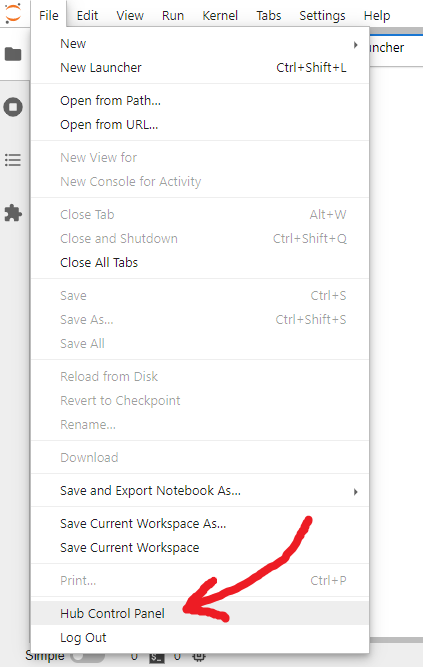
|

|
||||||
|
|
||||||
2. At the top of the Control Panel, click **Admin**:
|
2. In the Control Panel, open the **Admin** link in the top left:
|
||||||
|
|
||||||

|

|
||||||
|
|
||||||
This opens up the JupyterHub Admin page, where you can add / delete users, start / stop peoples’ servers and see who is online.
|
This opens up the JupyterHub Admin page, where you can add / delete users, start / stop peoples’ servers and see who is online.
|
||||||
|
|
||||||
|
|
@ -74,20 +70,6 @@ The `Admin` user (and any users given `Admin` privilege) can reset user password
|
||||||
|
|
||||||
_WARNING: If on login users see "500 : Internal Server Error", you may need to remove ALL files of the form_ `/run/jupyter-johndoe-singleuser`
|
_WARNING: If on login users see "500 : Internal Server Error", you may need to remove ALL files of the form_ `/run/jupyter-johndoe-singleuser`
|
||||||
|
|
||||||
### Logging
|
|
||||||
|
|
||||||
To see JupyterHub's (typically very long!) log, run:
|
|
||||||
|
|
||||||
```
|
|
||||||
journalctl -u jupyterhub
|
|
||||||
```
|
|
||||||
|
|
||||||
Sometimes other logs might also be available, e.g.:
|
|
||||||
|
|
||||||
```
|
|
||||||
journalctl -u jupyter-admin-singleuser
|
|
||||||
```
|
|
||||||
|
|
||||||
### PAWS/Jupyter Notebooks for Python Beginners
|
### PAWS/Jupyter Notebooks for Python Beginners
|
||||||
|
|
||||||
While PAWS is a little bit off topic, if you have an interest in Wikipedia, please do see this 23m 42s video ["Intro to PAWS/Jupyter notebooks for Python beginners"](https://www.youtube.com/watch?v=AUZkioRI-aA&list=PLeoTcBlDanyNQXBqI1rVXUqUTSSiuSIXN&index=8) by Chico Venancio, from 2021-06-01.
|
While PAWS is a little bit off topic, if you have an interest in Wikipedia, please do see this 23m 42s video ["Intro to PAWS/Jupyter notebooks for Python beginners"](https://www.youtube.com/watch?v=AUZkioRI-aA&list=PLeoTcBlDanyNQXBqI1rVXUqUTSSiuSIXN&index=8) by Chico Venancio, from 2021-06-01.
|
||||||
|
|
|
||||||
|
|
@ -13,20 +13,10 @@
|
||||||
when: nodejs_installed is undefined
|
when: nodejs_installed is undefined
|
||||||
|
|
||||||
|
|
||||||
- name: Record (initial) disk space used
|
- name: "Install package: python3-venv"
|
||||||
shell: df -B1 --output=used / | tail -1
|
package:
|
||||||
register: df1
|
name: python3-venv
|
||||||
|
state: present
|
||||||
# 2025-02-16
|
|
||||||
#- name: "Install package: python3-psutil"
|
|
||||||
# package:
|
|
||||||
# name: python3-psutil
|
|
||||||
# state: present
|
|
||||||
|
|
||||||
- name: Remove previous virtual environment {{ jupyterhub_venv }}
|
|
||||||
file:
|
|
||||||
path: "{{ jupyterhub_venv }}"
|
|
||||||
state: absent
|
|
||||||
|
|
||||||
- name: Make 3 directories to hold JupyterHub config
|
- name: Make 3 directories to hold JupyterHub config
|
||||||
file:
|
file:
|
||||||
|
|
@ -43,18 +33,17 @@
|
||||||
global: yes
|
global: yes
|
||||||
state: latest
|
state: latest
|
||||||
|
|
||||||
- name: "pip install 3 packages into virtual environment: {{ jupyterhub_venv }} (~316 MB total, after 2 Ansible calls)"
|
- name: "pip install 3 packages into virtual environment: {{ jupyterhub_venv }} (~304 MB total, after 2 Ansible calls)"
|
||||||
pip:
|
pip:
|
||||||
name:
|
name:
|
||||||
- pip
|
- pip
|
||||||
- wheel
|
- wheel
|
||||||
- jupyterhub
|
- jupyterhub
|
||||||
virtualenv: "{{ jupyterhub_venv }}" # /opt/iiab/jupyterhub
|
virtualenv: "{{ jupyterhub_venv }}" # /opt/iiab/jupyterhub
|
||||||
#virtualenv_site_packages: no
|
virtualenv_site_packages: no
|
||||||
virtualenv_command: python3 -m venv "{{ jupyterhub_venv }}" # 2025-02-16
|
virtualenv_command: python3 -m venv "{{ jupyterhub_venv }}" # 2021-07-29: This works on RasPiOS 10, Debian 11, Ubuntu 20.04 and Mint 20 -- however if you absolutely must use the older Debian 10 -- you can work around errors "can't find Rust compiler" and "This package requires Rust >=1.41.0" if you (1) revert this line to 'virtualenv_command: virtualenv' AND (2) uncomment the line just below
|
||||||
#virtualenv_command: python3 -m venv --system-site-packages "{{ jupyterhub_venv }}" # 2021-07-29: This works on RasPiOS 10, Debian 11, Ubuntu 20.04 and Mint 20 -- however if you absolutely must use the older Debian 10 -- you can work around errors "can't find Rust compiler" and "This package requires Rust >=1.41.0" if you (1) revert this line to 'virtualenv_command: virtualenv' AND (2) uncomment the line just below
|
|
||||||
#virtualenv_python: python3 # 2021-07-29: Was needed when above line was 'virtualenv_command: virtualenv' (generally for Python 2)
|
#virtualenv_python: python3 # 2021-07-29: Was needed when above line was 'virtualenv_command: virtualenv' (generally for Python 2)
|
||||||
extra_args: "--no-cache-dir --prefer-binary" # 2021-11-30, 2022-07-07: The "--pre" flag had earlier been needed, for beta-like pre-releases of JupyterHub 2.0.0
|
extra_args: "--no-cache-dir" # 2021-11-30, 2022-07-07: The "--pre" flag had earlier been needed, for beta-like pre-releases of JupyterHub 2.0.0
|
||||||
|
|
||||||
# 2022-07-07: Attempting to "pip install" all 7 together (3 above + 4 below)
|
# 2022-07-07: Attempting to "pip install" all 7 together (3 above + 4 below)
|
||||||
# fails on OS's like 64-bit RasPiOS (but interestingly works on Ubuntu 22.04!)
|
# fails on OS's like 64-bit RasPiOS (but interestingly works on Ubuntu 22.04!)
|
||||||
|
|
@ -68,10 +57,9 @@
|
||||||
- jupyterhub-systemdspawner
|
- jupyterhub-systemdspawner
|
||||||
- ipywidgets
|
- ipywidgets
|
||||||
virtualenv: "{{ jupyterhub_venv }}"
|
virtualenv: "{{ jupyterhub_venv }}"
|
||||||
#virtualenv_site_packages: no
|
virtualenv_site_packages: no
|
||||||
virtualenv_command: python3 -m venv "{{ jupyterhub_venv }}" # 2025-02-16
|
virtualenv_command: python3 -m venv "{{ jupyterhub_venv }}"
|
||||||
#virtualenv_command: python3 -m venv --system-site-packages "{{ jupyterhub_venv }}"
|
extra_args: "--no-cache-dir"
|
||||||
extra_args: "--no-cache-dir --prefer-binary" # 2023-10-01: Lifesaver when recent wheels (e.g. piwheels.org) are inevitably not yet built! SEE #3560
|
|
||||||
|
|
||||||
- name: "Install from template: {{ jupyterhub_venv }}/etc/jupyterhub/jupyterhub_config.py"
|
- name: "Install from template: {{ jupyterhub_venv }}/etc/jupyterhub/jupyterhub_config.py"
|
||||||
template:
|
template:
|
||||||
|
|
@ -84,7 +72,7 @@
|
||||||
dest: /etc/systemd/system/jupyterhub.service
|
dest: /etc/systemd/system/jupyterhub.service
|
||||||
|
|
||||||
# 2022-07-07: No longer needed, thx to upstream fixes
|
# 2022-07-07: No longer needed, thx to upstream fixes
|
||||||
# - name: Install {{ jupyterhub_venv }}/bin/getsite.py from template, to fetch site_packages path, e.g. {{ jupyterhub_venv }}/lib/python{{ python_version }}/site-packages
|
# - name: Install {{ jupyterhub_venv }}/bin/getsite.py from template, to fetch site_packages path, e.g. {{ jupyterhub_venv }}/lib/python{{ python_ver }}/site-packages
|
||||||
# template:
|
# template:
|
||||||
# src: getsite.py.j2
|
# src: getsite.py.j2
|
||||||
# dest: "{{ jupyterhub_venv }}/bin/getsite.py"
|
# dest: "{{ jupyterhub_venv }}/bin/getsite.py"
|
||||||
|
|
@ -111,17 +99,6 @@
|
||||||
|
|
||||||
# RECORD JupyterHub AS INSTALLED
|
# RECORD JupyterHub AS INSTALLED
|
||||||
|
|
||||||
- name: Record (final) disk space used
|
|
||||||
shell: df -B1 --output=used / | tail -1
|
|
||||||
register: df2
|
|
||||||
|
|
||||||
- name: Add 'jupyterhub_disk_usage = {{ df2.stdout|int - df1.stdout|int }}' to {{ iiab_ini_file }}
|
|
||||||
ini_file:
|
|
||||||
path: "{{ iiab_ini_file }}" # /etc/iiab/iiab.ini
|
|
||||||
section: jupyterhub
|
|
||||||
option: jupyterhub_disk_usage
|
|
||||||
value: "{{ df2.stdout|int - df1.stdout|int }}"
|
|
||||||
|
|
||||||
- name: "Set 'jupyterhub_installed: True'"
|
- name: "Set 'jupyterhub_installed: True'"
|
||||||
set_fact:
|
set_fact:
|
||||||
jupyterhub_installed: True
|
jupyterhub_installed: True
|
||||||
|
|
|
||||||
File diff suppressed because it is too large
Load diff
|
|
@ -1,8 +1,3 @@
|
||||||
- name: Record (initial) disk space used
|
|
||||||
shell: df -B1 --output=used / | tail -1
|
|
||||||
register: df1
|
|
||||||
|
|
||||||
|
|
||||||
- name: Download {{ kalite_requirements }} to {{ pip_packages_dir }}/kalite.txt
|
- name: Download {{ kalite_requirements }} to {{ pip_packages_dir }}/kalite.txt
|
||||||
get_url:
|
get_url:
|
||||||
url: "{{ kalite_requirements }}"
|
url: "{{ kalite_requirements }}"
|
||||||
|
|
@ -15,46 +10,36 @@
|
||||||
# ignore_errors: yes
|
# ignore_errors: yes
|
||||||
# when: is_raspbian
|
# when: is_raspbian
|
||||||
|
|
||||||
- name: 'Install packages: python2, python-setuptools, virtualenv (for Python 2) -- if Ubuntu 22.04 / Mint 21'
|
- name: 'Install packages: python2, python-setuptools, virtualenv (for Python 2)'
|
||||||
package:
|
package:
|
||||||
name:
|
name:
|
||||||
- python2
|
- python2
|
||||||
- python-setuptools # Provides setuptools-44 on recent OS's (last version compatible with python2)
|
- python-setuptools # Provides setuptools-44 on recent OS's (last version compatible with python2)
|
||||||
- virtualenv # Drags in 'python3-virtualenv' which in turn drags in 'python3-pip' -- for Ansible module 'pip' when used with 'virtualenv_command: /usr/bin/virtualenv' and 'virtualenv_python: python2.7' -- compare package 'python3-venv' used by roles {calibre-web, jupyterhub, lokole}
|
- virtualenv # For Ansible module 'pip' when used with 'virtualenv_command: /usr/bin/virtualenv' and 'virtualenv_python: python2.7' -- compare package 'python3-venv' used by roles {calibre-web, jupyterhub, lokole}
|
||||||
state: present
|
state: present
|
||||||
when: is_ubuntu_2204 # Also covers is_linuxmint_21
|
#when: not (is_debian_9 or is_debian_10 or is_ubuntu_16 or is_ubuntu_17 or is_ubuntu_18 or is_ubuntu_19)
|
||||||
|
# 2020-03-31: Testing for {is_raspbian_9, is_raspbian_10} is not currently nec, as testing for {is_debian_9, is_debian_10} covers that already.
|
||||||
|
|
||||||
- name: Run scripts/install_python2.sh to install python2 and virtualenv -- if Debian 12 or RasPiOS 12
|
- name: Use pip to pin setuptools to 44 in {{ kalite_venv }} if Raspbian/Debian > 10 or Ubuntu > 19
|
||||||
command: "{{ iiab_dir }}/scripts/install_python2.sh"
|
|
||||||
when: is_debian_12 # Also covers is_raspbian_12
|
|
||||||
|
|
||||||
- name: Use pip to pin setuptools to 44 in {{ kalite_venv }} -- if Ubuntu 22.04 / Mint 21, Ubuntu 23.10, Debian 12 or RasPiOS 12
|
|
||||||
pip:
|
pip:
|
||||||
name: setuptools==44
|
name: setuptools==44
|
||||||
virtualenv: "{{ kalite_venv }}" # /usr/local/kalite/venv
|
virtualenv: "{{ kalite_venv }}" # /usr/local/kalite/venv
|
||||||
virtualenv_site_packages: no
|
virtualenv_site_packages: no
|
||||||
virtualenv_command: virtualenv # Traditionally /usr/bin/virtual/env -- but install_python2.sh (for Ubuntu 23.10+) sets up /usr/local/bin/virtualenv
|
virtualenv_command: /usr/bin/virtualenv
|
||||||
virtualenv_python: python2.7
|
virtualenv_python: python2.7
|
||||||
extra_args: "--no-use-pep517 --no-cache-dir --no-python-version-warning"
|
extra_args: "--no-use-pep517 --no-cache-dir --no-python-version-warning"
|
||||||
when: is_ubuntu_2204 or is_ubuntu_2310 or is_debian_12 # Also covers is_linuxmint_21 and is_raspbian_12
|
when: not (is_debian_9 or is_debian_10 or is_ubuntu_16 or is_ubuntu_17 or is_ubuntu_18 or is_ubuntu_19)
|
||||||
|
# long form of (is_debian_11+ or is_ubuntu_20+)
|
||||||
|
|
||||||
- name: Use pip to install ka-lite-static to {{ kalite_venv }} -- if Ubuntu 22.04 / Mint 21, Ubuntu 23.10, Debian 12 or RasPiOS 12
|
- name: Use pip to install ka-lite-static to {{ kalite_venv }}
|
||||||
pip:
|
pip:
|
||||||
name: ka-lite-static
|
name: ka-lite-static
|
||||||
version: "{{ kalite_version }}"
|
version: "{{ kalite_version }}"
|
||||||
virtualenv: "{{ kalite_venv }}"
|
virtualenv: "{{ kalite_venv }}"
|
||||||
virtualenv_site_packages: no
|
virtualenv_site_packages: no
|
||||||
virtualenv_command: virtualenv
|
virtualenv_command: /usr/bin/virtualenv
|
||||||
virtualenv_python: python2.7
|
virtualenv_python: python2.7
|
||||||
extra_args: "--no-cache-dir"
|
extra_args: "--no-cache-dir"
|
||||||
when: is_ubuntu_2204 or is_ubuntu_2310 or is_debian_12 # Also covers is_linuxmint_21 and is_raspbian_12
|
|
||||||
|
|
||||||
# 2024-04-30: Sadly no longer works with Ubuntu 24.04 LTS final release (#3731).
|
|
||||||
# So roles/kalite is OS-restricted during initial install, SEE: roles/7-edu-apps/tasks/main.yml
|
|
||||||
# CLARIF: If install_python2_kalite-venv_u2404.sh proves no longer useful, it will deprecated in coming months.
|
|
||||||
- name: Run scripts/install_python2_kalite-venv_u2404.sh -- if Ubuntu 24.04+ or Mint 22
|
|
||||||
command: bash "{{ iiab_dir }}/scripts/install_python2_kalite-venv_u2404.sh"
|
|
||||||
when: is_ubuntu and not is_linuxmint and os_ver is version('ubuntu-2404', '>=') or is_linuxmint_22
|
|
||||||
|
|
||||||
- name: "Install from templates: venv wrapper /usr/bin/kalite, unit file /etc/systemd/system/kalite-serve.service"
|
- name: "Install from templates: venv wrapper /usr/bin/kalite, unit file /etc/systemd/system/kalite-serve.service"
|
||||||
template:
|
template:
|
||||||
|
|
@ -65,11 +50,30 @@
|
||||||
- { src: 'kalite.sh.j2', dest: '/usr/bin/kalite', mode: '0755' }
|
- { src: 'kalite.sh.j2', dest: '/usr/bin/kalite', mode: '0755' }
|
||||||
- { src: 'kalite-serve.service.j2', dest: '/etc/systemd/system/kalite-serve.service', mode: '0644' }
|
- { src: 'kalite-serve.service.j2', dest: '/etc/systemd/system/kalite-serve.service', mode: '0644' }
|
||||||
|
|
||||||
- name: Fix KA Lite bug in regex parsing ifconfig output (ifcfg/parser.py) for @m-anish's network names that contain dashes # WAS: if Raspbian/Debian > 10 or Ubuntu > 19
|
# Useless stanza, for 2 reasons: (1) http://box/kalite was never made to work
|
||||||
|
# (2) /etc/apache2/sites-available does not exist on many IIAB's w/o Apache
|
||||||
|
# - name: "Install from template: /etc/{{ apache_conf_dir }}/kalite.conf (useless, as http://box/kalite was never made to work)"
|
||||||
|
# template:
|
||||||
|
# src: kalite.conf
|
||||||
|
# dest: "/etc/{{ apache_conf_dir }}" # apache2/sites-available on debuntu
|
||||||
|
# when: apache_installed is defined
|
||||||
|
|
||||||
|
- name: Fix KA Lite bug in regex parsing ifconfig output (ifcfg/parser.py) for @m-anish's network names that contain dashes, if Raspbian/Debian > 10 or Ubuntu > 19
|
||||||
replace:
|
replace:
|
||||||
path: "{{ kalite_venv }}/lib/python2.7/site-packages/kalite/packages/dist/ifcfg/parser.py" # /usr/local/kalite/venv
|
path: "{{ kalite_venv }}/lib/python2.7/site-packages/kalite/packages/dist/ifcfg/parser.py" # /usr/local/kalite/venv
|
||||||
regexp: 'a-zA-Z0-9'
|
regexp: 'a-zA-Z0-9'
|
||||||
replace: 'a-zA-Z0-9\-'
|
replace: 'a-zA-Z0-9\-'
|
||||||
|
when: not (is_debian_9 or is_debian_10 or is_ubuntu_16 or is_ubuntu_17 or is_ubuntu_18 or is_ubuntu_19)
|
||||||
|
# 2020-03-31: Testing for {is_raspbian_9, is_raspbian_10} is not currently nec, as testing for {is_debian_9, is_debian_10} covers that already.
|
||||||
|
# JV: why not just is_ubuntu_20? AH: to make this work on Ubuntu 21+ and ideally Debian/RasPiOS 11+ too?
|
||||||
|
|
||||||
|
- name: Fix KA Lite bug in regex parsing ifconfig output (ifcfg/parser.py) for @m-anish's network names that contain dashes, if Raspbian/Debian < 11 or Ubuntu < 20
|
||||||
|
replace:
|
||||||
|
path: "{{ kalite_venv }}/local/lib/python2.7/site-packages/kalite/packages/dist/ifcfg/parser.py"
|
||||||
|
regexp: 'a-zA-Z0-9'
|
||||||
|
replace: 'a-zA-Z0-9\-'
|
||||||
|
when: is_debian_9 or is_debian_10 or is_ubuntu_16 or is_ubuntu_17 or is_ubuntu_18 or is_ubuntu_19
|
||||||
|
# 2020-03-31: Testing for {is_raspbian_9, is_raspbian_10} is not currently nec, as testing for {is_debian_9, is_debian_10} covers that already.
|
||||||
|
|
||||||
- name: Create dir {{ kalite_root }}
|
- name: Create dir {{ kalite_root }}
|
||||||
file:
|
file:
|
||||||
|
|
@ -86,17 +90,6 @@
|
||||||
|
|
||||||
# RECORD KA Lite AS INSTALLED
|
# RECORD KA Lite AS INSTALLED
|
||||||
|
|
||||||
- name: Record (final) disk space used
|
|
||||||
shell: df -B1 --output=used / | tail -1
|
|
||||||
register: df2
|
|
||||||
|
|
||||||
- name: Add 'kalite_disk_usage = {{ df2.stdout|int - df1.stdout|int }}' to {{ iiab_ini_file }}
|
|
||||||
ini_file:
|
|
||||||
path: "{{ iiab_ini_file }}" # /etc/iiab/iiab.ini
|
|
||||||
section: kalite
|
|
||||||
option: kalite_disk_usage
|
|
||||||
value: "{{ df2.stdout|int - df1.stdout|int }}"
|
|
||||||
|
|
||||||
- name: "Set 'kalite_installed: True'"
|
- name: "Set 'kalite_installed: True'"
|
||||||
set_fact:
|
set_fact:
|
||||||
kalite_installed: True
|
kalite_installed: True
|
||||||
|
|
|
||||||
|
|
@ -14,7 +14,7 @@ Locations
|
||||||
|
|
||||||
- Your ZIM files go in ``/library/zims/content``
|
- Your ZIM files go in ``/library/zims/content``
|
||||||
- Your ZIM index files used to go in directories under ``/library/zims/index`` (these index files are increasingly no longer necessary, as most ZIM files produced since 2017 contain an internal search index instead!)
|
- Your ZIM index files used to go in directories under ``/library/zims/index`` (these index files are increasingly no longer necessary, as most ZIM files produced since 2017 contain an internal search index instead!)
|
||||||
- The URL is http://box/kiwix or http://box.lan/kiwix (both proxied for AWStats, Matomo, ETC)
|
- The URL is http://box/kiwix or http://box.lan/kiwix (both proxied for AWStats)
|
||||||
- Use URL http://box:3000/kiwix if you want to avoid the proxy
|
- Use URL http://box:3000/kiwix if you want to avoid the proxy
|
||||||
|
|
||||||
Your ``/library/zims/library.xml`` (containing essential metadata for the ZIM files you've installed) can be regenerated if necessary, by running:
|
Your ``/library/zims/library.xml`` (containing essential metadata for the ZIM files you've installed) can be regenerated if necessary, by running:
|
||||||
|
|
|
||||||
|
|
@ -8,11 +8,11 @@
|
||||||
# If nec, change them by editing /etc/iiab/local_vars.yml prior to installing!
|
# If nec, change them by editing /etc/iiab/local_vars.yml prior to installing!
|
||||||
|
|
||||||
|
|
||||||
# ONLINE UPGRADE INSTRUCTIONS:
|
# INSTRUCTIONS TO REINSTALL Kiwix:
|
||||||
# (1) VERIFY VARS IN /etc/iiab/local_vars.yml
|
# (1) VERIFY THESE VARS IN /etc/iiab/local_vars.yml
|
||||||
# kiwix_install: True
|
# kiwix_install: True
|
||||||
# kiwix_enabled: True
|
# kiwix_enabled: True
|
||||||
# (2) RUN: cd /opt/iiab/iiab; sudo ./runrole --reinstall kiwix
|
# (2) RUN: cd /opt/iiab/iiab; ./runrole --reinstall kiwix
|
||||||
|
|
||||||
|
|
||||||
# FYI /library/zims contains 3 important things:
|
# FYI /library/zims contains 3 important things:
|
||||||
|
|
@ -21,30 +21,14 @@
|
||||||
# - index = directory for legacy *.zim.idx's
|
# - index = directory for legacy *.zim.idx's
|
||||||
kiwix_library_xml: "{{ iiab_zim_path }}/library.xml"
|
kiwix_library_xml: "{{ iiab_zim_path }}/library.xml"
|
||||||
|
|
||||||
kiwix_base_url: https://download.kiwix.org/release/kiwix-tools/
|
# 3 lines below specify which version(s) of kiwix-tools to download from...
|
||||||
#kiwix_base_url: https://download.kiwix.org/nightly/2022-10-04/
|
# https://download.iiab.io/packages/ ...as originally obtained from...
|
||||||
#kiwix_base_url: "{{ iiab_download_url }}/" # e.g. https://download.iiab.io/packages/
|
# https://download.kiwix.org/release/kiwix-tools/ ...or sometimes...
|
||||||
|
# https://download.kiwix.org/nightly/
|
||||||
|
|
||||||
kiwix_arch_dict: # 'dpkg --print-architecture' key would be: (to mitigate #3516 in future, if truly nec?)
|
kiwix_version_armhf: kiwix-tools_linux-armhf-3.3.0-1
|
||||||
#i386: # ?
|
kiwix_version_linux64: kiwix-tools_linux-x86_64-3.3.0-1
|
||||||
i686: i586 # ?
|
kiwix_version_i686: kiwix-tools_linux-i586-3.3.0-1
|
||||||
x86_64: x86_64 # amd64
|
|
||||||
armv6l: armv6 # armhf
|
|
||||||
armv7l: armv8 # armhf BEWARE: armhf version of kiwix-tools suddenly FAILS on 64-bit RasPiOS, since 3.5.0 released 2023-04-28 -- #3574, PR #3576
|
|
||||||
aarch64: aarch64 # arm64 BEWARE: "32-bit" RasPiOS suddenly boots 64-bit kernel since March 2023 -- #3516, explained at https://github.com/iiab/iiab/pull/3422#issuecomment-1533441463
|
|
||||||
|
|
||||||
# ansible_architecture might also work, if not quite as well:
|
|
||||||
# https://stackoverflow.com/questions/66828315/what-is-the-difference-between-ansible-architecture-and-ansible-machine-on-a/66828837#66828837
|
|
||||||
# CLAIM: 'ansible_machine might be "i686", whereas ansible_architecture on the same host would be "i386"'
|
|
||||||
# https://stackoverflow.com/questions/44713880/how-do-i-make-decision-based-on-arch-in-ansible-playbooks/44714226#44714226
|
|
||||||
kiwix_arch: "{{ kiwix_arch_dict[ansible_machine] | default('unsupported') }}"
|
|
||||||
|
|
||||||
# Latest official kiwix-tools release, per Kiwix permalink redirects:
|
|
||||||
# https://www.kiwix.org/en/downloads/kiwix-serve/
|
|
||||||
# https://github.com/kiwix/container-images/issues/236
|
|
||||||
# https://github.com/kiwix/kiwix-tools/issues/623
|
|
||||||
kiwix_tar_gz: "kiwix-tools_linux-{{ kiwix_arch }}.tar.gz"
|
|
||||||
#kiwix_tar_gz: "kiwix-tools_linux-{{ kiwix_arch }}-3.3.0-1.tar.gz" # Version can be hard-coded if you prefer (as was done til 2022-10-04)
|
|
||||||
|
|
||||||
# kiwix_src_file_i686: "kiwix-linux-i686.tar.bz2"
|
# kiwix_src_file_i686: "kiwix-linux-i686.tar.bz2"
|
||||||
# v0.9 for i686 published May 2014 ("use it to test legacy ZIM content")
|
# v0.9 for i686 published May 2014 ("use it to test legacy ZIM content")
|
||||||
|
|
|
||||||
|
|
@ -13,46 +13,30 @@
|
||||||
systemd:
|
systemd:
|
||||||
name: kiwix-serve
|
name: kiwix-serve
|
||||||
enabled: yes
|
enabled: yes
|
||||||
state: started
|
state: started # Not needed...but can't hurt
|
||||||
when: kiwix_enabled
|
when: kiwix_enabled
|
||||||
|
|
||||||
|
|
||||||
|
# TO DO: BOTH CRON ENTRIES BELOW *SHOULD* BE DELETED "when: not kiwix_enabled"
|
||||||
|
|
||||||
# In the past kiwix-serve did not stay running, so we'd been doing this hourly.
|
# In the past kiwix-serve did not stay running, so we'd been doing this hourly.
|
||||||
# @mgautierfr & others suggest kiwix-serve might be auto-restarted w/o cron in
|
# @mgautierfr & others suggest kiwix-serve might be auto-restarted w/o cron in
|
||||||
# future, whenever service fails, if this really catches all cases??
|
# future, whenever service fails, if this really catches all cases??
|
||||||
# https://github.com/iiab/iiab/issues/484#issuecomment-342151726
|
# https://github.com/iiab/iiab/issues/484#issuecomment-342151726
|
||||||
|
- name: Make a crontab entry to restart kiwix-serve at 4AM (debuntu)
|
||||||
|
lineinfile:
|
||||||
|
# mn hr dy mo day-of-week[Sunday=0] username command-to-be-executed
|
||||||
|
line: "0 4 * * * root /bin/systemctl restart kiwix-serve.service"
|
||||||
|
dest: /etc/crontab
|
||||||
|
when: kiwix_enabled and is_debuntu
|
||||||
|
|
||||||
- name: Set cron to restart kiwix-serve 4AM daily, if kiwix_enabled
|
- name: Make a crontab entry to restart kiwix-serve at 4AM (redhat)
|
||||||
cron:
|
# * * * * * user-name command to be executed
|
||||||
name: kiwix-serve daily restart
|
lineinfile:
|
||||||
minute: "0"
|
# mn hr dy mo day-of-week[Sunday=0] username command-to-be-executed
|
||||||
hour: "4"
|
line: "0 4 * * * root /usr/bin/systemctl restart kiwix-serve.service"
|
||||||
job: /usr/bin/systemctl restart kiwix-serve.service
|
dest: /etc/crontab
|
||||||
user: root
|
when: kiwix_enabled and is_redhat
|
||||||
cron_file: kiwix-serve_daily # i.e. /etc/cron.d/kiwix-serve_daily instead of /var/spool/cron/crontabs/root or /etc/cron.daily/* or /etc/crontab
|
|
||||||
when: kiwix_enabled
|
|
||||||
|
|
||||||
- name: Remove 4AM daily cron, if not kiwix_enabled
|
|
||||||
cron:
|
|
||||||
name: kiwix-serve daily restart
|
|
||||||
cron_file: kiwix-serve_daily
|
|
||||||
state: absent
|
|
||||||
when: not kiwix_enabled
|
|
||||||
|
|
||||||
# - name: Make a crontab entry to restart kiwix-serve at 4AM (debuntu)
|
|
||||||
# lineinfile:
|
|
||||||
# # mn hr dy mo day-of-week[Sunday=0] username command-to-be-executed
|
|
||||||
# line: "0 4 * * * root /usr/bin/systemctl restart kiwix-serve.service"
|
|
||||||
# dest: /etc/crontab
|
|
||||||
# when: kiwix_enabled
|
|
||||||
|
|
||||||
# - name: Make a crontab entry to restart kiwix-serve at 4AM (redhat)
|
|
||||||
# # * * * * * user-name command to be executed
|
|
||||||
# lineinfile:
|
|
||||||
# # mn hr dy mo day-of-week[Sunday=0] username command-to-be-executed
|
|
||||||
# line: "0 4 * * * root /usr/bin/systemctl restart kiwix-serve.service"
|
|
||||||
# dest: /etc/crontab
|
|
||||||
# when: kiwix_enabled and is_redhat
|
|
||||||
|
|
||||||
|
|
||||||
- name: Enable/Disable/Restart NGINX
|
- name: Enable/Disable/Restart NGINX
|
||||||
|
|
|
||||||
|
|
@ -1,62 +1,49 @@
|
||||||
# 0. VERIFY CPU/OS ARCHITECTURE SUPPORTED
|
# 0. SET CPU ARCHITECTURE
|
||||||
|
|
||||||
- name: Force Ansible to exit (FAIL) if kiwix-tools appears unavailable for your CPU/OS architecture ({{ ansible_machine }})
|
- name: "Initialize 'kiwix_src_dir: False' just in case CPU architecture is not supported"
|
||||||
|
set_fact:
|
||||||
|
kiwix_src_dir: False
|
||||||
|
|
||||||
|
- name: "Set fact 'kiwix_src_dir: {{ kiwix_version_armhf }}' (armv6l or armv71 or aarch64)"
|
||||||
|
set_fact:
|
||||||
|
kiwix_src_dir: "{{ kiwix_version_armhf }}"
|
||||||
|
when: ansible_machine == "armv6l" or ansible_machine == "armv7l" or ansible_machine == "aarch64"
|
||||||
|
|
||||||
|
- name: "Set fact 'kiwix_src_dir: {{ kiwix_version_linux64 }}' (x86_64)"
|
||||||
|
set_fact:
|
||||||
|
kiwix_src_dir: "{{ kiwix_version_linux64 }}"
|
||||||
|
when: ansible_machine == "x86_64"
|
||||||
|
|
||||||
|
- name: "Set fact 'kiwix_src_dir: {{ kiwix_version_i686 }}' (i686)"
|
||||||
|
set_fact:
|
||||||
|
kiwix_src_dir: "{{ kiwix_version_i686 }}"
|
||||||
|
when: ansible_machine == "i686"
|
||||||
|
# COMMENT OUT LINE ABOVE TO TEST i686 CODE PATH ON X86_64 (WORKS NOV 2017)
|
||||||
|
|
||||||
|
- name: Force Ansible to exit (FAIL) if kiwix-tools appears unavailable for your architecture ({{ ansible_machine }})
|
||||||
fail:
|
fail:
|
||||||
msg: "WARNING: kiwix-tools SOFTWARE APPEARS UNAVAILABLE FOR YOUR {{ ansible_machine }} CPU/OS ARCHITECTURE."
|
msg: "WARNING: kiwix-tools SOFTWARE APPEARS UNAVAILABLE FOR YOUR {{ ansible_machine }} OS/ARCHITECTURE."
|
||||||
when: kiwix_arch == "unsupported"
|
when: not kiwix_src_dir
|
||||||
|
|
||||||
|
- name: "Set fact 'kiwix_src_file: {{ kiwix_src_dir }}.tar.gz'"
|
||||||
|
set_fact:
|
||||||
|
kiwix_src_file: "{{ kiwix_src_dir }}.tar.gz"
|
||||||
|
|
||||||
|
|
||||||
- name: Record (initial) disk space used
|
# 1. PUT IN PLACE: /opt/iiab/downloads/kiwix-tools_linux-*.tar.gz, essential dirs, and test.zim if nec (library.xml is created later, by enable-or-disable.yml)
|
||||||
shell: df -B1 --output=used / | tail -1
|
|
||||||
register: df1
|
|
||||||
|
|
||||||
|
- name: Download {{ iiab_download_url }}/{{ kiwix_src_file }} to /opt/iiab/downloads
|
||||||
# 1. PUT IN PLACE: /opt/iiab/downloads/kiwix-tools_linux-*.tar.gz, move /opt/iiab/kiwix/bin aside if nec, create essential dirs, and test.zim if nec (library.xml is created later, by enable-or-disable.yml)
|
|
||||||
|
|
||||||
# 2022-10-04: get_url might be removed in future (unarchive below can handle
|
|
||||||
# everything!) Conversely: (1) unarchive doesn't support timeout (2) one day
|
|
||||||
# /opt/iiab/downloads might have practical value beyond hoarding (unlikely!)
|
|
||||||
- name: Download {{ kiwix_base_url }}{{ kiwix_tar_gz }} into /opt/iiab/downloads (ACTUAL filename should include kiwix-tools version, or nightly build date)
|
|
||||||
get_url:
|
get_url:
|
||||||
url: "{{ kiwix_base_url }}{{ kiwix_tar_gz }}" # e.g. https://download.kiwix.org/release/kiwix-tools/ + kiwix-tools_linux-x86_64.tar.gz
|
url: "{{ iiab_download_url }}/{{ kiwix_src_file }}" # https://download.iiab.io/packages
|
||||||
dest: "{{ downloads_dir }}" # /opt/iiab/downloads
|
dest: "{{ downloads_dir }}/{{ kiwix_src_file }}" # /opt/iiab/downloads
|
||||||
#force: yes # Already implied b/c dest is a dir! (to recover from incomplete downloads, etc)
|
|
||||||
timeout: "{{ download_timeout }}"
|
timeout: "{{ download_timeout }}"
|
||||||
register: kiwix_dl # PATH /opt/iiab/downloads + ACTUAL filename put in kiwix_dl.dest, for unarchive ~28 lines below
|
|
||||||
|
|
||||||
# - name: "2023-05-14: TEMPORARY PATCH REVERTING TO KIWIX-TOOLS 3.4.0 IF BUGGY 32-BIT (armhf) VERSION 3.5.0 IS DETECTED -- #3574"
|
|
||||||
# get_url:
|
|
||||||
# url: https://download.kiwix.org/release/kiwix-tools/kiwix-tools_linux-armhf-3.4.0.tar.gz
|
|
||||||
# dest: "{{ downloads_dir }}"
|
|
||||||
# timeout: "{{ download_timeout }}"
|
|
||||||
# #register: kiwix_dl # CLOBBERS kiwix_dl.dest WHEN THIS STANZA DOES NOT RUN :/
|
|
||||||
# when: kiwix_dl.dest == "/opt/iiab/downloads/kiwix-tools_linux-armhf-3.5.0.tar.gz"
|
|
||||||
#
|
|
||||||
# # Ansible does not allow changing individuals subfields in a dictionary, but
|
|
||||||
# # this crude hack works, overwriting the entire kiwix_dl dictionary var with
|
|
||||||
# # the single (needed) key/value pair. (Or "register: tmp_dl" could be set
|
|
||||||
# # above, if its other [subfields, key/value pairs, etc] really mattered...)
|
|
||||||
# - name: "2023-05-15: TEMPORARY PATCH REVERTING TO KIWIX-TOOLS 3.4.0 IF BUGGY 32-BIT (armhf) VERSION 3.5.0 IS DETECTED -- #3574"
|
|
||||||
# set_fact:
|
|
||||||
# kiwix_dl:
|
|
||||||
# dest: /opt/iiab/downloads/kiwix-tools_linux-armhf-3.4.0.tar.gz
|
|
||||||
# when: kiwix_dl.dest == "/opt/iiab/downloads/kiwix-tools_linux-armhf-3.5.0.tar.gz"
|
|
||||||
|
|
||||||
- name: Does {{ kiwix_path }}/bin already exist? (as a directory, symlink or file)
|
|
||||||
stat:
|
|
||||||
path: "{{ kiwix_path }}/bin" # /opt/iiab/kiwix
|
|
||||||
register: kiwix_bin
|
|
||||||
|
|
||||||
- name: If so, move {{ kiwix_path }}/bin to {{ kiwix_path }}/bin.DATE_TIME_TZ
|
|
||||||
shell: "mv {{ kiwix_path }}/bin {{ kiwix_path }}/bin.$(date +%F_%T_%Z)"
|
|
||||||
when: kiwix_bin.stat.exists
|
|
||||||
|
|
||||||
- name: "Create dirs, including parent dirs: {{ kiwix_path }}/bin (executables), {{ iiab_zim_path }}/content (ZIM files), {{ iiab_zim_path }}/index (legacy indexes) (by default 0755)"
|
- name: "Create dirs, including parent dirs: {{ kiwix_path }}/bin (executables), {{ iiab_zim_path }}/content (ZIM files), {{ iiab_zim_path }}/index (legacy indexes) (by default 0755)"
|
||||||
file:
|
file:
|
||||||
path: "{{ item }}"
|
path: "{{ item }}"
|
||||||
state: directory
|
state: directory
|
||||||
with_items:
|
with_items:
|
||||||
- "{{ kiwix_path }}/bin"
|
- "{{ kiwix_path }}/bin" # /opt/iiab/kiwix
|
||||||
- "{{ iiab_zim_path }}/content" # /library/zims
|
- "{{ iiab_zim_path }}/content" # /library/zims
|
||||||
- "{{ iiab_zim_path }}/index"
|
- "{{ iiab_zim_path }}/index"
|
||||||
|
|
||||||
|
|
@ -76,13 +63,13 @@
|
||||||
|
|
||||||
# 2. INSTALL KIWIX-TOOLS EXECUTABLES
|
# 2. INSTALL KIWIX-TOOLS EXECUTABLES
|
||||||
|
|
||||||
- name: Unarchive {{ kiwix_dl.dest }} to {{ kiwix_path }}/bin -- untar with '--strip-components=1' to chop tarball's top-level dir from path
|
- name: Unarchive {{ kiwix_src_file }} to /tmp # e.g. kiwix-tools_linux-armhf-3.1.2-3.tar.gz
|
||||||
unarchive:
|
unarchive:
|
||||||
src: "{{ kiwix_dl.dest }}" # See ~28 lines above, e.g. /opt/iiab/downloads/kiwix-tools_linux-x86_64-3.3.0-1.tar.gz
|
src: "{{ downloads_dir }}/{{ kiwix_src_file }}"
|
||||||
dest: "{{ kiwix_path }}/bin"
|
dest: /tmp
|
||||||
extra_opts: --strip-components=1
|
|
||||||
owner: root # 2023-05-14: When unpacking let's avoid bogus owner/group,
|
- name: Move /tmp/{{ kiwix_src_dir }}/* to permanent location {{ kiwix_path }}/bin
|
||||||
group: root # arising from UID/GID on Kiwix's build machine.
|
shell: "mv /tmp/{{ kiwix_src_dir }}/* {{ kiwix_path }}/bin/" # /opt/iiab/kiwix
|
||||||
|
|
||||||
|
|
||||||
# 3. ENABLE MODS FOR APACHE PROXY IF DEBUNTU
|
# 3. ENABLE MODS FOR APACHE PROXY IF DEBUNTU
|
||||||
|
|
@ -116,6 +103,7 @@
|
||||||
systemd:
|
systemd:
|
||||||
daemon_reload: yes
|
daemon_reload: yes
|
||||||
|
|
||||||
|
# install kiwix app
|
||||||
- name: Install Kiwix Android app
|
- name: Install Kiwix Android app
|
||||||
include_tasks: kiwix-apk.yml
|
include_tasks: kiwix-apk.yml
|
||||||
when: kiwix_incl_apk
|
when: kiwix_incl_apk
|
||||||
|
|
@ -123,17 +111,6 @@
|
||||||
|
|
||||||
# 5. RECORD Kiwix AS INSTALLED
|
# 5. RECORD Kiwix AS INSTALLED
|
||||||
|
|
||||||
- name: Record (final) disk space used
|
|
||||||
shell: df -B1 --output=used / | tail -1
|
|
||||||
register: df2
|
|
||||||
|
|
||||||
- name: Add 'kiwix_disk_usage = {{ df2.stdout|int - df1.stdout|int }}' to {{ iiab_ini_file }}
|
|
||||||
ini_file:
|
|
||||||
path: "{{ iiab_ini_file }}" # /etc/iiab/iiab.ini
|
|
||||||
section: kiwix
|
|
||||||
option: kiwix_disk_usage
|
|
||||||
value: "{{ df2.stdout|int - df1.stdout|int }}"
|
|
||||||
|
|
||||||
- name: "Set 'kiwix_installed: True'"
|
- name: "Set 'kiwix_installed: True'"
|
||||||
set_fact:
|
set_fact:
|
||||||
kiwix_installed: True
|
kiwix_installed: True
|
||||||
|
|
|
||||||
|
|
@ -42,8 +42,6 @@
|
||||||
value: "{{ kiwix_install }}"
|
value: "{{ kiwix_install }}"
|
||||||
- option: kiwix_enabled
|
- option: kiwix_enabled
|
||||||
value: "{{ kiwix_enabled }}"
|
value: "{{ kiwix_enabled }}"
|
||||||
- option: kiwix_tar_gz
|
|
||||||
value: "{{ kiwix_tar_gz }}"
|
|
||||||
- option: kiwix_url
|
- option: kiwix_url
|
||||||
value: "{{ kiwix_url }}"
|
value: "{{ kiwix_url }}"
|
||||||
- option: kiwix_url_plus_slash
|
- option: kiwix_url_plus_slash
|
||||||
|
|
|
||||||
|
|
@ -25,12 +25,12 @@ if flock -n -e 200; then :
|
||||||
else
|
else
|
||||||
/usr/bin/iiab-make-kiwix-lib.py -f # force rebuild of library.xml
|
/usr/bin/iiab-make-kiwix-lib.py -f # force rebuild of library.xml
|
||||||
fi
|
fi
|
||||||
/usr/bin/systemctl stop kiwix-serve
|
{{ systemctl_program }} stop kiwix-serve
|
||||||
if [ -f $KIWIXLIB ]; then
|
if [ -f $KIWIXLIB ]; then
|
||||||
rm $KIWIXLIB
|
rm $KIWIXLIB
|
||||||
fi
|
fi
|
||||||
mv $KIWIXLIB.tmp $KIWIXLIB
|
mv $KIWIXLIB.tmp $KIWIXLIB
|
||||||
/usr/bin/systemctl start kiwix-serve
|
{{ systemctl_program }} start kiwix-serve
|
||||||
else
|
else
|
||||||
echo "Can't get wait lock for iiab-make-kiwix-lib.py";
|
echo "Can't get wait lock for iiab-make-kiwix-lib.py";
|
||||||
exit 1;
|
exit 1;
|
||||||
|
|
|
||||||
|
|
@ -24,7 +24,7 @@ Please look in `/opt/iiab/iiab/roles/kolibri/defaults/main.yml <defaults/main.ym
|
||||||
Automatic Device Provisioning
|
Automatic Device Provisioning
|
||||||
-----------------------------
|
-----------------------------
|
||||||
|
|
||||||
When kolibri_provision is enabled (e.g. in `/etc/iiab/local_vars.yml <http://FAQ.IIAB.IO#What_is_local_vars.yml_and_how_do_I_customize_it%3F>`_) the installation will set up the following defaults::
|
When kolibri_provision is enabled (e.g. in `/etc/iiab/local_vars.yml <http://FAQ.IIAB.IO#What_is_local_vars.yml_and_how_do_I_customize_it.3F>`_) the installation will set up the following defaults::
|
||||||
|
|
||||||
kolibri_facility: Kolibri-in-a-Box
|
kolibri_facility: Kolibri-in-a-Box
|
||||||
kolibri_language: en # See KOLIBRI_SUPPORTED_LANGUAGES at the bottom of https://github.com/learningequality/kolibri/blob/develop/kolibri/utils/i18n.py
|
kolibri_language: en # See KOLIBRI_SUPPORTED_LANGUAGES at the bottom of https://github.com/learningequality/kolibri/blob/develop/kolibri/utils/i18n.py
|
||||||
|
|
|
||||||
|
|
@ -3,21 +3,11 @@
|
||||||
|
|
||||||
# kolibri_language: en # See KOLIBRI_SUPPORTED_LANGUAGES at the bottom of https://github.com/learningequality/kolibri/blob/develop/kolibri/utils/i18n.py
|
# kolibri_language: en # See KOLIBRI_SUPPORTED_LANGUAGES at the bottom of https://github.com/learningequality/kolibri/blob/develop/kolibri/utils/i18n.py
|
||||||
|
|
||||||
# Kolibri folder to store its data and configuration files.
|
|
||||||
# kolibri_home: "{{ content_base }}/kolibri" # /library/kolibri
|
|
||||||
|
|
||||||
# kolibri_user: kolibri # Whereas a vanilla install of Kolibri auto-identifies
|
|
||||||
# and saves a 'desktop-like' user like {iiab-admin, pi} to /etc/kolibri/username
|
|
||||||
# (generally the user with lowest UID >= 1000) to allow access to USB devices:
|
|
||||||
# https://kolibri.readthedocs.io/en/latest/install/ubuntu-debian.html#changing-the-owner-of-kolibri-system-service
|
|
||||||
# https://github.com/learningequality/kolibri-installer-debian/issues/115
|
|
||||||
|
|
||||||
# kolibri_http_port: 8009
|
# kolibri_http_port: 8009
|
||||||
|
|
||||||
# All above are set in: github.com/iiab/iiab/blob/master/vars/default_vars.yml
|
# All above are set in: github.com/iiab/iiab/blob/master/vars/default_vars.yml
|
||||||
# If nec, change them by editing /etc/iiab/local_vars.yml prior to installing!
|
# If nec, change them by editing /etc/iiab/local_vars.yml prior to installing!
|
||||||
|
|
||||||
|
|
||||||
# 2019-09-27: Pinning to a particular version is unfortunately NOT supported
|
# 2019-09-27: Pinning to a particular version is unfortunately NOT supported
|
||||||
# with our new apt approach (.deb installer) at this time.
|
# with our new apt approach (.deb installer) at this time.
|
||||||
# 2019-06-21: Uncomment this pinning line if you want a particular version of
|
# 2019-06-21: Uncomment this pinning line if you want a particular version of
|
||||||
|
|
@ -26,12 +16,8 @@
|
||||||
# https://github.com/iiab/iiab/issues/1675
|
# https://github.com/iiab/iiab/issues/1675
|
||||||
# https://github.com/learningequality/kolibri/issues/5664
|
# https://github.com/learningequality/kolibri/issues/5664
|
||||||
|
|
||||||
# 2024-04-08: Kolibri 0.16.1+ restores install via apt
|
# 2022-07-30: UNCOMMENT THE FOLLOWING LINE TO TEST A PARTICULAR .deb INSTALL
|
||||||
# https://github.com/learningequality/kolibri/issues/11892#issuecomment-2043073998
|
|
||||||
# 2022-07-30: UNCOMMENT ONE OF THE FOLLOWING LINES TO TEST A PARTICULAR .deb INSTALL
|
|
||||||
# kolibri_deb_url: https://learningequality.org/r/kolibri-deb-latest
|
# kolibri_deb_url: https://learningequality.org/r/kolibri-deb-latest
|
||||||
# 2024-02-17: https://github.com/learningequality/kolibri/issues/11892
|
|
||||||
# kolibri_deb_url: https://learningequality.org/r/kolibri-deb-next
|
|
||||||
# 2019-11-21 issue #2045 - above URL had redirected to this broken Kolibri 0.12.9 release:
|
# 2019-11-21 issue #2045 - above URL had redirected to this broken Kolibri 0.12.9 release:
|
||||||
# https://storage.googleapis.com/le-releases/downloads/kolibri/v0.12.9/kolibri_0.12.9-0ubuntu1_all.deb
|
# https://storage.googleapis.com/le-releases/downloads/kolibri/v0.12.9/kolibri_0.12.9-0ubuntu1_all.deb
|
||||||
#
|
#
|
||||||
|
|
@ -44,11 +30,19 @@
|
||||||
# Corresponding to:
|
# Corresponding to:
|
||||||
# https://launchpad.net/~learningequality/+archive/ubuntu/kolibri
|
# https://launchpad.net/~learningequality/+archive/ubuntu/kolibri
|
||||||
|
|
||||||
|
# Kolibri folder to store its data and configuration files.
|
||||||
|
kolibri_home: "{{ content_base }}/kolibri" # /library/kolibri
|
||||||
|
|
||||||
kolibri_url_without_slash: /kolibri
|
kolibri_url_without_slash: /kolibri
|
||||||
kolibri_url: "{{ kolibri_url_without_slash }}/" # /kolibri/
|
kolibri_url: "{{ kolibri_url_without_slash }}/" # /kolibri/
|
||||||
|
|
||||||
kolibri_exec_path: /usr/bin/kolibri
|
kolibri_exec_path: /usr/bin/kolibri
|
||||||
|
|
||||||
|
kolibri_user: kolibri # Whereas a vanilla install of Kolibri auto-identifies
|
||||||
|
# and saves a 'desktop' user like {iiab-admin, pi} to /etc/kolibri/username,
|
||||||
|
# towards guaranteeing access to USB devices, per:
|
||||||
|
# https://kolibri.readthedocs.io/en/latest/install.html#changing-the-owner-of-kolibri-system-service
|
||||||
|
|
||||||
# To populate /library/kolibri with essential/minimum files and dirs. This
|
# To populate /library/kolibri with essential/minimum files and dirs. This
|
||||||
# provisions Kolibri with facility name, admin acnt / password, preset type,
|
# provisions Kolibri with facility name, admin acnt / password, preset type,
|
||||||
# and language. You can set this to 'False' when reinstalling Kolibri:
|
# and language. You can set this to 'False' when reinstalling Kolibri:
|
||||||
|
|
|
||||||
|
|
@ -1,43 +1,13 @@
|
||||||
# 2022-09-08 @jredrejo's Ansible install scripts may provide guidelines:
|
|
||||||
# https://github.com/learningequality/pi-gen/blob/master/stage2/04-hostapd/common.yml
|
|
||||||
# https://github.com/learningequality/pi-gen/blob/master/stage2/04-hostapd/install.yml
|
|
||||||
# https://github.com/learningequality/pi-gen/blob/master/stage2/04-hostapd/offline.yml
|
|
||||||
# https://github.com/learningequality/pi-gen/blob/master/stage2/04-hostapd/online.yml
|
|
||||||
|
|
||||||
# Install Kolibri » Debian/Ubuntu
|
|
||||||
# https://kolibri.readthedocs.io/en/latest/install/ubuntu-debian.html
|
|
||||||
|
|
||||||
# Advanced management
|
|
||||||
# https://kolibri.readthedocs.io/en/latest/manage/advanced.html
|
|
||||||
|
|
||||||
# Working with Kolibri from the command line
|
|
||||||
# https://kolibri.readthedocs.io/en/latest/manage/command_line.html
|
|
||||||
|
|
||||||
# Customize Kolibri settings with the [ /library/kolibri/options.ini ] file
|
|
||||||
# https://kolibri.readthedocs.io/en/latest/manage/options_ini.html
|
|
||||||
|
|
||||||
# Test Kolibri server performance
|
|
||||||
# https://kolibri.readthedocs.io/en/latest/manage/performance.html
|
|
||||||
|
|
||||||
# Provisioning many servers
|
|
||||||
# https://kolibri.readthedocs.io/en/latest/install/provision.html
|
|
||||||
|
|
||||||
|
|
||||||
- name: Record (initial) disk space used
|
|
||||||
shell: df -B1 --output=used / | tail -1
|
|
||||||
register: df1
|
|
||||||
|
|
||||||
|
|
||||||
- name: Create Linux user {{ kolibri_user }} and add it to groups {{ apache_user }}, disk
|
- name: Create Linux user {{ kolibri_user }} and add it to groups {{ apache_user }}, disk
|
||||||
user:
|
user:
|
||||||
name: "{{ kolibri_user }}"
|
name: "{{ kolibri_user }}"
|
||||||
groups: "{{ apache_user }}" # 2023-03-29: Not really necessary (Kolibri is demonstrated to work without group 'www-data'). But it likely doesn't hurt.
|
groups:
|
||||||
#- disk # 2023-03-29: Tested to be unnec with USB sticks (with 64-bit RasPiOS). FWIW group 'disk' is "Mostly equivalent to root access" according to https://wiki.debian.org/SystemGroups
|
- "{{ apache_user }}"
|
||||||
|
- disk
|
||||||
state: present
|
state: present
|
||||||
shell: /bin/false
|
shell: /bin/false
|
||||||
system: yes
|
system: yes
|
||||||
create_home: no
|
create_home: no
|
||||||
home: "{{ kolibri_home }}"
|
|
||||||
|
|
||||||
- name: Create directory {{ kolibri_home }} for Kolibri content, configuration, sqlite3 databases ({{ kolibri_user }}:{{ apache_user }}, by default 0755)
|
- name: Create directory {{ kolibri_home }} for Kolibri content, configuration, sqlite3 databases ({{ kolibri_user }}:{{ apache_user }}, by default 0755)
|
||||||
file:
|
file:
|
||||||
|
|
@ -61,99 +31,61 @@
|
||||||
content: 'KOLIBRI_HOME="{{ kolibri_home }}"'
|
content: 'KOLIBRI_HOME="{{ kolibri_home }}"'
|
||||||
dest: /etc/kolibri/daemon.conf
|
dest: /etc/kolibri/daemon.conf
|
||||||
|
|
||||||
|
- name: apt install latest Kolibri .deb from {{ kolibri_deb_url }} (populates {{ kolibri_home }}, migrates database) # i.e. /library/kolibri
|
||||||
# https://kolibri.readthedocs.io/en/latest/install/ubuntu-debian.html claims:
|
|
||||||
# "When you use the PPA installation method, upgrades to newer versions
|
|
||||||
# will be automatic, provided there is internet access available."
|
|
||||||
#
|
|
||||||
# IN REALITY: apt upgrading Kolibri is messy, as up-to-5 debconf screens prompt
|
|
||||||
# PPL WHO DON'T KNOW with the wrong default username, instead of 'kolibri' :/
|
|
||||||
# https://github.com/learningequality/kolibri-installer-debian/pull/117
|
|
||||||
|
|
||||||
# 2022-08-31: keyring /etc/apt/trusted.gpg DEPRECATED as detailed on #3343
|
|
||||||
- name: Download Kolibri's apt key to /usr/share/keyrings/learningequality-kolibri.gpg
|
|
||||||
shell: |
|
|
||||||
gpg --keyserver hkp://keyserver.ubuntu.com:80 --recv-keys DC5BAA93F9E4AE4F0411F97C74F88ADB3194DD81
|
|
||||||
gpg --yes --output /usr/share/keyrings/learningequality-kolibri.gpg --export DC5BAA93F9E4AE4F0411F97C74F88ADB3194DD81
|
|
||||||
|
|
||||||
# 2024-06-25: Strongly consider PPA "kolibri-proposed" in future...
|
|
||||||
# https://github.com/learningequality/kolibri/issues/11892
|
|
||||||
# https://kolibri.readthedocs.io/en/latest/install/ubuntu-debian.html
|
|
||||||
- name: Add signed Kolibri PPA 'jammy'
|
|
||||||
apt_repository:
|
|
||||||
repo: "deb [signed-by=/usr/share/keyrings/learningequality-kolibri.gpg] http://ppa.launchpad.net/learningequality/kolibri/ubuntu jammy main"
|
|
||||||
# when: is_ubuntu and os_ver is version('ubuntu-2204', '>=') or is_linuxmint_21 or is_debian_12
|
|
||||||
# #when: is_ubuntu_2204 or is_ubuntu_2210 or is_debian_12 # MINT 21 COVERED BY is_ubuntu_2204
|
|
||||||
|
|
||||||
# - name: Add signed Kolibri PPA 'focal' (if other/older OS's)
|
|
||||||
# apt_repository:
|
|
||||||
# repo: "deb [signed-by=/usr/share/keyrings/learningequality-kolibri.gpg] http://ppa.launchpad.net/learningequality/kolibri/ubuntu focal main"
|
|
||||||
# when: not (is_ubuntu and os_ver is version('ubuntu-2204', '>=') or is_linuxmint_21 or is_debian_12)
|
|
||||||
# #when: not (is_ubuntu_2204 or is_ubuntu_2210 or is_debian_12)
|
|
||||||
|
|
||||||
# - name: Add Kolibri PPA repo 'ppa:learningequality/kolibri' (if is_ubuntu and not is_linuxmint)
|
|
||||||
# apt_repository:
|
|
||||||
# repo: ppa:learningequality/kolibri
|
|
||||||
# when: is_ubuntu and not is_linuxmint
|
|
||||||
|
|
||||||
# 2022-08-19: 'add-apt-repository ppa:learningequality/kolibri' works at CLI on
|
|
||||||
# Mint 21 (creating /etc/apt/sources.list.d/learningequality-kolibri-jammy.list)
|
|
||||||
# BUT equivalent Ansible command (STANZA ABOVE) failed with error...
|
|
||||||
# "Failed to update apt cache: E:The repository 'http://ppa.launchpad.net/learningequality/kolibri/ubuntu vanessa Release' does not have a Release file."
|
|
||||||
# ...so for now we special case Mint, similar to Debian (BOTH STANZAS BELOW!)
|
|
||||||
|
|
||||||
# 2022-08-19: https://github.com/learningequality/kolibri/issues/9647 also asks
|
|
||||||
# about the warning below, arising no matter if codename is 'focal' or 'jammy'
|
|
||||||
# with Kolibri 0.15.6 on Mint 21 -- if you run '/usr/bin/kolibri --version':
|
|
||||||
#
|
|
||||||
# /usr/lib/python3/dist-packages/pkg_resources/__init__.py:116: PkgResourcesDeprecationWarning: 0.1.43ubuntu1 is an invalid version and will not be supported in a future release
|
|
||||||
# warnings.warn(
|
|
||||||
|
|
||||||
# 2022-08-19: 'apt-key list' & 'apt-key del 3194 DD81' are useful if you also
|
|
||||||
# want to clear out Kolibri's key from the DEPRECATED /etc/apt/trusted.gpg
|
|
||||||
|
|
||||||
# - name: Add Kolibri PPA repo 'ppa:learningequality/kolibri' with codename 'jammy' (if is_linuxmint_21)
|
|
||||||
# apt_repository:
|
|
||||||
# repo: ppa:learningequality/kolibri
|
|
||||||
# codename: jammy # CONSOLIDATE THIS SPECIAL CASE STANZA WITH UBUNTU ABOVE IN FUTURE?
|
|
||||||
# when: is_linuxmint_21
|
|
||||||
|
|
||||||
# - name: Add Kolibri PPA repo 'ppa:learningequality/kolibri' with codename 'focal' (if is_debian or is_linuxmint_20)
|
|
||||||
# apt_repository:
|
|
||||||
# repo: ppa:learningequality/kolibri
|
|
||||||
# codename: focal # UPDATE THIS TO 'jammy' AFTER "RasPiOS Bookworm" (based on Debian 12) IS RELEASED! (ETA Q3 2023)
|
|
||||||
# when: is_debian or is_linuxmint_20
|
|
||||||
|
|
||||||
|
|
||||||
# 2024-08-07: Hack no longer needed! As Kolibri 0.17.0 now installs via "kolibri" PPA (https://launchpad.net/~learningequality/+archive/ubuntu/kolibri).
|
|
||||||
# Hopefully "kolibri-proposed" PPA will install 0.18 pre-releases soon, on Python 3.13 too! https://github.com/learningequality/kolibri/issues/11892
|
|
||||||
|
|
||||||
# - name: '2024-06-25 TEMPORARY HACK: Hard code kolibri_deb_url to Kolibri 0.17.x (pre-release or final release) if Python >= 3.12 -- kolibri-proposed PPA should do this automatically in future!'
|
|
||||||
# set_fact:
|
|
||||||
# kolibri_deb_url: https://github.com/learningequality/kolibri/releases/download/v0.17.0/kolibri_0.17.0-0ubuntu1_all.deb
|
|
||||||
# when: python_version is version('3.12', '>=') # For Ubuntu 24.04, Mint 22, pre-releases of Ubuntu 24.10, and Debian 13 (even if/when "Trixie" changes from Python 3.12 to 3.13!) Regarding PPA kolibri-proposed not quite being ready yet, see: learningequality/kolibri#11316 -> learningequality/kolibri#11892
|
|
||||||
|
|
||||||
- name: apt install kolibri (using apt source specified above, if kolibri_deb_url ISN'T defined)
|
|
||||||
apt:
|
apt:
|
||||||
name: kolibri
|
deb: "{{ kolibri_deb_url }}" # https://learningequality.org/r/kolibri-deb-latest
|
||||||
when: kolibri_deb_url is undefined
|
environment:
|
||||||
# environment:
|
KOLIBRI_HOME: "{{ kolibri_home }}" # These don't do a thing for now but
|
||||||
# KOLIBRI_HOME: "{{ kolibri_home }}" # 2023-03-27: These don't do a thing
|
KOLIBRI_USER: "{{ kolibri_user }}" # both can't hurt & Might Help Later
|
||||||
# KOLIBRI_USER: "{{ kolibri_user }}" # for now.
|
|
||||||
|
|
||||||
- name: apt install {{ kolibri_deb_url }} (if kolibri_deb_url IS defined)
|
|
||||||
apt:
|
|
||||||
deb: "{{ kolibri_deb_url }}" # e.g. https://learningequality.org/r/kolibri-deb-latest
|
|
||||||
when: kolibri_deb_url is defined
|
when: kolibri_deb_url is defined
|
||||||
# environment:
|
|
||||||
# KOLIBRI_HOME: "{{ kolibri_home }}" # 2023-03-27: These don't do a thing
|
|
||||||
# KOLIBRI_USER: "{{ kolibri_user }}" # for now.
|
|
||||||
|
|
||||||
|
- block: # ELSE...
|
||||||
|
|
||||||
- name: Run 'rm -rf /root/.kolibri' to remove "unavoidable" pollution created above
|
# https://kolibri.readthedocs.io/en/latest/install/ubuntu-debian.html says:
|
||||||
file:
|
# "When you use the PPA installation method, upgrades to newer versions
|
||||||
state: absent
|
# will be automatic, provided there is internet access available."
|
||||||
path: /root/.kolibri
|
|
||||||
|
- name: Add Kolibri PPA repo 'ppa:learningequality/kolibri' (if is_ubuntu and not is_linuxmint)
|
||||||
|
apt_repository:
|
||||||
|
repo: ppa:learningequality/kolibri
|
||||||
|
when: is_ubuntu and not is_linuxmint
|
||||||
|
|
||||||
|
# 2022-08-19: 'add-apt-repository ppa:learningequality/kolibri' works at CLI on
|
||||||
|
# Mint 21 (creating /etc/apt/sources.list.d/learningequality-kolibri-jammy.list)
|
||||||
|
# BUT equivalent Ansible command (STANZA ABOVE) failed with error...
|
||||||
|
# "Failed to update apt cache: E:The repository 'http://ppa.launchpad.net/learningequality/kolibri/ubuntu vanessa Release' does not have a Release file."
|
||||||
|
# ...so for now we special case Mint, similar to Debian (BOTH STANZAS BELOW!)
|
||||||
|
|
||||||
|
# 2022-08-19: https://github.com/learningequality/kolibri/issues/9647 also asks
|
||||||
|
# about the warning below, arising no matter if codename is 'focal' or 'jammy'
|
||||||
|
# with Kolibri 0.15.6 on Mint 21 -- if you run '/usr/bin/kolibri --version':
|
||||||
|
#
|
||||||
|
# /usr/lib/python3/dist-packages/pkg_resources/__init__.py:116: PkgResourcesDeprecationWarning: 0.1.43ubuntu1 is an invalid version and will not be supported in a future release
|
||||||
|
# warnings.warn(
|
||||||
|
|
||||||
|
# 2022-08-19: 'apt-key list' & 'apt-key del 3194 DD81' are useful if you also
|
||||||
|
# want to clear out Kolibri's key from the DEPRECATED /etc/apt/trusted.gpg
|
||||||
|
|
||||||
|
- name: Add Kolibri PPA repo 'ppa:learningequality/kolibri' with codename 'jammy' (if is_linuxmint_21)
|
||||||
|
apt_repository:
|
||||||
|
repo: ppa:learningequality/kolibri
|
||||||
|
codename: jammy # CONSOLIDATE THIS STANZA WITH UBUNTU ABOVE IN FUTURE?
|
||||||
|
when: is_linuxmint_21
|
||||||
|
|
||||||
|
- name: Add Kolibri PPA repo 'ppa:learningequality/kolibri' with codename 'focal' (if is_debian or is_linuxmint_20)
|
||||||
|
apt_repository:
|
||||||
|
repo: ppa:learningequality/kolibri
|
||||||
|
codename: focal # UPDATE THIS TO 'jammy' AFTER "RasPiOS Bookworm" (based on Debian 12) IS RELEASED! (ETA Q3 2023)
|
||||||
|
when: is_debian or is_linuxmint_20
|
||||||
|
|
||||||
|
- name: apt install kolibri (populates {{ kolibri_home }}, migrates database) # i.e. /library/kolibri
|
||||||
|
apt:
|
||||||
|
name: kolibri
|
||||||
|
environment:
|
||||||
|
KOLIBRI_HOME: "{{ kolibri_home }}" # These don't do a thing for now but
|
||||||
|
KOLIBRI_USER: "{{ kolibri_user }}" # both can't hurt & Might Help Later
|
||||||
|
|
||||||
|
when: kolibri_deb_url is undefined
|
||||||
|
|
||||||
- name: 'Install from template: /etc/systemd/system/kolibri.service'
|
- name: 'Install from template: /etc/systemd/system/kolibri.service'
|
||||||
template:
|
template:
|
||||||
|
|
@ -162,8 +94,8 @@
|
||||||
|
|
||||||
- name: Stop 'kolibri' systemd service, for Kolibri provisioning (after daemon_reload)
|
- name: Stop 'kolibri' systemd service, for Kolibri provisioning (after daemon_reload)
|
||||||
systemd:
|
systemd:
|
||||||
daemon_reload: yes
|
|
||||||
name: kolibri
|
name: kolibri
|
||||||
|
daemon_reload: yes
|
||||||
state: stopped
|
state: stopped
|
||||||
|
|
||||||
|
|
||||||
|
|
@ -184,13 +116,9 @@
|
||||||
# become_user: "{{ kolibri_user }}"
|
# become_user: "{{ kolibri_user }}"
|
||||||
# when: kolibri_provision
|
# when: kolibri_provision
|
||||||
|
|
||||||
# Run "kolibri manage help provisiondevice" to see CLI options, e.g.:
|
|
||||||
# --facility_settings FACILITY_SETTINGS
|
|
||||||
# JSON file containing facility settings
|
|
||||||
# --device_settings DEVICE_SETTINGS
|
|
||||||
# JSON file containing device settings
|
|
||||||
- name: 'Provision Kolibri, while setting: facility name, admin acnt / password, preset type, and language'
|
- name: 'Provision Kolibri, while setting: facility name, admin acnt / password, preset type, and language'
|
||||||
shell: >
|
shell: >
|
||||||
|
export KOLIBRI_HOME="{{ kolibri_home }}" &&
|
||||||
"{{ kolibri_exec_path }}" manage provisiondevice --facility "{{ kolibri_facility }}"
|
"{{ kolibri_exec_path }}" manage provisiondevice --facility "{{ kolibri_facility }}"
|
||||||
--superusername "{{ kolibri_admin_user }}" --superuserpassword "{{ kolibri_admin_password }}"
|
--superusername "{{ kolibri_admin_user }}" --superuserpassword "{{ kolibri_admin_password }}"
|
||||||
--preset "{{ kolibri_preset }}" --language_id "{{ kolibri_language }}"
|
--preset "{{ kolibri_preset }}" --language_id "{{ kolibri_language }}"
|
||||||
|
|
@ -199,22 +127,15 @@
|
||||||
become: yes
|
become: yes
|
||||||
become_user: "{{ kolibri_user }}"
|
become_user: "{{ kolibri_user }}"
|
||||||
when: kolibri_provision
|
when: kolibri_provision
|
||||||
environment:
|
|
||||||
KOLIBRI_HOME: "{{ kolibri_home }}" # 2023-03-27: Required!
|
|
||||||
#KOLIBRI_USER: "{{ kolibri_user }}" # 2023-03-27: Not nec due to /etc/kolibri/username ?
|
|
||||||
|
|
||||||
|
- name: chown -R {{ kolibri_user }}:{{ apache_user }} {{ kolibri_home }} for good measure?
|
||||||
|
file:
|
||||||
|
path: "{{ kolibri_home }}" # /library/kolibri
|
||||||
|
owner: "{{ kolibri_user }}" # kolibri
|
||||||
|
group: "{{ apache_user }}" # www-data (on Debian/Ubuntu/Raspbian)
|
||||||
|
recurse: yes
|
||||||
|
when: kolibri_provision
|
||||||
|
|
||||||
# 2023-03-25: Likely overkill (let's strongly consider removing this stanza?)
|
|
||||||
# Certainly, setting owner (recursively) is advised when moving /library/kolibri :
|
|
||||||
# https://kolibri.readthedocs.io/en/latest/install/ubuntu-debian.html#changing-the-owner-of-kolibri-system-service
|
|
||||||
# 2023-03-27: Commented out on a provisional basis (Spring Cleaning)
|
|
||||||
# - name: chown -R {{ kolibri_user }}:{{ apache_user }} {{ kolibri_home }} for good measure?
|
|
||||||
# file:
|
|
||||||
# path: "{{ kolibri_home }}" # /library/kolibri
|
|
||||||
# owner: "{{ kolibri_user }}" # kolibri
|
|
||||||
# group: "{{ apache_user }}" # www-data (on Debian/Ubuntu/Raspbian)
|
|
||||||
# recurse: yes
|
|
||||||
# when: kolibri_provision
|
|
||||||
|
|
||||||
# 2019-10-07: Moved to roles/httpd/tasks/main.yml
|
# 2019-10-07: Moved to roles/httpd/tasks/main.yml
|
||||||
# 2019-09-29: roles/kiwix/tasks/kiwix_install.yml installs 4 Apache modules
|
# 2019-09-29: roles/kiwix/tasks/kiwix_install.yml installs 4 Apache modules
|
||||||
|
|
@ -226,17 +147,6 @@
|
||||||
|
|
||||||
# RECORD Kolibri AS INSTALLED
|
# RECORD Kolibri AS INSTALLED
|
||||||
|
|
||||||
- name: Record (final) disk space used
|
|
||||||
shell: df -B1 --output=used / | tail -1
|
|
||||||
register: df2
|
|
||||||
|
|
||||||
- name: Add 'kolibri_disk_usage = {{ df2.stdout|int - df1.stdout|int }}' to {{ iiab_ini_file }}
|
|
||||||
ini_file:
|
|
||||||
path: "{{ iiab_ini_file }}" # /etc/iiab/iiab.ini
|
|
||||||
section: kolibri
|
|
||||||
option: kolibri_disk_usage
|
|
||||||
value: "{{ df2.stdout|int - df1.stdout|int }}"
|
|
||||||
|
|
||||||
- name: "Set 'kolibri_installed: True'"
|
- name: "Set 'kolibri_installed: True'"
|
||||||
set_fact:
|
set_fact:
|
||||||
kolibri_installed: True
|
kolibri_installed: True
|
||||||
|
|
|
||||||
|
|
@ -14,7 +14,6 @@
|
||||||
# https://pypi.org/project/opwen-email-client/ ...OR... HARDCODE EITHER HERE:
|
# https://pypi.org/project/opwen-email-client/ ...OR... HARDCODE EITHER HERE:
|
||||||
#lokole_commit: # OPTIONAL: a 40-char git hash, from https://github.com/ascoderu/lokole/commits/master
|
#lokole_commit: # OPTIONAL: a 40-char git hash, from https://github.com/ascoderu/lokole/commits/master
|
||||||
#lokole_version: # OPTIONAL: e.g. master or 0.5.10 or a version number from https://pypi.org/project/opwen-email-client/#history
|
#lokole_version: # OPTIONAL: e.g. master or 0.5.10 or a version number from https://pypi.org/project/opwen-email-client/#history
|
||||||
lokole_repo: https://github.com/ascoderu/lokole.git # the lokole git repo location to pull from if lokole_commit is defined
|
|
||||||
|
|
||||||
lokole_admin_user: admin # lowercase is nec here (even though uppercase Admin/changeme is IIAB's OOB recommendation: BOTH WORK to log in to http://box/lokole)
|
lokole_admin_user: admin # lowercase is nec here (even though uppercase Admin/changeme is IIAB's OOB recommendation: BOTH WORK to log in to http://box/lokole)
|
||||||
lokole_admin_password: changeme
|
lokole_admin_password: changeme
|
||||||
|
|
|
||||||
|
|
@ -2,16 +2,12 @@
|
||||||
# https://github.com/iiab/iiab/blob/master/roles/www_base/templates/iiab-refresh-wiki-docs.sh#L51-L52
|
# https://github.com/iiab/iiab/blob/master/roles/www_base/templates/iiab-refresh-wiki-docs.sh#L51-L52
|
||||||
|
|
||||||
|
|
||||||
- name: Record (initial) disk space used
|
- name: "Install 8 packages for Lokole: python3, python3-pip, python3-venv, python3-dev, python3-bcrypt, libffi-dev, libssl-dev, libopenjp2-7"
|
||||||
shell: df -B1 --output=used / | tail -1
|
|
||||||
register: df1
|
|
||||||
|
|
||||||
|
|
||||||
- name: Install 12 packages for Lokole
|
|
||||||
apt:
|
apt:
|
||||||
name:
|
name:
|
||||||
#- python3 # 2022-12-21: IIAB pre-req, see scripts/local_facts.fact
|
- python3
|
||||||
#- python3-pip
|
- python3-pip
|
||||||
|
- python3-venv
|
||||||
- python3-dev
|
- python3-dev
|
||||||
- python3-bcrypt # 2019-10-14: Should work across modern Linux OS's
|
- python3-bcrypt # 2019-10-14: Should work across modern Linux OS's
|
||||||
#- bcrypt does not exist on Ubuntu 19.10
|
#- bcrypt does not exist on Ubuntu 19.10
|
||||||
|
|
@ -27,16 +23,27 @@
|
||||||
- wvdial
|
- wvdial
|
||||||
state: present
|
state: present
|
||||||
|
|
||||||
|
- name: "workarounds for older flask version used"
|
||||||
|
pip:
|
||||||
|
name: "{{ item.name }}"
|
||||||
|
version: "{{ item.version }}"
|
||||||
|
virtualenv: "{{ lokole_venv }}"
|
||||||
|
virtualenv_command: python3 -m venv "{{ lokole_venv }}"
|
||||||
|
extra_args: --no-cache-dir # To avoid caching issues e.g. soon after new releases hit https://pypi.org/project/opwen-email-client/
|
||||||
|
with_items:
|
||||||
|
- { name: 'itsdangerous', version: '2.0.1' }
|
||||||
|
- { name: 'Jinja2', version: '3.0.3' }
|
||||||
|
|
||||||
|
|
||||||
# For development purposes -- To install Lokole from a given commit, add the
|
# For development purposes -- To install Lokole from a given commit, add the
|
||||||
# following line to roles/lokole/defaults/main.yml:
|
# following line to roles/lokole/defaults/main.yml:
|
||||||
# lokole_commit: <git_commit_id>
|
# lokole_commit: <git_commit_id>
|
||||||
- name: "OPTIONAL: pip install opwen_email_client (Lokole, git commit {{ lokole_commit }}) from GitHub to {{ lokole_venv }}, if lokole_commit is defined"
|
- name: "OPTIONAL: pip install opwen_email_client (Lokole, git commit {{ lokole_commit }}) from GitHub to {{ lokole_venv }}, if lokole_commit is defined"
|
||||||
pip:
|
pip:
|
||||||
name: "git+{{ lokole_repo }}@{{ lokole_commit }}#egg=opwen_email_client"
|
name: "git+https://github.com/ascoderu/lokole.git@{{ lokole_commit }}#egg=opwen_email_client"
|
||||||
virtualenv: "{{ lokole_venv }}"
|
virtualenv: "{{ lokole_venv }}"
|
||||||
virtualenv_command: python3 -m venv "{{ lokole_venv }}"
|
virtualenv_command: python3 -m venv "{{ lokole_venv }}"
|
||||||
extra_args: --no-cache-dir --force-reinstall # To avoid caching issues e.g. soon after new releases hit https://pypi.org/project/opwen-email-client/
|
extra_args: --no-cache-dir # To avoid caching issues e.g. soon after new releases hit https://pypi.org/project/opwen-email-client/
|
||||||
when: lokole_commit is defined
|
when: lokole_commit is defined
|
||||||
|
|
||||||
# For development purposes -- To install a given pip version of Lokole, add
|
# For development purposes -- To install a given pip version of Lokole, add
|
||||||
|
|
@ -59,19 +66,12 @@
|
||||||
extra_args: --no-cache-dir # To avoid caching issues e.g. soon after new releases hit https://pypi.org/project/opwen-email-client/
|
extra_args: --no-cache-dir # To avoid caching issues e.g. soon after new releases hit https://pypi.org/project/opwen-email-client/
|
||||||
when: lokole_commit is undefined and lokole_version is undefined
|
when: lokole_commit is undefined and lokole_version is undefined
|
||||||
|
|
||||||
# - name: Compile translations
|
- name: Compile translations
|
||||||
# shell: |
|
|
||||||
# python_version=$(python3 -c 'from sys import version_info; print("%s.%s" % (version_info.major, version_info.minor));';)
|
|
||||||
# {{ lokole_venv }}/bin/pybabel compile -d {{ item }}/translations
|
|
||||||
# with_items:
|
|
||||||
# - "{{ lokole_venv }}/lib/python${python_version}/site-packages/opwen_email_client/webapp"
|
|
||||||
|
|
||||||
# 2022-12-21: python_version determined by scripts/local_facts.fact -- to match templates/lokole-nginx.conf.j2
|
|
||||||
- name: Compile translations for Python {{ python_version }}
|
|
||||||
shell: |
|
shell: |
|
||||||
|
python_version=$(python3 -c 'from sys import version_info; print("%s.%s" % (version_info.major, version_info.minor));';)
|
||||||
{{ lokole_venv }}/bin/pybabel compile -d {{ item }}/translations
|
{{ lokole_venv }}/bin/pybabel compile -d {{ item }}/translations
|
||||||
with_items:
|
with_items:
|
||||||
- "{{ lokole_venv }}/lib/python{{ python_version }}/site-packages/opwen_email_client/webapp"
|
- "{{ lokole_venv }}/lib/python${python_version}/site-packages/opwen_email_client/webapp"
|
||||||
|
|
||||||
- name: Create system {{ lokole_user }} user
|
- name: Create system {{ lokole_user }} user
|
||||||
ansible.builtin.user:
|
ansible.builtin.user:
|
||||||
|
|
@ -138,17 +138,6 @@
|
||||||
|
|
||||||
# RECORD Lokole AS INSTALLED
|
# RECORD Lokole AS INSTALLED
|
||||||
|
|
||||||
- name: Record (final) disk space used
|
|
||||||
shell: df -B1 --output=used / | tail -1
|
|
||||||
register: df2
|
|
||||||
|
|
||||||
- name: Add 'lokole_disk_usage = {{ df2.stdout|int - df1.stdout|int }}' to {{ iiab_ini_file }}
|
|
||||||
ini_file:
|
|
||||||
path: "{{ iiab_ini_file }}" # /etc/iiab/iiab.ini
|
|
||||||
section: lokole
|
|
||||||
option: lokole_disk_usage
|
|
||||||
value: "{{ df2.stdout|int - df1.stdout|int }}"
|
|
||||||
|
|
||||||
- name: "Set 'lokole_installed: True'"
|
- name: "Set 'lokole_installed: True'"
|
||||||
set_fact:
|
set_fact:
|
||||||
lokole_installed: True
|
lokole_installed: True
|
||||||
|
|
|
||||||
|
|
@ -3,13 +3,10 @@
|
||||||
name: supervisor
|
name: supervisor
|
||||||
state: started
|
state: started
|
||||||
|
|
||||||
# 2022-12-21: python_version determined by scripts/local_facts.fact -- to match templates/lokole-nginx.conf.j2
|
|
||||||
- name: Create Lokole admin user with password, for http://box{{ lokole_url }} # http://box/lokole
|
- name: Create Lokole admin user with password, for http://box{{ lokole_url }} # http://box/lokole
|
||||||
shell: |
|
shell: |
|
||||||
while read envvar; do export "$envvar"; done < {{ lokole_run_dir }}/settings.env
|
while read envvar; do export "$envvar"; done < {{ lokole_run_dir }}/settings.env
|
||||||
cd {{ lokole_venv }}/lib/python{{ python_version }}/site-packages/
|
{{ lokole_venv }}/bin/manage.py createadmin --name='{{ lokole_admin_user }}' --password='{{ lokole_admin_password }}'
|
||||||
export FLASK_APP="opwen_email_client.webapp:app"
|
|
||||||
{{ lokole_venv }}/bin/flask manage createadmin --name='{{ lokole_admin_user }}' --password='{{ lokole_admin_password }}'
|
|
||||||
|
|
||||||
- name: Change owner of dbfiles
|
- name: Change owner of dbfiles
|
||||||
file:
|
file:
|
||||||
|
|
|
||||||
|
|
@ -1,9 +1,9 @@
|
||||||
location = {{ lokole_url }}/favicon.ico {
|
location = {{ lokole_url }}/favicon.ico {
|
||||||
alias {{ lokole_venv }}/lib/python{{ python_version }}/site-packages/opwen_email_client/webapp/static/favicon.ico;
|
alias {{ lokole_venv }}/lib/python{{ python_ver }}/site-packages/opwen_email_client/webapp/static/favicon.ico;
|
||||||
}
|
}
|
||||||
|
|
||||||
location ~ ^{{ lokole_url }}/static/(.*)$ {
|
location ~ ^{{ lokole_url }}/static/(.*)$ {
|
||||||
alias {{ lokole_venv }}/lib/python{{ python_version }}/site-packages/opwen_email_client/webapp/static/$1;
|
alias {{ lokole_venv }}/lib/python{{ python_ver }}/site-packages/opwen_email_client/webapp/static/$1;
|
||||||
}
|
}
|
||||||
|
|
||||||
location {{ lokole_url }}/ {
|
location {{ lokole_url }}/ {
|
||||||
|
|
|
||||||
|
|
@ -1,5 +1,5 @@
|
||||||
[program:lokole_restarter]
|
[program:lokole_restarter]
|
||||||
command={{ lokole_venv }}/bin/flask manage restarter --directory={{ lokole_run_dir }}/lokole_restarter
|
command={{ lokole_venv }}/bin/manage.py restarter --directory={{ lokole_run_dir }}/lokole_restarter
|
||||||
autostart=true
|
autostart=true
|
||||||
autorestart=true
|
autorestart=true
|
||||||
startretries=3
|
startretries=3
|
||||||
|
|
@ -7,4 +7,4 @@ stopasgroup=true
|
||||||
stderr_logfile={{ lokole_log_dir }}/lokole_restarter.stderr.log
|
stderr_logfile={{ lokole_log_dir }}/lokole_restarter.stderr.log
|
||||||
stdout_logfile={{ lokole_log_dir }}/lokole_restarter.stdout.log
|
stdout_logfile={{ lokole_log_dir }}/lokole_restarter.stdout.log
|
||||||
user=root
|
user=root
|
||||||
environment=FLASK_APP="opwen_email_client.webapp",OPWEN_SETTINGS={{ lokole_settings }}
|
environment=OPWEN_SETTINGS={{ lokole_settings }}
|
||||||
|
|
|
||||||
|
|
@ -4,7 +4,7 @@ https://matomo.org/[Matomo] is a web analytics alternative to Google Analytics,
|
||||||
|
|
||||||
== Install it
|
== Install it
|
||||||
|
|
||||||
Prior to installing Matomo with IIAB, the default URL (http://box.lan/matomo) can be customized in https://wiki.iiab.io/go/FAQ#What_is_local_vars.yml_and_how_do_I_customize_it%3F[/etc/iiab/local_vars.yml]
|
Prior to installing Matomo with IIAB, the default URL (http://box.lan/matomo) can be customized in https://wiki.iiab.io/go/FAQ#What_is_local_vars.yml_and_how_do_I_customize_it.3F[/etc/iiab/local_vars.yml]
|
||||||
|
|
||||||
One way to do that is by changing these 2 lines:
|
One way to do that is by changing these 2 lines:
|
||||||
|
|
||||||
|
|
@ -41,25 +41,29 @@ Log in to your IIAB's full Matomo URL, e.g. http://box.lan/matomo, as arranged a
|
||||||
|
|
||||||
Take a look at Matomo's official guides to further set this up: https://matomo.org/guides/
|
Take a look at Matomo's official guides to further set this up: https://matomo.org/guides/
|
||||||
|
|
||||||
|
WARNING: If your IIAB URL is *not* http://box.lan, you may run into a big orange warning from Matomo that it has been configured to run from a different address. Here are the steps to fix this problem.
|
||||||
|
|
||||||
|
1. Copy the IP address listed in the box below "How do I fix this problem and how do I log in again?" For example, I see `trusted_hosts[] = "192.168.64.10"`, so I copy `"192.168.64.10"`.
|
||||||
|
2. Run `sudo nano /library/www/matomo/config/config.ini.php` to edit Matomo's config file.
|
||||||
|
3. Paste or type the IP address from Step 1 to replace `"box.lan"` in the `trusted_hosts` line, which should be about line 13. When I'm done, my line 13 says `trusted_hosts[] = "192.168.64.10"` instead of `trusted_hosts[] = "box.lan"`.
|
||||||
|
4. Refresh the Matomo homepage and the warning should be gone.
|
||||||
|
5. Optionally, see the https://forum.matomo.org/t/trusted-hostname/11963[advanced tips] in https://forum.matomo.org/[Matomo's Forum].
|
||||||
|
|
||||||
WARNING: Matomo won't show any traffic statistics until after 1 day or reboot (which are the events that trigger the log scraper!)
|
WARNING: Matomo won't show any traffic statistics until after 1 day or reboot (which are the events that trigger the log scraper!)
|
||||||
|
|
||||||
=== Getting Started
|
=== Getting Started
|
||||||
|
|
||||||
Matomo is developed with commercial websites in mind. After navigating to http://box.lan/matomo and logging in with the username and password you set above, you will see a variety of references to revenue, marketplaces, and other terms focused on commercialization and advertising. Don't worry about that.
|
Matomo is developed with commercial websites in mind. After navigating to http://box.lan/matomo and logging in with the user name and password you set above, you will see a variety of references to revenue, marketplaces, and other terms focused on commercialization and advertising. Don't worry about that.
|
||||||
|
|
||||||
The heart of Matomo's value for you is in the navigation bar on the left side of the page. Click on *Visitors* and then below *Visitors*, *Overview*, to see how many different users are visiting your site. The top of the page will show a graph of how many visits occur on each day (although your device may not keep track of time when it is off and has no connection to the Internet, so this graph might not be perfectly accurate). Below the graph, you'll see some overall statistics, like how many unique visitors you've had. Matomo thinks of visitors in terms of devices, so it won't know if two people are connecting to your Internet-in-a-Box using the same phone. There are several other interesting statistics here, like the average visit duration, or average time your visitors are spending using Internet-in-a-Box.
|
The heart of Matomo's value for you is in the navigation bar on the left side of the page. Click on *Visitors* and then below *Visitors*, *Overview*, to see how many different users are visiting your site. The top of the page will show a graph of how many visits occur on each day (although your device can't keep track of time when it is off and has no connection to the Internet, so this graph might not be perfectly accurate). Below the graph, you'll see some overall statistics, like how many unique visitors you've had. Matomo thinks of visitors in terms of devices, so it won't know if two people are connecting to your Internet-in-a-Box using the same phone. There are several other interesting statistics here, like the average visit duration, or average time your visitors are spending using Internet-in-a-Box.
|
||||||
|
|
||||||
Below the *Visitors* button is a second button, *Behavior*. Click on the *Pages* button after clicking *Behavior* and you can see the various pages that have been visited by your users. You may not see activity from the most recent day, since Matomo only updates its records once per day.
|
Below the *Visitors* button is a second button, *Behavior*. Click on the *Pages* button after clicking *Behavior* and you can see the various pages that have been visited by your users. You may not see activity from the most recent day, since Matomo only updates its records once per day.
|
||||||
|
|
||||||
=== IIAB Tips, Tricks, and Gotchas
|
=== IIAB Tips, Tricks, and Gotchas
|
||||||
|
|
||||||
1. If your Internet-in-a-Box setup is without power and Internet access, it may not be able to keep time correctly. This is okay! But it means that the time-of-visit information in Matomo will not be correct.
|
1. If your Internet-in-a-Box setup is without power and Internet access, it will not be able to keep time correctly. This is okay! But it means that the time-of-visit information in Matomo will not be correct.
|
||||||
|
|
||||||
2. One thing Matomo can't track correctly is navigation within KA Lite (Khan Academy) pages. If your users are spending a lot of time here, it won't be visible in the Matomo statistics.
|
|
||||||
|
|
||||||
3. Time Zones: The Matomo installer's default behavior in "Configure Matomo to track IIAB" is to pick up the system time zone when none is supplied. If this doesn't work, you can set the time zone to whatever you prefer from the Matomo home page. In testing, Matomo picked up the system time zone on a regular Multipass Ubuntu instance. However, it was unable to do so on a VirtualBox Ubuntu instance. Thus, we provide a fallback behavior "Fallback Configure Matomo to track IIAB" that picks an arbitrary time zone. The fallback fires only when the form with an empty time zone is submitted and returns a 200 status code instead of 302, indicating that form submission failed.
|
|
||||||
|
|
||||||
|
2. One thing Matomo can't track correctly is navigation within Khan Academy pages. If your users are spending a lot of time here, it won't be visible in the Matomo statistics.
|
||||||
|
|
||||||
== Credits
|
== Credits
|
||||||
|
|
||||||
|
|
|
||||||
|
|
@ -1,7 +1,6 @@
|
||||||
# The sections of code interacting with the Matomo website are modified from code found at https://git.coop/webarch/matomo/. This code is distributed under
|
# The sections of code interacting with the Matomo website are modified from code found at https://git.coop/webarch/matomo/. This code is distributed under
|
||||||
# Version 3 of the GNU General Public License. We modified this code and applied it here in April 2022. The derived sections correspond to the tasks running
|
# Version 3 of the GNU General Public License. We modified this code and applied it here in April 2022. The derived sections correspond to the tasks running
|
||||||
# from "HTTP Get Welcome" through "Finish Matomo Setup", lines 63 through 199.
|
# from "HTTP Get Welcome" through "Finish Matomo Setup", lines 45 through 156.
|
||||||
|
|
||||||
|
|
||||||
- name: "WARNING: './runrole --reinstall matomo' CAN FAIL AS OF 2022-06-15, e.g. if /library/www/matomo already exists"
|
- name: "WARNING: './runrole --reinstall matomo' CAN FAIL AS OF 2022-06-15, e.g. if /library/www/matomo already exists"
|
||||||
meta: noop
|
meta: noop
|
||||||
|
|
@ -11,43 +10,6 @@
|
||||||
# TASK [matomo : HTTP Get Welcome] ***************************************************************************************************************************************
|
# TASK [matomo : HTTP Get Welcome] ***************************************************************************************************************************************
|
||||||
# fatal: [127.0.0.1]: FAILED! => {"cache_control": "private, no-cache, no-store", "changed": false, "connection": "close", "content_type": "text/html; charset=utf-8", "date": "Wed, 15 Jun 2022 05:07:41 GMT", "elapsed": 0, "expires": "Thu, 19 Nov 1981 08:52:00 GMT", "msg": "Status code was 500 and not [200]: HTTP Error 500: Internal Server Error", "pragma": "no-cache", "redirected": false, "server": "nginx/1.18.0 (Ubuntu)", "set_cookie": "MATOMO_SESSID=psak3aem27vrdrt8t2f016600f; path=/; HttpOnly; SameSite=Lax", "status": 500, "transfer_encoding": "chunked", "url": "http://box.lan/matomo/index.php?action=welcome", "x_matomo_request_id": "fbfd2"}
|
# fatal: [127.0.0.1]: FAILED! => {"cache_control": "private, no-cache, no-store", "changed": false, "connection": "close", "content_type": "text/html; charset=utf-8", "date": "Wed, 15 Jun 2022 05:07:41 GMT", "elapsed": 0, "expires": "Thu, 19 Nov 1981 08:52:00 GMT", "msg": "Status code was 500 and not [200]: HTTP Error 500: Internal Server Error", "pragma": "no-cache", "redirected": false, "server": "nginx/1.18.0 (Ubuntu)", "set_cookie": "MATOMO_SESSID=psak3aem27vrdrt8t2f016600f; path=/; HttpOnly; SameSite=Lax", "status": 500, "transfer_encoding": "chunked", "url": "http://box.lan/matomo/index.php?action=welcome", "x_matomo_request_id": "fbfd2"}
|
||||||
|
|
||||||
|
|
||||||
- name: "Set 'mysql_install: True' and 'mysql_enabled: True'"
|
|
||||||
set_fact:
|
|
||||||
mysql_install: True
|
|
||||||
mysql_enabled: True
|
|
||||||
|
|
||||||
- name: MYSQL - run 'mysql' role (attempt to install & enable MySQL / MariaDB)
|
|
||||||
include_role:
|
|
||||||
name: mysql
|
|
||||||
|
|
||||||
- name: FAIL (STOP THE INSTALL) IF 'mysql_installed is undefined'
|
|
||||||
fail:
|
|
||||||
msg: "Matomo install cannot proceed, as MySQL / MariaDB is not installed."
|
|
||||||
when: mysql_installed is undefined
|
|
||||||
|
|
||||||
|
|
||||||
- name: Record (initial) disk space used
|
|
||||||
shell: df -B1 --output=used / | tail -1
|
|
||||||
register: df1
|
|
||||||
|
|
||||||
|
|
||||||
# https://matomo.org/faq/on-premise/matomo-requirements/
|
|
||||||
- name: Install Matomo's recommended PHP extensions
|
|
||||||
package:
|
|
||||||
name:
|
|
||||||
- php{{ php_version }}-curl
|
|
||||||
- php{{ php_version }}-gd
|
|
||||||
- php{{ php_version }}-cli
|
|
||||||
- php{{ php_version }}-mysql
|
|
||||||
- php{{ php_version }}-xml
|
|
||||||
- php{{ php_version }}-mbstring
|
|
||||||
|
|
||||||
- name: "Run roles/www_options/tasks/php-settings.yml with 'nginx_high_php_limits: False' by default"
|
|
||||||
include_tasks: roles/www_options/tasks/php-settings.yml
|
|
||||||
when: php_settings_done is undefined
|
|
||||||
|
|
||||||
|
|
||||||
- name: Start MariaDB
|
- name: Start MariaDB
|
||||||
#action: service name=mysql state=started
|
#action: service name=mysql state=started
|
||||||
systemd:
|
systemd:
|
||||||
|
|
@ -67,7 +29,7 @@
|
||||||
priv: "{{ matomo_db_name }}.*:ALL"
|
priv: "{{ matomo_db_name }}.*:ALL"
|
||||||
#login_unix_socket: /var/run/mysqld/mysqld.sock
|
#login_unix_socket: /var/run/mysqld/mysqld.sock
|
||||||
|
|
||||||
- name: Download and Extract Matomo (~3 min)
|
- name: Download and Extract Matomo (~1 min)
|
||||||
unarchive:
|
unarchive:
|
||||||
src: "{{ matomo_dl_url }}" # e.g. https://builds.matomo.org/matomo.tar.gz
|
src: "{{ matomo_dl_url }}" # e.g. https://builds.matomo.org/matomo.tar.gz
|
||||||
dest: "{{ matomo_path }}" # e.g. /library/www
|
dest: "{{ matomo_path }}" # e.g. /library/www
|
||||||
|
|
@ -177,23 +139,8 @@
|
||||||
url: "{{ matomo_host_url }}"
|
url: "{{ matomo_host_url }}"
|
||||||
ecommerce: 0
|
ecommerce: 0
|
||||||
body_format: form-urlencoded
|
body_format: form-urlencoded
|
||||||
status_code: [200, 302]
|
|
||||||
register: _result
|
|
||||||
|
|
||||||
- name: Fallback Configure Matomo to track IIAB
|
|
||||||
uri:
|
|
||||||
url: "{{ matomo_full_url }}index.php?action=firstWebsiteSetup&module=Installation"
|
|
||||||
method: POST
|
|
||||||
headers:
|
|
||||||
Cookie: "{{ matomo_session_cookie }}"
|
|
||||||
body:
|
|
||||||
siteName: "IIAB"
|
|
||||||
url: "{{ matomo_host_url }}"
|
|
||||||
timezone: "Europe/London"
|
|
||||||
ecommerce: 0
|
|
||||||
body_format: form-urlencoded
|
|
||||||
status_code: 302
|
status_code: 302
|
||||||
when: _result.status == 200
|
#register: matomo_first_website_setup
|
||||||
|
|
||||||
- name: Matomo Tracking Code
|
- name: Matomo Tracking Code
|
||||||
uri:
|
uri:
|
||||||
|
|
@ -235,41 +182,9 @@
|
||||||
user: root
|
user: root
|
||||||
cron_file: "matomo_daily"
|
cron_file: "matomo_daily"
|
||||||
|
|
||||||
- name: Set Permissions for token.php
|
|
||||||
copy:
|
|
||||||
content: ""
|
|
||||||
dest: "{{ matomo_path }}/matomo/tmp/cache/token.php"
|
|
||||||
group: "{{ apache_user }}"
|
|
||||||
owner: "{{ apache_user }}"
|
|
||||||
|
|
||||||
- name: Set Permissions for tracker Directory
|
|
||||||
file:
|
|
||||||
path: "{{ matomo_path }}/matomo/tmp/cache/tracker"
|
|
||||||
state: directory
|
|
||||||
owner: "{{ apache_user }}"
|
|
||||||
group: "{{ apache_user }}"
|
|
||||||
|
|
||||||
- name: Don't Check for Trusted Host
|
|
||||||
ini_file:
|
|
||||||
path: "{{ matomo_path }}/matomo/config/config.ini.php"
|
|
||||||
section: General
|
|
||||||
option: enable_trusted_host_check
|
|
||||||
value: 0
|
|
||||||
|
|
||||||
|
|
||||||
# RECORD Matomo AS INSTALLED
|
# RECORD Matomo AS INSTALLED
|
||||||
|
|
||||||
- name: Record (final) disk space used
|
|
||||||
shell: df -B1 --output=used / | tail -1
|
|
||||||
register: df2
|
|
||||||
|
|
||||||
- name: Add 'matomo_disk_usage = {{ df2.stdout|int - df1.stdout|int }}' to {{ iiab_ini_file }}
|
|
||||||
ini_file:
|
|
||||||
path: "{{ iiab_ini_file }}" # /etc/iiab/iiab.ini
|
|
||||||
section: matomo
|
|
||||||
option: matomo_disk_usage
|
|
||||||
value: "{{ df2.stdout|int - df1.stdout|int }}"
|
|
||||||
|
|
||||||
- name: "Set 'matomo_installed: True'"
|
- name: "Set 'matomo_installed: True'"
|
||||||
set_fact:
|
set_fact:
|
||||||
matomo_installed: True
|
matomo_installed: True
|
||||||
|
|
|
||||||
|
|
@ -21,7 +21,7 @@
|
||||||
|
|
||||||
- block:
|
- block:
|
||||||
|
|
||||||
- name: Enable/Disable/Reload NGINX for Matomo
|
- name: Enable/Disable/Reload NGINX for OSM, if nginx_enabled
|
||||||
include_tasks: nginx.yml
|
include_tasks: nginx.yml
|
||||||
|
|
||||||
- name: Install Matomo if 'matomo_installed' not defined, e.g. in {{ iiab_state_file }} # /etc/iiab/iiab_state.yml
|
- name: Install Matomo if 'matomo_installed' not defined, e.g. in {{ iiab_state_file }} # /etc/iiab/iiab_state.yml
|
||||||
|
|
|
||||||
|
|
@ -1,10 +1,10 @@
|
||||||
- name: Enable http://box/matomo via NGINX, by installing {{ nginx_conf_dir }}/matomo-nginx.conf from template
|
- name: Enable http://box/maps & http://box/matomo via NGINX, by installing {{ nginx_conf_dir }}/matomo-nginx.conf from template
|
||||||
template:
|
template:
|
||||||
src: matomo-nginx.conf.j2
|
src: matomo-nginx.conf.j2
|
||||||
dest: "{{ nginx_conf_dir }}/matomo-nginx.conf" # /etc/nginx/conf.d
|
dest: "{{ nginx_conf_dir }}/matomo-nginx.conf" # /etc/nginx/conf.d
|
||||||
when: matomo_enabled
|
when: matomo_enabled
|
||||||
|
|
||||||
- name: Disable http://box/matomo via NGINX, by removing {{ nginx_conf_dir }}/matomo-nginx.conf
|
- name: Disable http://box/maps & http://box/matomo via NGINX, by removing {{ nginx_conf_dir }}/matomo-nginx.conf
|
||||||
file:
|
file:
|
||||||
path: "{{ nginx_conf_dir }}/matomo-nginx.conf" # /etc/nginx/conf.d
|
path: "{{ nginx_conf_dir }}/matomo-nginx.conf" # /etc/nginx/conf.d
|
||||||
state: absent
|
state: absent
|
||||||
|
|
|
||||||
|
|
@ -1,5 +1,3 @@
|
||||||
location ~ ^/matomo/(config|tmp|core|lang) { deny all; return 403; }
|
|
||||||
|
|
||||||
location ~ ^/matomo(.*)\.php(.*)$ {
|
location ~ ^/matomo(.*)\.php(.*)$ {
|
||||||
alias /library/www/matomo$1.php$2; # /library/www/matomo
|
alias /library/www/matomo$1.php$2; # /library/www/matomo
|
||||||
proxy_set_header X-Real-IP $remote_addr;
|
proxy_set_header X-Real-IP $remote_addr;
|
||||||
|
|
@ -14,6 +12,6 @@ location ~ ^/matomo(.*)\.php(.*)$ {
|
||||||
fastcgi_param PATH_INFO $2;
|
fastcgi_param PATH_INFO $2;
|
||||||
}
|
}
|
||||||
|
|
||||||
location ~ ^/matomo(/)? {
|
location ~ ^/matomo/ {
|
||||||
root /library/www;
|
root /library/www;
|
||||||
}
|
}
|
||||||
|
|
|
||||||
|
|
@ -4,8 +4,8 @@
|
||||||
# All above are set in: github.com/iiab/iiab/blob/master/vars/default_vars.yml
|
# All above are set in: github.com/iiab/iiab/blob/master/vars/default_vars.yml
|
||||||
# If nec, change them by editing /etc/iiab/local_vars.yml prior to installing!
|
# If nec, change them by editing /etc/iiab/local_vars.yml prior to installing!
|
||||||
|
|
||||||
mediawiki_major_version: "1.43" # "1.40" quotes nec if trailing zero
|
mediawiki_major_version: 1.38 # "1.35" also works
|
||||||
mediawiki_minor_version: 0
|
mediawiki_minor_version: 2
|
||||||
mediawiki_version: "{{ mediawiki_major_version }}.{{ mediawiki_minor_version }}"
|
mediawiki_version: "{{ mediawiki_major_version }}.{{ mediawiki_minor_version }}"
|
||||||
|
|
||||||
mediawiki_download_base_url: "https://releases.wikimedia.org/mediawiki/{{ mediawiki_major_version }}"
|
mediawiki_download_base_url: "https://releases.wikimedia.org/mediawiki/{{ mediawiki_major_version }}"
|
||||||
|
|
|
||||||
|
|
@ -1,23 +1,3 @@
|
||||||
- name: "Set 'mysql_install: True' and 'mysql_enabled: True'"
|
|
||||||
set_fact:
|
|
||||||
mysql_install: True
|
|
||||||
mysql_enabled: True
|
|
||||||
|
|
||||||
- name: MYSQL - run 'mysql' role (attempt to install & enable MySQL / MariaDB)
|
|
||||||
include_role:
|
|
||||||
name: mysql
|
|
||||||
|
|
||||||
- name: FAIL (STOP THE INSTALL) IF 'mysql_installed is undefined'
|
|
||||||
fail:
|
|
||||||
msg: "MediaWiki install cannot proceed, as MySQL / MariaDB is not installed."
|
|
||||||
when: mysql_installed is undefined
|
|
||||||
|
|
||||||
|
|
||||||
- name: Record (initial) disk space used
|
|
||||||
shell: df -B1 --output=used / | tail -1
|
|
||||||
register: df1
|
|
||||||
|
|
||||||
|
|
||||||
# https://www.mediawiki.org/wiki/Manual:Installation_requirements#PHP
|
# https://www.mediawiki.org/wiki/Manual:Installation_requirements#PHP
|
||||||
- name: 'Install packages: php{{ php_version }}-intl, php{{ php_version }}-mbstring, php{{ php_version }}-xml'
|
- name: 'Install packages: php{{ php_version }}-intl, php{{ php_version }}-mbstring, php{{ php_version }}-xml'
|
||||||
package:
|
package:
|
||||||
|
|
@ -115,17 +95,6 @@
|
||||||
|
|
||||||
# RECORD MediaWiki AS INSTALLED
|
# RECORD MediaWiki AS INSTALLED
|
||||||
|
|
||||||
- name: Record (final) disk space used
|
|
||||||
shell: df -B1 --output=used / | tail -1
|
|
||||||
register: df2
|
|
||||||
|
|
||||||
- name: Add 'mediawiki_disk_usage = {{ df2.stdout|int - df1.stdout|int }}' to {{ iiab_ini_file }}
|
|
||||||
ini_file:
|
|
||||||
path: "{{ iiab_ini_file }}" # /etc/iiab/iiab.ini
|
|
||||||
section: mediawiki
|
|
||||||
option: mediawiki_disk_usage
|
|
||||||
value: "{{ df2.stdout|int - df1.stdout|int }}"
|
|
||||||
|
|
||||||
- name: "Set 'mediawiki_installed: True'"
|
- name: "Set 'mediawiki_installed: True'"
|
||||||
set_fact:
|
set_fact:
|
||||||
mediawiki_installed: True
|
mediawiki_installed: True
|
||||||
|
|
|
||||||
Some files were not shown because too many files have changed in this diff Show more
Loading…
Add table
Add a link
Reference in a new issue